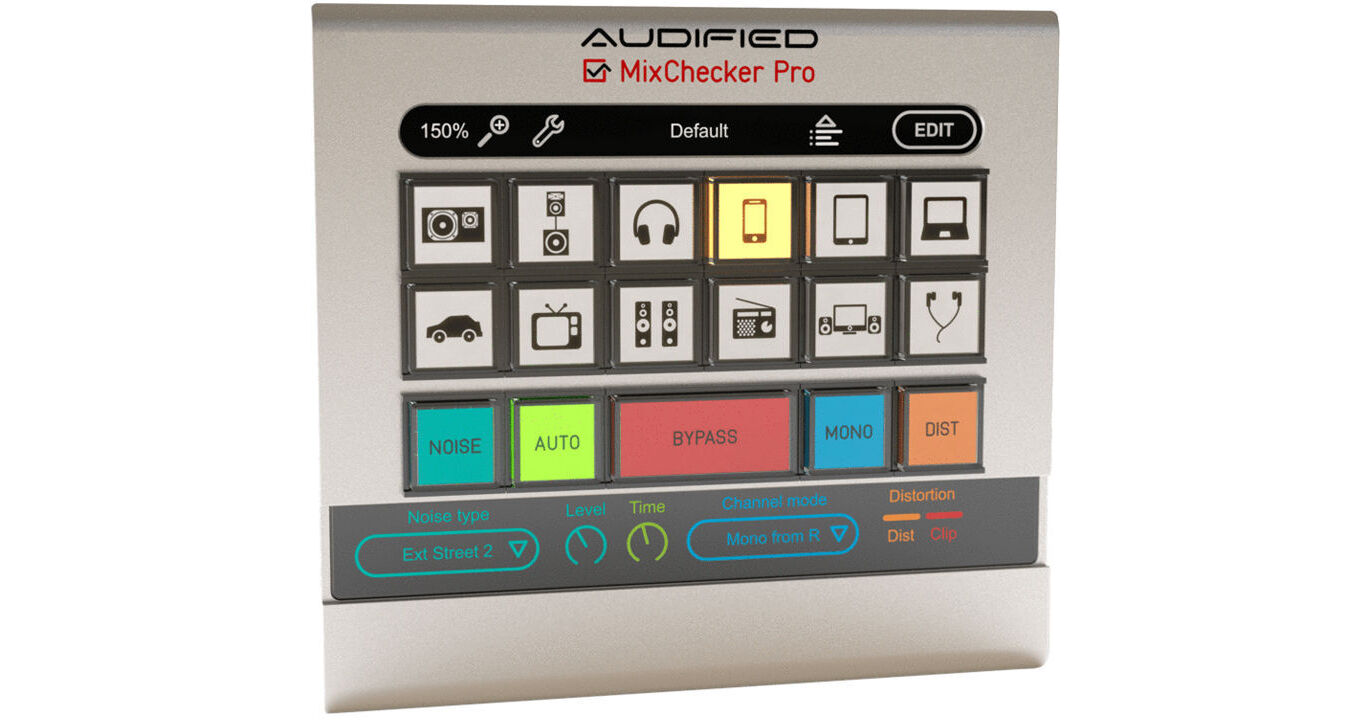
The electronic download of MixChecker Pro from Audified is a plug-in that simulates professional reference monitors, headphones, or speakers found on consumer devices such as TVs, smartphones, tablets, laptops, and more. It can be used to get an indication of how your mix sounds when played on speakers other than the ones in your studio, allowing you to quickly make the necessary corrections to ensure that listeners accurately hear your music regardless of their choice of monitoring device. Toggle between the devices you want to simulate and perform quick tests without going through the time-consuming process of exporting your mix.
In Mix Checker Pro, all of the simulations found in MixChecker 1.1 have been newly measured and now feature better phase linearity and lower latency. Audified models many pieces of vintage gear with unique distortion characteristics. The company has taken this methodology and applied it to measuring the distorted responses of various real-world speakers. The simple impulse response method of the previous version has been overhauled completely to provide a more accurate sound.
Simulations of background noise are now possible, and you are able to add it into the chain in adjustable measures. An auto-advance mode takes care of browsing through simulations, and this feature is also adjustable. As with the previous version, you can monitor in mono, though you can also swap channels, monitor independent channels, and adjust the width of the stereo base to simulate other environments.
For ease of use, you can drag simulations in any order, selecting your favorite ones more easily. You can also put custom labels on each button. A remote control lets you change the software while walking around your studio and is compatible over the web, and on iOS and Android devices. The software works on Mac and Windows platforms and operates on AU, VST, and AAX platforms.
- All characteristics are newly measured; a new processing engine features lower latency and better phase linearity.
- Extensive distortion and saturation modeling has been employed.
- Create sets of simulations and drag the selected simulations in any order to the MixChecker buttons. Save your selection to several button sets together with stereo base width and volume level for each button.
- Custom settings and labels for buttons allow you to have several adjustable parameters. You may even assign one simulated device to several buttons, each with different settings. To distinguish between them, you can place custom labels over each button.
- Exact modeling of distortions and saturations of speakers or of amps, preamps and other circuits are now available. Added modeling of these distortions have been added to MixChecker Pro.
- MixChecker Pro adds the possibility of adding audio background noise with adjustable volume. The combination with simulated devices is quite sophisticated: when you select the simulation of phones, the path of the noise through the headphones and ears is simulated, so you hear the realistic combination of the mix playing from headphones and of the noise, coming through headphones from outside.
- The auto advance parameter can be used to browse through simulations at a pace that serves your needs. This parameter is adjustable.
- MixChecker offers channel swap, independent channel monitoring, and adjustable stereo base width for each simulation.
- MixChecker Pro comes with a remote for web browsers, mobile phones, and compatible tablets. You may walk around your studio when checking the final mix, saving the valuable screen size.
- Interface zoom and calibration have also been added to the MixChecker platform.
- Simulates professional reference monitors
- Simulates headphones and earphones
- Simulates smartphone, tablet, and laptop speakers
- Simulates TV and car stereo speakers
- Simple controls let you switch easily and quickly between simulation types