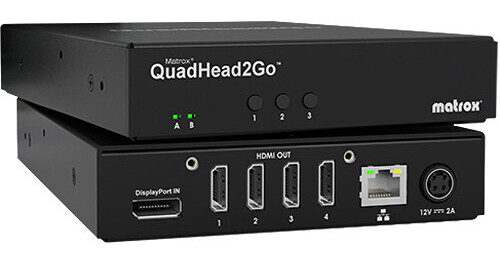
Deploy your video wall or split a single signal with up to four displays using the QuadHead2Go Multi-Monitor Controller Appliance from Matrox. Designed for ease-of-use, this controller can be used in a plug-and-play fashion with the default 2 x 2 landscape orientation. Or, users can choose from portrait or other asymmetrical or non-rectangular orientations as well as rotated, cloned, or cropped feeds. Accepting resolutions up to 4K at 60 Hz via a DisplayPort 1.4 input, the QuadHead2Go offers max output resolutions up to 1920 x 1080 via four HDMI outputs. Additionally, an RJ45 port supports wired Gigabit Ethernet connectivity.
Ask Our Experts800-606-6969
Hello, Log InAccount & Orders
Video Chat with a Pro Video Expert - Live
Key Features
- Splits a 4K Signal to Four Displays
- Plug-and-Play Default Settings
- DisplayPort 1.4 Input
- Four HDMI Outputs
Deploy your video wall or split a single signal with up to four displays using the QuadHead2Go Multi-Monitor Controller Appliance from Matrox. Designed for ease-of-use, this controller can be used in a plug-and-play fashion with the default 2 x 2 landscape orientation. Or, users can choose from portrait or other asymmetrical or non-rectangular orientations as well as rotated, cloned, or cropped feeds. Accepting resolutions up to 4K at 60 Hz via a DisplayPort 1.4 input, the QuadHead2Go offers max output resolutions up to 1920 x 1080 via four HDMI outputs. Additionally, an RJ45 port supports wired Gigabit Ethernet connectivity.
More DetailsIn Stock
Protect Your Gear
Add a protection plan from $79.99
See Options
Matrox QuadHead2Go Overview
Content Flexibility
Choose from a wide selection of content sources, including professional graphics cards and integrated GPUs, video wall controllers, digital signage players, media players, decoders, laptops, NUCs, set-top boxes, gaming consoles, and more.
Artistic Freedom
Design modern and artistic video wall layouts with free rein—each output can have its own resolution, be independently rotated 90, 180, or 270 degrees, cropped, upscaled, downscaled, and positioned anywhere.
Custom Configurations
Design any custom configuration or array with the intuitive Matrox PowerWall software, available separately.
Don't Sweat the Bezel
Control and fine-tune bezels using presets to ensure seamless image displays.
UPC: 790750255217
Matrox QuadHead2Go Specs
Interfaces
| Other I/O |
Standards
| HDCP Support |
Transmission
| Maximum Multiple Display Configuration | |
| Maximum Sampling Rate |
Power
| Power Consumption |
General
| Certifications | |
| Operating Conditions | |
| Storage Conditions | |
| Dimensions | |
| Weight |
Packaging Info
| Package Weight | |
| Box Dimensions (LxWxH) |
Matrox QuadHead2Go Reviews
Everything and more
By Travis
Rated 5 out of 5
Date: 2025-05-19
The Matrox QH2G is everything I expected and more. Seamless integration. I only needed it for a 2x1 double wide display (3840x1080), and it works beautifully. A bit overkill for my application; however, I am set to scale easily if I want to add 2 additional display screens. Again, excellent product!
Input requires DisplayPort
By Michael
Rated 2 out of 5
Date: 2022-07-13
The input port for video is display port. I was not able to find an HDMI to display port dongle, as every dongle out there works from display port to HDMI only. Cannot use it.
See any errors on this page?
How many QuadHead2Go devices do I need to connect ...
How many QuadHead2Go devices do I need to connect 8 monitors to a single input? 2 or 3?
To connect 8 monitors using the Matrox QuadHead2Go Multi-Monitor Controller Appliance, you would need 2 units, but you would also need 2 DisplayPort outputs from your source in order to connect to 8 monitors. Matrox recommends using a Luma Series graphics card such as the Matrox Luma Series LUMA A380 Graphics Card, BH #MALUMAA380 to connect multiple appliances.
Date published: 2024-06-23
Will I need more that one Matrox Quad Head 2 go ...
Will I need more that one Matrox Quad Head 2 go if I would like it to show on more than four monitors?
Yes, the Matrox QuadHead2Go Multi-Monitor Controller Appliance can handle a maximum of four displays. Anything above that would require additional devices.
Date published: 2024-06-22
