Ask Our Experts800-606-6969
Hello, Log InAccount & Orders
Video Chat with a Pro Video Expert - Live
Key Features
- Splits a 4K Signal to Four Displays
- Plug-and-Play Default Settings
- DisplayPort 1.4 Input
- Four HDMI Outputs
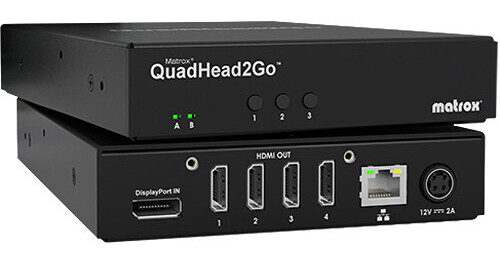
Deploy your video wall or split a single signal with up to four displays using the QuadHead2Go Multi-Monitor Controller Appliance from Matrox. Designed for ease-of-use, this controller can be used in a plug-and-play fashion with the default 2 x 2 landscape orientation. Or, users can choose from portrait or other asymmetrical or non-rectangular orientations as well as rotated, cloned, or cropped feeds. Accepting resolutions up to 4K at 60 Hz via a DisplayPort 1.4 input, the QuadHead2Go offers max output resolutions up to 1920 x 1080 via four HDMI outputs. Additionally, an RJ45 port supports wired Gigabit Ethernet connectivity.
More DetailsIn Stock
Protect Your Gear
Add a protection plan from $79.99
See Options
See any errors on this page?
How many QuadHead2Go devices do I need to connect ...
How many QuadHead2Go devices do I need to connect 8 monitors to a single input? 2 or 3?
To connect 8 monitors using the Matrox QuadHead2Go Multi-Monitor Controller Appliance, you would need 2 units, but you would also need 2 DisplayPort outputs from your source in order to connect to 8 monitors. Matrox recommends using a Luma Series graphics card such as the Matrox Luma Series LUMA A380 Graphics Card, BH #MALUMAA380 to connect multiple appliances.
Date published: 2024-06-23
Will I need more that one Matrox Quad Head 2 go ...
Will I need more that one Matrox Quad Head 2 go if I would like it to show on more than four monitors?
Yes, the Matrox QuadHead2Go Multi-Monitor Controller Appliance can handle a maximum of four displays. Anything above that would require additional devices.
Date published: 2024-06-22