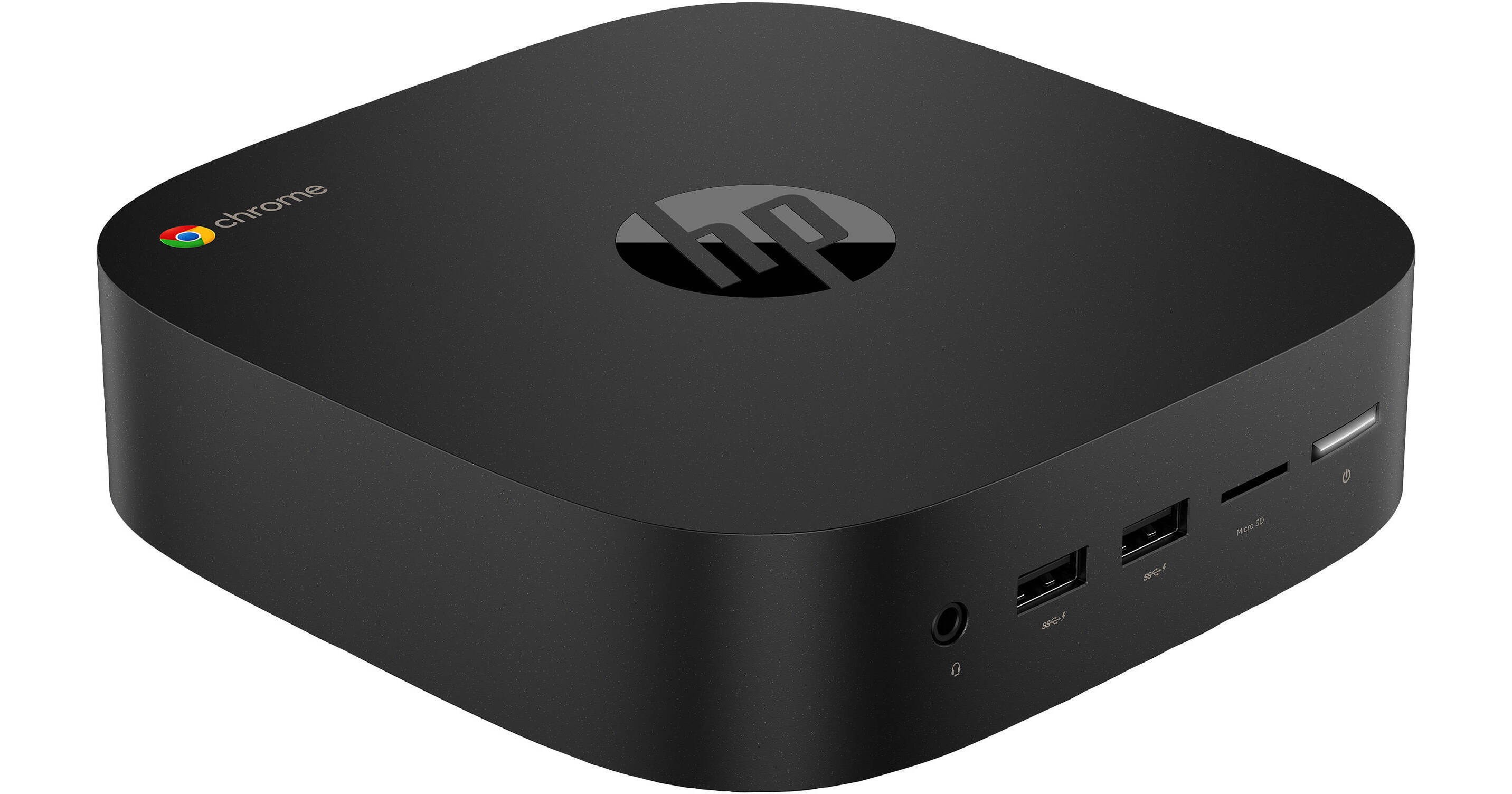
Boost your cloud-based productivity with the Chromebox Enterprise G2 Mini Desktop Computer from HP, a compact and versatile desktop that unlocks the full business capabilities of Chrome OS and Android apps for quick data access and user-friendly collaboration. It's powered by a 2.7 GHz Intel Core i3-7130U Dual-Core processor, 8GB of 2400 MHz DDR4 RAM, and integrated Intel HD Graphics 620. Like most Chrome OS-based systems, storage space is limited, so the Chromebox Enterprise G2 is only equipped with a 32GB M.2 SATA SSD. Should you need more space, you can attach external storage solutions using its three USB 3.1 Gen 1 Type-A ports, two USB 2.0 Type-A ports, and a microSD card reader. Storage can be further expanded using a USB Type-C port, which also serves as a power connector, a charging port, and supports 4K display connectivity. Other integrated features include an HDMI 1.4b port, which supports 4K video at 30 Hz, Gigabit Ethernet, Wi-Fi 5 (802.11ac), Bluetooth 4.2, and a 3.5mm headset jack.
Ask Our Experts800-606-6969
Hello, Log InAccount & Orders
Key Features
- 2.7 GHz Intel Core i3-7130U Dual-Core
- 8GB DDR4 RAM | 32GB M.2 SATA SSD
- Integrated Intel HD Graphics 620
- microSD Card Reader
Boost your cloud-based productivity with the Chromebox Enterprise G2 Mini Desktop Computer from HP, a compact and versatile desktop that unlocks the full business capabilities of Chrome OS and Android apps for quick data access and user-friendly collaboration. It's powered by a 2.7 GHz Intel Core i3-7130U Dual-Core processor, 8GB of 2400 MHz DDR4 RAM, and integrated Intel HD Graphics 620. Like most Chrome OS-based systems, storage space is limited, so the Chromebox Enterprise G2 is only equipped with a 32GB M.2 SATA SSD. Should you need more space, you can attach external storage solutions using its three USB 3.1 Gen 1 Type-A ports, two USB 2.0 Type-A ports, and a microSD card reader. Storage can be further expanded using a USB Type-C port, which also serves as a power connector, a charging port, and supports 4K display connectivity. Other integrated features include an HDMI 1.4b port, which supports 4K video at 30 Hz, Gigabit Ethernet, Wi-Fi 5 (802.11ac), Bluetooth 4.2, and a 3.5mm headset jack.
More DetailsNo Longer Available
HP Enterpri e G2 Overview
General Features
Lean and Light Rounded Design with Powerful Performance
Tackle tough work with a 2.7 GHz Intel Core i3-7130U Dual-Core processor, 8GB of 2400 MHz DDR4 RAM, and a 32GB M.2 SATA SSD. Double your view and experience vibrant visuals with support for dual 4K displays through HDMI 1.4b and USB Type-C ports.
Easy Setup
Remote management features make it easy to configure the HP Chromebox as a virtual desktop, a kiosk, or use it for digital signage in schools and businesses.
Make Life Easy for IT with Chrome Enterprise
Enable flexible cloud-based fleet management, theft prevention, Active Directory integration, and 24/7 Google support with a business-ready Chromebox that has the Chrome Enterprise Upgrade.
Google G Suite
Access e-mail, create documents, edit presentations, and video conference with Google G Suite and customize your HP Chromebox with Android apps, tools, extensions, and themes built for business and designed for teams.
Digital Signage and Kiosk Management
Digital signage and kiosk management are made easy with the virtually maintenance-free Chrome OS and built-in software features that can be locked down to deliver an affordable, protected user experience in public spaces.
HP Chromebox Enterprise
Build an effective office with the affordable HP Chromebox Enterprise. Fast start-up and browsing, plus access to cloud-based productivity apps and storage help keep you and your business productive.
Multiple Users
Deploy one HP Chromebox Enterprise across multiple users in shared workspaces with apps and documents customized according to individual logins.
Chrome OS
Using Linux as a base, Google designed Chrome OS to work exclusively with web applications. The user interface takes a minimalist approach, which greatly resembles the Google Chrome web browser. Chrome OS was built for people who spend a majority, if not all, of their time on the computer connected to the internet. The only application that comes installed on Chrome OS is a special Google Chrome web browser with an integrated media player and file manager. All other applications are accessed by adding apps from the Google Chrome Web Store. Since Chrome OS relies entirely on Google's web apps and access to Google's services, it is highly recommended that you connect to the internet to optimize your Chrome OS experience.
HP Enterpri e G2 Specs
Key Specs
| Operating System | |
| Installed RAM | |
| GPU | |
| Total Installed Storage | |
| Ports | |
| USB-C | |
| Display I/O | |
| Wi-Fi |
| Operating System |
Performance
| CPU Architecture | |
| CPU | |
| L3 Cache | |
| Installed RAM | |
| Graphics Type | |
| GPU |
Storage and Expansion
| Total Installed Storage | |
| Solid State Storage | |
| PCI Expansion | |
| Optical Drive |
Inputs / Outputs
| Ports | |
| USB-C | |
| Display I/O | |
| Audio I/O |
Communications
| Network I/O | |
| Wi-Fi | |
| Bluetooth |
Keyboard & Mouse
| Keyboard | |
| Pointing Device |
General
| Security | |
| Power Supply | |
| AC Input Power | |
| Operating Temperature | |
| Operating Humidity | |
| VESA Mounting-Hole Pattern | |
| Dimensions | |
| Weight |
HP Enterpri e G2 Reviews
See any errors on this page?