Video Chat with a Pro Video Expert - Live

Softron S80R Bundle (No PCI Card Included)

BH #SOST3AS80R • MFR #ST-3.AS80R
Print
Softron S80R Bundle (No PCI Card Included)
Key Features
  • 8 x Ingest Licenses of MovieRecorder
  • 8 x Channel Licenses of M|Replay
  • License for 1 Computer, No Splitting
  • Multiple Codecs Supported
The Softron S80R Bundle includes eight licenses of MovieRecorder for macOS, allowing you to ingest eight channels of video for editing, and it also includes eight licenses of M|Replay that allows you to play back eight individual channels for replay. A dongle is included with all 16 licenses and these licenses cannot be split and are for use on a single computer instance.
More Details
Special Order
Expected availability: 3-5 Weeks
No Store Display

Business Financing Options

This item cannot be canceled or returned.
Free Standard Shipping
Ask an Expert
800-606-6969

Softron S80R Overview

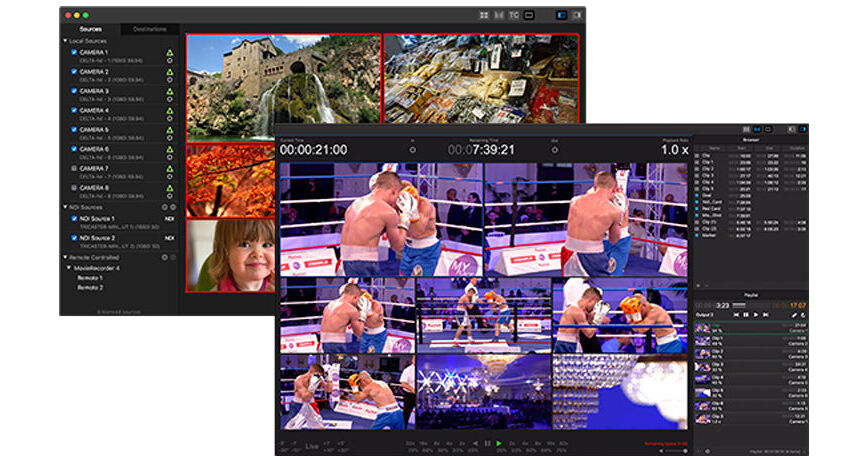
The Softron S80R Bundle includes eight licenses of MovieRecorder for macOS, allowing you to ingest eight channels of video for editing, and it also includes eight licenses of M|Replay that allows you to play back eight individual channels for replay. A dongle is included with all 16 licenses and these licenses cannot be split and are for use on a single computer instance.

MovieRecorder is an advanced software program that allows for the simultaneous ingest and editing of live video on your Mac. This license permits up to eight capture streams on a single computer; an Internet connection is required for activation.

M|Replay is an instant replay software for macOS, designed for video production and as an adjudication system for referees. While recording, it allows you to use on-screen controls, keyboard shortcuts, or hardware controllers to immediately play back an action that just occurred.

MovieRecorder Features
The number of channels that can be captured simultaneously is only limited by your capture hardware and computer capabilities.
SD, HD, and 4K video feeds are supported, and encoding is available in many different pro codecs, including AVC-Intra, DVCPRO, ProRes, DNxHD, HDV, IMX, and XDCAM.
External audio sources
Effects and overlays
Multiple destinations
VTR Control
Save and restore configurations
Closed Captioning
Metadata
MXF
Pro Codecs (AVC-Intra, DV/DVCPRO, DNxHD, HDV, IMX, XDCAM)
Slave mode
Trigger AppleScripts when recording starts/stops or when an error occurs
M|Replay Features
Flexible Input and Output Configurations
Enable the number of inputs and/or outputs you need and start working right away. The licenses are per channel, and can be used for input or output. As you can use the video device of your choice, you can adapt to every situation, depending on the need of each production. Get the number of licenses that you need and connect the device that suits you best to your Mac. You can do instant replay with as little as one input and one output on a MacBook Pro or use high-density video devices for multiple inputs and outputs on a Mac Pro.
Intuitive User Interface
Simply drag and drop the inputs and outputs to the viewer you want to assign it to, or select it from the drop-down menu. The user interface accommodates for many inputs and outputs that you can arrange the way you want. And that's it, you are ready to go. Use the on-screen controls, keyboard shortcuts, or a jog shuttle to instantly go backwards on all the viewers simultaneously. Locate the important moment you want to replay, select the angle you want to show, and play it back at the appropriate speed. You can even change the input while it is playing. All that is made to be quick and easy to use. Everything is available at the touch of a finger and there is almost no learning curve.
Create Markers, Clips, and Playlists
Create markers to instantly "jump" to an important moment and replay it using the angle you want. Create clips to build playlists, so you can chain different moments, from different angles and at the playback speed you want. This can be very useful for creating a "highlights" playlist for example. Prepare that playlist while the show goes on, so it is ready to play at the end of the show. You can even import video clips from the Finder to play in your playlist.
Flexible Hardware Configuration
M|Replay runs on any Mac with video devices from AJA, Blackmagic-Design, or Softron's M|80, M|62, or M|44 devices. The choice is yours only, depending on the number of inputs and outputs you need.
UPC: 685167164095

Softron S80R Specs

Delivery Format
USB Flash Drive
License Type
Standard: Perpetual License
User Support
1 User / 1 Device
System Compatibility/Requirements
Operating System: macOS

Softron S80R Reviews

See any errors on this page?
Whatever You Need, We've Got It