
Sony Global

Video Chat with a Pro Audio Expert - Live

Waves Berzerk Distortion - Pro Audio Software for Creative Distortion (Download)

BH #WABZKDIST • MFR #BZKDIST
Print
Waves Berzerk Distortion - Pro Audio Software for Creative Distortion (Download)
Key Features
  • Character Menu, 10 Distortion Waveshapes
  • Creative Density and Go! Controls
  • Feedback Section for Modulation
  • Dynamics Section
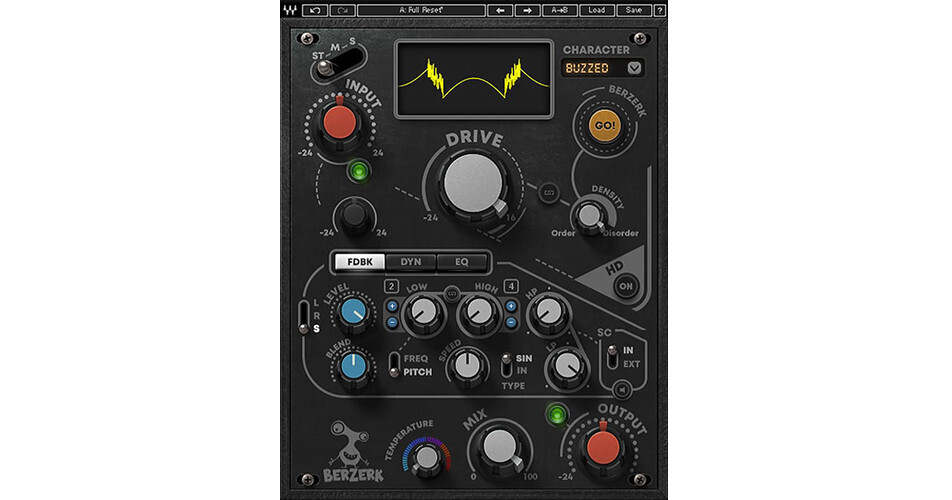
Available for download, Bezerk Distortion from Waves is a plug-in that adds anything from harmonic saturation to wild, screeching distortion to your signal. It features a whole host of different distortion algorithms with a dropdown Character menu giving you 10 different overall waveform shapes as well as esoteric controls such as Density, Temperature, and Go! parameters to help you fashion a highly individualized tone.
More Details
Digital
Electronic Download
No Store Display
$34.99
$99.00
Save $64.01
Offer ends at
This item cannot be returned.
Emailed within 1-3 Business Days
Ask an Expert
800-606-6969

Waves Berzerk Distortion Overview

Available for download, Bezerk Distortion from Waves is a plug-in that adds anything from harmonic saturation to wild, screeching distortion to your signal. It features a whole host of different distortion algorithms with a dropdown Character menu giving you 10 different overall waveform shapes as well as esoteric controls such as Density, Temperature, and Go! parameters to help you fashion a highly individualized tone.

In addition to its Drive, Mix, and I/O controls, the plug-in provides three tabs that give you a plethora of controls. In the middle of the plug-in's GUI you'll find a Feedback section for implementing modulation, a dynamic section to influence the distortion, and a three-band EQ.

In stereo, M/S processing is on hand. The plug-in comes with presets fashioned by Grammy-winning engineers. Use this plug-in with Mac and Windows operating systems, in AU, VST, AudioSuite, and AAX formats.

Feedback and Dynamic Sections
Berserk offers Feedback and Dynamics tabs which alter the sound in interesting ways. Neither one of these sections is audible at audio output stage. Instead, they influence the Drive signal in interesting ways.

The Feedback section is an oscillator It generates a sine wave that tracks the amplitude of the input section. The Feedback module is fed to the Drive, and Drive is then fed back to the oscillator. The oscillator can vary in pitch or frequency, and you can select the high and low limits of its modulation, as well as its speed. For all intents and purposes, it's an LFO for modulating the distortion, creating crazy sounds in the process.

The dynamics tab allows you to control the dynamic characteristics of the signal fed into the drive section. You can choose between compression or expansion via the Up/Down switch, and you can also choose whether to apply the distortion to material above or below the threshold with the Rider/Dyn switch. You'll also note a Blend knob. Note that as you increase the value of the Blend knob, the waveform in the shaper display becomes increasingly complex.

3-Band EQ
The three-band EQ colors the sound of the distorted signal. It is located just before the output section and is not fed back to the Drive section.

  • Low Band: Q is 0.5 to 100; Gain is -12 to +12 dB; Frequency is 60 to 550 Hz
  • Mid Band: Q is 0.5 to 100; Gain is -12 to +12 dB; Frequency is 800 Hz to 2.5 kHz
  • High Band: Q is 0.5 to 100; Gain is -12 to +12 dB; Frequency is 3 to 11 kHz
Density and Go! Controls
After you select among 10 waveshapes in the Character menu, you can click the Go! button to create a randomly generated and unique variation of the waveform you selected. It will keep the same fundamental shape as your chosen waveform, but the finer points will differ in an individualized way.

You can control the amount of randomness added in the Go! process with the Density knob. Click the Link button between the Drive and Density knobs to link Drive to Density.

Temperature Control
This knob adjusts the overall color and feeling of the output of the plugin. Higher settings generally result in a roomier, darker, and smoother sound. Lower settings usually provide more presence and more articulation. Temperature tends to have a noted impact on the air surrounding the sound.
8x Up-Sampling
Press the HQ On/Off button and you can enable 8x up-sampling of the output signal. With low-resolution files, low and high frequency parts of a signal tend to collapse, and compression can be perceived as edgy. Up-sampling provides more room for these parts of the signal and can result in a more pleasant sound. When HQ is Off, you can get a grittier sound.

Waves Berzerk Distortion Specs

Delivery Format
Download
License Type
Standard: Perpetual License
User Support
1 User
Standalone Operation
No
System Compatibility/Requirements
Operating System: Windows/macOS
Plug In Formats: AAX (Native) / AU / AudioSuite / VST / VST3

Waves Berzerk Distortion Reviews

See any errors on this page?
Whatever You Need, We've Got It