
Holiday Headstart

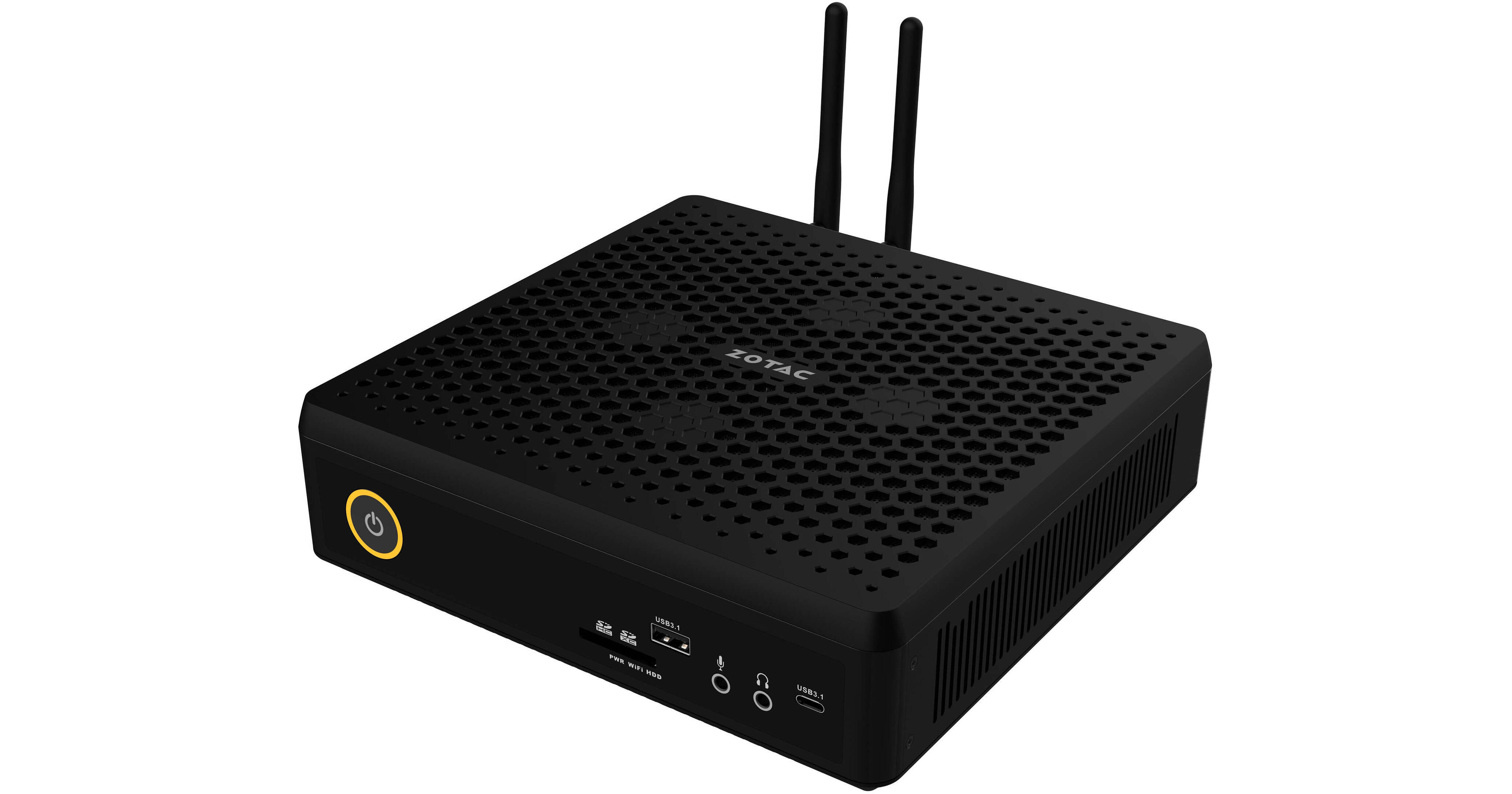
ZOTAC ZBOX MAGNUS EN72080V Barebone Mini Creator PC

BH #ZOZBEN72080V • MFR #ZBXO-EN72080V-U
Print
ZOTAC ZBOX MAGNUS EN72080V Barebone Mini Creator PC
Key Features
  • 2.6 GHz Intel Core i7-9750H Six-Core
  • Up to 32 GB 2666/2400 MHz DDR4 RAM
  • NVIDIA GeForce RTX 2080 8GB GPU
  • 1 x 2.5-inch SATA III HDD or SSD Bay
Take advantage of big performance in a small package with the ZBOX MAGNUS EN72080V Mini Creator PC from Zotac. Designed for creative professionals and power users, this tiny machine can tackle 8K video editing, 3D animation, graphic design, photography, gaming, and VR. Boasting an Intel Core i7-9750H Six-Core processor, the ZBOX MAGNUS also features an NVIDIA GeForce RTX 2080 8GB graphics card and can support up to four displays. As a barebone configuration, this computer comes without memory, storage, or an OS, allowing users to pick the right parts for their ideal setup. Supporting up to 32GB of RAM, a 2.5" SATA III SSD or HDD, an M.2 PCIe solid-state drive, and Intel Optane Memory, the MAGNUS allows you to tailor processing speed and storage to your own needs.
More Details
No Longer Available
No Store Display
Ask an Expert
800-606-6969

ZOTAC EN72080V Overview

Take advantage of big performance in a small package with the ZBOX MAGNUS EN72080V Mini Creator PC from Zotac. Designed for creative professionals and power users, this tiny machine can tackle 8K video editing, 3D animation, graphic design, photography, gaming, and VR. Boasting an Intel Core i7-9750H Six-Core processor, the ZBOX MAGNUS also features an NVIDIA GeForce RTX 2080 8GB graphics card and can support up to four displays. As a barebone configuration, this computer comes without memory, storage, or an OS, allowing users to pick the right parts for their ideal setup. Supporting up to 32GB of RAM, a 2.5" SATA III SSD or HDD, an M.2 PCIe solid-state drive, and Intel Optane Memory, the MAGNUS allows you to tailor processing speed and storage to your own needs.

Sporting two USB 3.1 Gen 2 ports, including one Type-A and one Type-C port, the ZBOX MAGNUS also utilizes an additional four USB 3.0 Type-A ports, allowing room for extra peripherals. A DisplayPort 1.4 connection, USB-Type-C port, and two HDMI 2.0b ports support up to four monitors, allowing for greater multi-tasking or gaming immersion. RJ45 ports for Gigabit Ethernet and Killer Ethernet facilitate wired connections up to 2.5 Gb/s, and the ZBOX MAGNUS also offers Wi-Fi 6 and Bluetooth 5.0 wireless connectivity options.

Measuring just 8.27” on its longest side, the ZBOX MAGNUS easily fits on top of or beneath a desk, while its VR and gaming capabilities can lend this small computer to home-entertainment setups. Relying on air-cooling, the MAGNUS utilizes a heatsink and fan. Two detachable Wi-Fi antennas are included, as is a USB drive with necessary Zotac drivers for using your new computer. The ZBOX MAGNUS supports Windows 10 64-bit Operating Systems, and an operating system must be installed before using this computer.

Intel 9th Gen Processor
Let the creative juices flow with a 9th Generation Intel Core processor. Delivering responsive performance, the Intel Core i7-9750H Six-Core processor ensures your creativity isn't put on hold, supporting heavy rendering, 4K streaming, VR, and resource-intense gaming.
NVIDIA Studio
Create without compromise. Studio combines NVIDIA GeForce GPUs with exclusive NVIDIA Studio Drivers designed to supercharge creative applications. Unlock performance and reliability so you can create at the speed of imagination.
Intel Optane Ready
The ZBOX MAGNUS supports Intel Optane memory, allowing you to reap the benefits of customized performance with memory that learns your preferences, increasing processing speed and minimizing power requirements.
Up to 8K Resolution
Thanks to an NVIDIA GeForce RTX 2080 8GB graphics card, the ZBOX MAGNUS can support one display up to 7680 x 4320 @ 120 Hz, two displays up to 3840 x 2160 @ 60 Hz, or four displays up to 1920 x 1080 @ 30 Hz.
Wireless or Wired Connectivity
Featuring Bluetooth connectivity for peripherals such as mice, keyboards, and headphones, the ZBOX MAGNUS also offers Wi-Fi 6, allowing you to game over a wireless connection and still stay competitive with faster speeds. Of course, the MAGNUS can also be used with wired Gigabit Ethernet connections, as well as faster 2.5-Gigabit Ethernet, thanks to the inclusion of a Killer E3000 controller.
Intoxicating Immersion
Get mesmerized by ray-tracing and enhanced lighting, shadows, and reflections while AI handles repetitive tasks such as upscaling, photo enhancements, color matching, face tagging, and style transfer.

ZOTAC EN72080V Specs

Key Specs
GPU
NVIDIA GeForce RTX 2080 with 8 GB GDDR6 VRAM
Total Installed Storage
0 GB
Ports
1 x USB-A 3.1/3.2 Gen 2
4 x USB-A 3.0 / 3.1/3.2 Gen 1
USB-C
1 x USB 3.1/3.2 Gen 2
Display I/O
2x HDMI 2.0
1x DisplayPort 1.4
Audio I/O
1x 1/8" / 3.5 mm Headphone Output
1x 1/8" / 3.5 mm Microphone Input
Wi-Fi
Wi-Fi 6 (802.11ax)
Power Supply
330 W with
Operating System
No
Performance
CPU Socket
BGA 1440
CPU
2.6 GHz Intel Core i7-9750H 6-Core
Maximum Boost Speed
4.5 GHz
L3 Cache
12 MB
Total Installed Memory
No
Graphics Type
Dedicated
GPU
NVIDIA GeForce RTX 2080 with 8 GB GDDR6 VRAM
Storage and Expansion
Total Drive Bays
1 x 2.5" (Internal)
SSD Slots
1 x M.2 2280 PCIe (Available)
Total Installed Storage
0 GB
Optical Drive
No
Inputs / Outputs
Ports
1 x USB-A 3.1/3.2 Gen 2
4 x USB-A 3.0 / 3.1/3.2 Gen 1
USB-C
1 x USB 3.1/3.2 Gen 2
Display I/O
2x HDMI 2.0
1x DisplayPort 1.4
Audio I/O
1x 1/8" / 3.5 mm Headphone Output
1x 1/8" / 3.5 mm Microphone Input
Built-In Speakers
No
Built-In Microphones
No
Media Card Slots
1 x SD/SDHC/SDXC
Communications
Network I/O
1x RJ45 (Gigabit Ethernet)
1x RJ45 (2.5 GbE)
Wi-Fi
Wi-Fi 6 (802.11ax)
MU-MIMO Support
No
Bluetooth
5.0
NFC
No
Keyboard & Mouse
Keyboard
No
Pointing Device
No
General
Security
Kensington Lock Slot
Power Supply
330 W with
Dimensions
8.27 x 7.99 x 2.45" / 210 x 203 x 62.2 mm
Warranty Length
Limited 2-Year Warranty
Packaging Info
Package Weight
8.52 lb
Box Dimensions (LxWxH)
11 x 10.5 x 5.4"

ZOTAC EN72080V Reviews

See any errors on this page?
Whatever You Need, We've Got It