Video Chat with a Pro Video Expert - Live

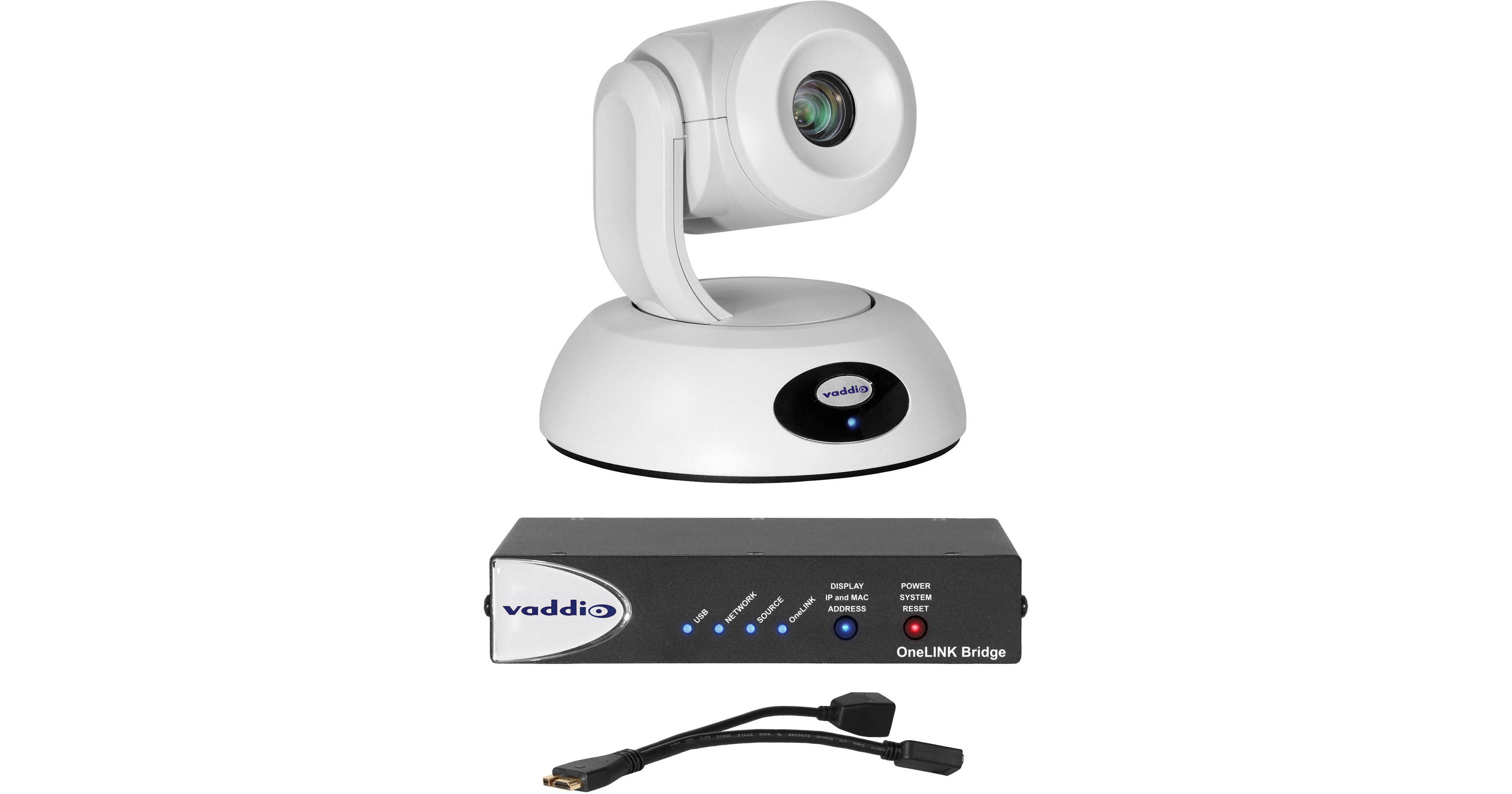
Vaddio RoboSHOT 12E HDBT OneLINK Bridge System for Cisco SX Codecs (White)

BH #VAROBSHTCSCO • MFR #999-96750-400W
Print
Vaddio RoboSHOT 12E HDBT OneLINK Bridge System for Cisco SX Codecs (White)
Key Features
  • RoboSHOT 12E HDBT IP Camera System
  • OneLINK Bridge A/V Interface
  • 1080p/60 Video Resolution
  • 1/2.5" CMOS Image Sensor
The RoboSHOT 12E HDBT OneLINK Bridge System from Vaddio combines a white RoboSHOT 12E HDBT IP Camera System with a OneLINK Bridge A/V Interface. The system captures 1080p/60 video from a single 1/2.5" type CMOS sensor and transmits it up to 328' over a Cat 5 cable. The combination enables powering the camera, sending control signals, and transmitting video over a single Ethernet cable.
More Details
Special Order
Expected availability: 7-14 Business Days
No Store Display
This item cannot be canceled or returned.
Free Standard Shipping
Protect Your Gear
Add a protection plan from $279.99

Business Financing Options

Ask an Expert
800-606-6969
Kit Contains:

From Manufacturer

The RoboSHOT 12E HDBT OneLINK Bridge System from Vaddio combines a white RoboSHOT 12E HDBT IP Camera System with a OneLINK Bridge A/V Interface. The system captures 1080p/60 video from a single 1/2.5" type CMOS sensor and transmits it up to 328' over a Cat 5 cable. The combination enables powering the camera, sending control signals, and transmitting video over a single Ethernet cable.

The PTZ camera features a 12x optical zoom with a 70.2° wide horizontal field of view. The OneLINK features HDMI, USB 3.0, and HD-SDI video outputs, audio inputs and outputs, and accepts HDBaseT input as well as RS-232 and Ethernet.

For Cisco SX Codecs connection, the system comes with a Cisco CAB-PHD4XS2-SPLIT cable, a Cat5 cable, a directional Cat5 cable (for Cisco SX20), an HDMI cable, and an EZCamera RS-232 control adapter (model 998-1002-232) for Cisco codec serial 9-pin ports.

Vaddio RoboSHOT 12E HDBT IP Camera System (White)

Capture full motion video in conference rooms, training rooms, and classrooms with the white RoboSHOT 12E HDBT IP Camera System from Vaddio. Designed with 12x optical zoom and a 1/2.5" CMOS sensor, the camera delivers high-definition 1080p/60 video resolution. It features image signal processing and a wide dynamic range for enhanced lighting in dimly lit conditions. For smooth and natural motion, the camera features tri-synchronous motion technology allowing all three axes of the camera to move simultaneously. This camera can be controlled via integration-ready Telnet, serial RS-232 control, or an included IR remote control.

The RoboSHOT 12E provides a web-based user interface allowing configuration, management, and control from anywhere in the world over the IP network making this camera ideal for remote management, network operating centers, and overall IT control. Simply enter the camera's streaming URL into any standards-based H.264, RTSP format media player. This camera also allows you to simultaneously stream live events over YouTube, Livestream, and Facebook with the HDBaseT, HDMI, and IP video outputs. To simplify cabling and extend installation distance, you can connect it directly to HDBaseT-compatible devices or pair it with Vaddio OneLINK receivers.

Simultaneous HDBT, HDMI, and IP (H.264) streaming outputs
Full administrative control via web interface; manage remotely while monitoring the stream separately
Aspect Ratio
HDMI: 16:9 (all resolutions)
IP (H.264) streaming: 16:9, 3:2, and 4:3
Back-light compensation
Auto/manual gain
White Balance
Auto, ATW, indoor, outdoor, one-push, manual
Wide dynamic range
Spotlight compensation mode
Noise reduction
16 presets with custom home
Invertible
Silent BLDC direct-drive motors
UPC: 840077504083
Vaddio OneLINK Bridge A/V Interface Receiver for HDBaseT Cameras (North America)

The OneLINK Bridge A/V Interface Receiver from Vaddio connects a non-USB camera and audio source, and bridges to a USB stream for easy connection to USB-based conferencing applications such as Skype for Business, Google Hangouts, and Zoom. This OneLINK Bridge simplifies installation by extending power, video, and control to your Vaddio HDBaseT camera over a single Cat5e cable up to 328'.

Converts any conference room to a BYOD environment, delivering a USB stream for soft conferencing clients
Connects professional A/V equipment to PC applications via USB 3.0 media stream
Simultaneous uncompressed USB 3.0, HDMI 1.4b, and 3 Gb/s HD-SDI
Two balanced audio inputs and two balanced audio outputs
Control via web interface or Telnet
Status lights
UPC: 840077502287
Vaddio EZCamera Control Adapter For TANDBERG Codecs

The Vaddio EZCamera Control Adapter For TANDBERG Codecs is an RJ-45 to DB-9F adapter. It converts a standard Cat. 5 cable with an RJ-45 connector to a DB-9 connector. It eliminates the need for a null-modem adapter and gender changer.

Kit Contains:

Vaddio RoboSHOT 12E HDBT IP Camera System (White)

Key Specs
Image Sensor
1/2.5"-Type
Effective Sensor Resolution
8.51 Megapixel
Shutter Speed
1 to 1/10000 Second
Max Optical Zoom
12x
Max Video Output
via HDMI / RJ45
Up to 1080p at 25/29.97/50/59.94/60.00 fps
Max Recording Modes
No
Broadcast Output
NTSC/PAL
Wireless
IR
PoE Support
Yes: PoE+ 802.3at
Imaging
Image Sensor
1/2.5"-Type CMOS
Effective Sensor Resolution
8.51 Megapixel
Focus Control
Autofocus
Manual Focus
Exposure Control
Shutter Speed
1 to 1/10000 Second
ISO/Gain Sensitivity
Gain: 0 to 33 dB
Signal-to-Noise Ratio
50 dB
Minimum Illumination
100 Lux
Flip / Mirror Support
Image Flip
White Balance
Presets: ATW, Auto, Indoors, Manual, One Push, Outdoors
Lens
Focal Length
4.4 to 88.4mm
Max Optical Zoom
12x
Field of View
Horizontal: 70.2 to 6.8°
Maximum Aperture
f/2 to 3.8
Minimum Focus Distance
3.1" / 8 cm (Wide) to 31.5" / 80 cm (Tele)
Video Capture
Video Output
via HDMI / RJ45
1920 x 1080p at 25/29.97/50/59.94/60.00 fps
1920 x 1080i at 50/59.94/60.00 fps
1280 x 720 at 50/59.94/60.00 fps
Internal Recording
No
Broadcast Output
NTSC/PAL
Control
Presets
16
Tally Light
No
Networking
Wireless
IR
Interface
Video I/O
1x RJ45 (HDBaseT) Output
1x HDMI Output
Other I/O
1x RJ45 Control Input (Shared with Power Input, Video Output)
Built-In Microphone
No
Built-In Speaker
No
Power
PoE Support
Yes: PoE+ 802.3at
Environmental
Operating Conditions
32 to 104°F / 0 to 40°C at 20 to 80% Humidity
Storage Conditions
32 to 104°F / 0 to 40°C at 20 to 80% Humidity
General
Certifications
CE, FCC, TAA
Dimensions (W x H x D)
7.05 x 6.94 x 6.75" / 17.91 x 17.63 x 17.14 cm
Weight
4.85 lb / 2.2 kg (Body Only)
Packaging Info
Package Weight
10.375 lb
Box Dimensions (LxWxH)
13.5 x 12.5 x 12"

Vaddio RoboSHOT 12E Reviews

See any errors on this page?

How long can I run the USB3.1 cable to this ...

How long can I run the USB3.1 cable to this camera?
Asked by: Rj
The USB cable that comes with the camera is 6 feet. You can extend that further with a high quality extender like the ATEN USB 3.1 Gen1 Extender Cable - 32.8' (BH #ATUE3310) but signal degradation may start to occur over some longer runs.
Answered by: Zacky
Date published: 2023-06-21

Is this compatible with the Vaddio ProductionVIEW ...

Is this compatible with the Vaddio ProductionVIEW HD-SDI MV CAM?
Asked by: Kevin
Yes it is. The Roboshot 12E is compatible with the Vaddio ProductionVIEW HD-SDI MV CAM.
Answered by: jabarih
Date published: 2021-12-28

How do I flip the image on the camera if it's ...

How do I flip the image on the camera if it's ceiling mounted
Asked by: Marco
In order to flip camera image go to back of PTZ camera base and locate the Camera Settings: DIP switches adjust the following features Ir remote frequency Baud rate Image flip
Answered by: hectorm
Date published: 2021-08-19

How to mount the camera?

How to mount the camera?
Asked by: Nicole
This camera can be mounted to walls or ceilings. You will find a few recommended mounts on the "Accessories" page under the "Mounts and Brackets" tab.
Answered by: jabarih
Date published: 2021-06-02
  • y_2026, m_8, d_5, h_10CST
  • bvseo_bulk, prod_bvqa, vn_bulk_3.0.48
  • cp_1, bvpage1
  • co_hasquestionsanswers, tq_4
  • loc_en_US, sid_1545208, prod, sort_[SortEntry(order=HAS_STAFF_ANSWERS, direction=DESCENDING)]
  • clientName_bhphotovideo
Whatever You Need, We've Got It