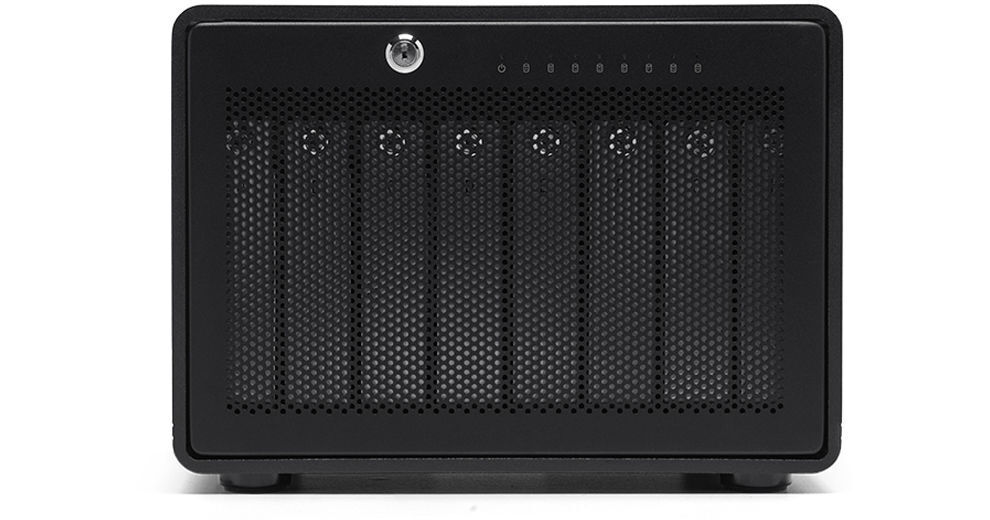
OWC ThunderBay 8 32TB 8-Bay Thunderbolt 3 RAID 5 Array (8 x 4TB)

BH #OWTB38SRT032 • MFR #OWCTB38SRT032
Print
OWC ThunderBay 8 32TB 8-Bay Thunderbolt 3 RAID 5 Array (8 x 4TB)
Key Features
  • 8 x 4TB HDDs
  • 8 x 3.5/2.5" SATA Drive Bays
  • 2 x Thunderbolt 3 (USB Type-C) Ports
  • 1 x DisplayPort 1.2
Get enough drive space for your raw, 4K, large-format, and VR workflows with the ThunderBay 8 32TB 8-Bay Thunderbolt 3 RAID 5 Array with from OWC / Other World Computing. Compatible with Windows and Mac systems, the ThunderBay 8 features dual Thunderbolt 3 ports, which use USB Type-C connectors. There is also a DisplayPort 1.2 port for connecting to a 4K display.
More Details
Temporarily Out of Stock
No Store Display
Free Expedited Shipping
Ask an Expert
800-606-6969

OWC ThunderBay 8 External HDD Overview

From Manufacturer

Get enough drive space for your raw, 4K, large-format, and VR workflows with the ThunderBay 8 32TB 8-Bay Thunderbolt 3 RAID 5 Array with from OWC / Other World Computing. Compatible with Windows and Mac systems, the ThunderBay 8 features dual Thunderbolt 3 ports, which use USB Type-C connectors. There is also a DisplayPort 1.2 port for connecting to a 4K display.

The ThunderBay 8 has eight drive bays, which support both 2.5" and 3.5" hard drives (2.5" HDDs do not need adapters). This particular ThunderBay 8 model comes with eight 4TB drives for 32TB of total storage capacity. The included drives are configured in RAID 5. Using the SoftRAID software, you can reconfigure these drives from RAID 5 to alternate configurations including RAID 0, 1, 4, 1+0, and JBOD.

General Features
Thunderbolt 3
Thunderbolt 3 is a hardware interface that uses the reversible USB Type-C connector. Doubling the speed of its predecessor, Thunderbolt 3 features a maximum throughput of 40 Gb/s when used with compatible devices. The connector also transmits data via USB 3.1 at up to 10 Gb/s, and a dual-bandwidth DisplayPort 1.2 allows you to connect up to two 4K displays simultaneously. Additionally, you can daisy chain up to six devices from a single Thunderbolt 3 port.
RAID & JBOD Support
The ThunderBay 8 comes preconfigured in RAID 5, but also supports RAID 0, 1, 4, and 1+0 as well as JBOD.
Cooling
The Thunderbay 8 uses an oversized 92mm fan to keep the drives running cool and reliably.
Multi-Drive
Daisy chain up to six ThunderBay 8s for more storage capabilities and increased performance or connect multiple ThunderBay 8s to multiple Thunderbolt 3 ports to achieve higher speeds.
UPC: 810586034470

OWC ThunderBay 8 External HDD Specs

Key Specs
Storage Capacity
32 TB
Included Drives
8x 4 TB 3.5" HDD
RAID
Yes: Supported RAID Modes: 0 / 1 / 5 / JBOD (Preconfigured in RAID 5)
Number of Bays
8x 2.5"/3.5" SATA
Inputs/Outputs
2x USB-C Thunderbolt 3 (40 Gb/s)
1x DisplayPort 1.2
Drives
Storage Capacity
32 TB
Included Drives
8x 4 TB 3.5" HDD
RAID
Yes: Supported RAID Modes: 0 / 1 / 5 / JBOD (Preconfigured in RAID 5)
Transfer Rates
2586 MB/s (Read/Write)
General
Number of Bays
8x 2.5"/3.5" SATA
Inputs/Outputs
2x USB-C Thunderbolt 3 (40 Gb/s)
1x DisplayPort 1.2
Media Card Slots
No
Software
OS Compatibility
Windows 10
macOS 10.13
macOS 10.14
macOS 10.15
Security
Encryption
No
Security Features
Kensington Security Slot, Lockable Bay Door
Electrical
Input Power
115 to 230 VAC, 50 / 60 Hz at 1.8 to 3.5 A
Physical
Operating Conditions
41 to 95°F / 5 to 35°C
Storage Conditions
-4 to 140°F / -20 to 60°C
Certifications
BSMI, CE, FCC, RCM, VCCI
Cooling
1x 92 mm Fan
Dimensions
10.2 x 9.4 x 7.1" / 26 x 24 x 18 cm
Weight
16.1 lb / 7.3 kg
Packaging Info
Package Weight
35.9 lb
Box Dimensions (LxWxH)
18 x 17.8 x 16.5"

OWC ThunderBay 8 External HDD Reviews

Best RAID for Post Production

By Christopher
Rated 5 out of 5
Date: 2025-07-31

A feature film that I worked on used these at the edit stations and for finishing work. I was really impressed with the speed, reliability, and build quality. So I purchased one for myself to use on other edit and VFX projects. Highly recommend if you need storage that can handle Red Raw 6k, and Blackmagic 4k media.

Great Storage Value, M1Pro/Max Users See the Review

By Edward
Rated 5 out of 5
Date: 2021-12-14

This is a great storage value! So far the Software based RAID setup has performed very well. For new Apple Silicon users, there are a few hoops to jump through that I was unaware of. The disk would not mount initially, but after I reached out to OWC tech support, they gave me detailed instructions on how to get everything sorted out. But, just be aware of that if you are a Mac M1Pro/Max chip user. The only other gripe I've had is that the provided thunderbolt cable is very short, too short. It's only about 18 long.

See any errors on this page?

at raid 5 how much usable storage is there on ...

at raid 5 how much usable storage is there on this 32tb model?
Asked by: Keith
This configuration of the OWC ThunderBay 8 32TB 8-Bay Thunderbolt 3 RAID 5 Array has 8 drives, that each hold 4 TB. There is 28 TB capacity for storage, with 4 TB dedicated to parity, in case of drive failure.
Answered by: Jordan K
Date published: 2022-09-02

What drives are included? Specifically, what ...

What drives are included? Specifically, what brand drives are they?
Asked by: Phontaine
This drive you mentioned "Seagate ST2000DM008" is a Barracuda retail drive which is not NAS rated. Can you please re-check what brand and what mfr. part number do these drives have. thanks
Answered by: Menachem
Date published: 2021-08-08

Does this come with Softraid software License?

Does this come with Softraid software License?
Asked by: Cameron
Yes, it is included.
Answered by: OWC Andy
Date published: 2021-08-18

What is the transfer speed when configured to ...

What is the transfer speed when configured to raid 5?
Asked by: John
Unfortunately the manufacturer does not specify what the transfer speed may be when configured to RAID 5. This is likely because speeds may vary depending types of drive you use and other variations with computer spec.
Answered by: Geoffrey
Date published: 2022-07-07

I'm looking at getting something Could you add ...

I'm looking at getting something Could you add SSDs at a later date? or will this enclosure only accept HDDs?
Asked by: Kenton
Yes, you can add SSD's at a later date.
Answered by: OWC Andy
Date published: 2020-08-03

Are 20TB drives supported?

Are 20TB drives supported?
Asked by: Dave
Currently (11/22), the OWC ThunderBay 8 16TB 8-Bay Thunderbolt 3 RAID 5 Array supports up to 18TB drives in the unit.
Answered by: Zev
Date published: 2023-05-20

What drive speed to you get when on RAID 5 ...

What drive speed to you get when on RAID 5 configuration ??
Asked by: Joe
RAID5 affords 2x read speed with 1x write speed and one drive redundancy loss capability.
Answered by: Michael M
Date published: 2021-08-08
  • y_2026, m_6, d_4, h_10CST
  • bvseo_bulk, prod_bvqa, vn_bulk_3.0.46
  • cp_1, bvpage1
  • co_hasquestionsanswers, tq_7
  • loc_en_US, sid_1548718, prod, sort_[SortEntry(order=HAS_STAFF_ANSWERS, direction=DESCENDING)]
  • clientName_bhphotovideo
Whatever You Need, We've Got It