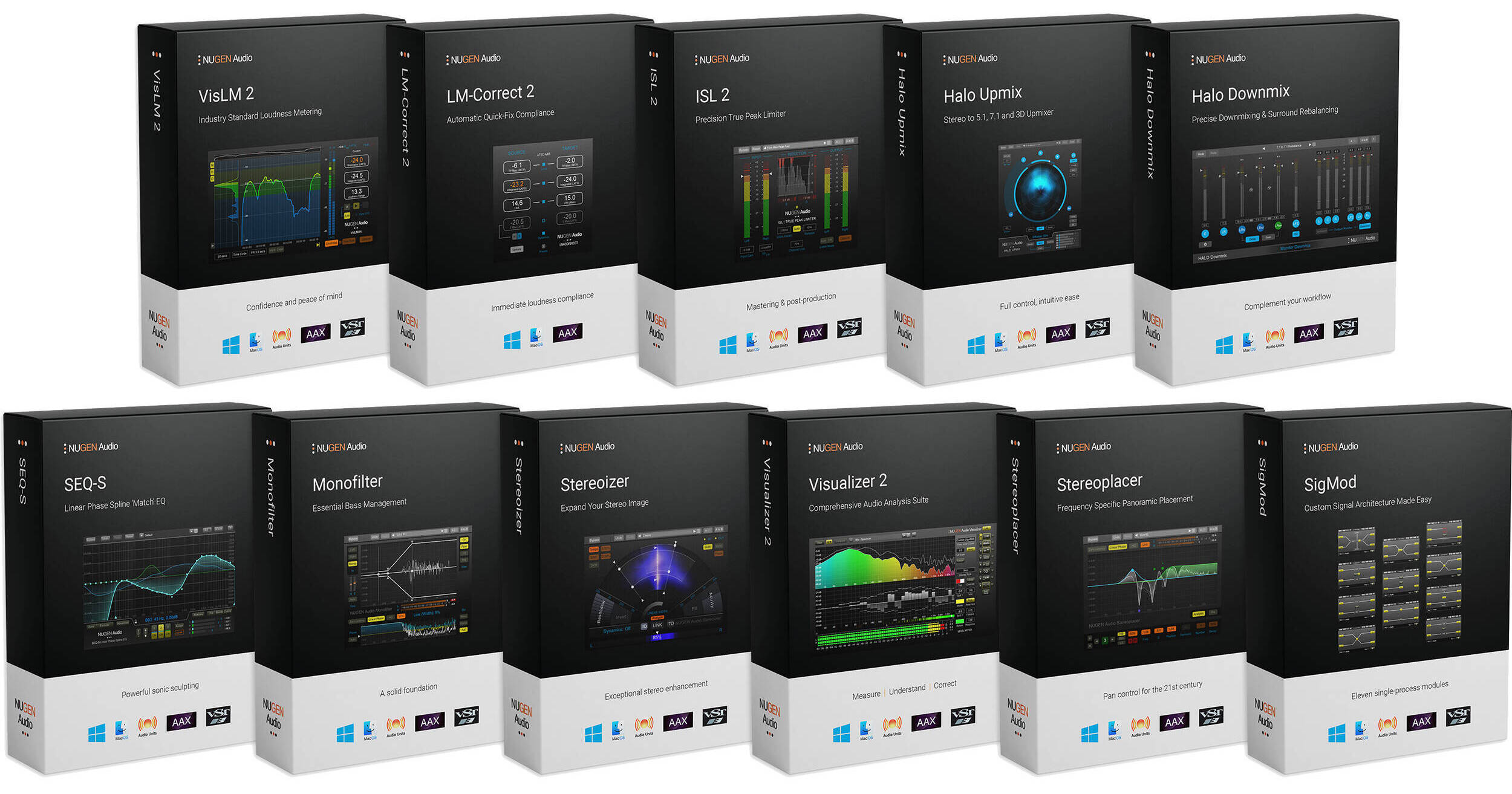


NUGEN Audio Post is a collection of plug-ins devoted to audio enhancement and problem-solving in high-quality broadcast, film, and game audio production environments. Containing a complete loudness solution including true-peak limiting, a comprehensive audio analysis suite, transparent auto-match EQ, and three stereo-control plug-ins, the collection delivers the same essential post production tools used by leading facilities the world over.
Features include industry-standard loudness metering, corrective and match EQ, complete stereo enhancement and correction, and comprehensive audio analysis, along with mono, stereo, 5.1 and 7.1 plug-ins.
VisLM 2 from NuGen Audio is a loudness meter plug-in and standalone application that offers a variety of loudness measurement tools intended for use in audio mastering, broadcast, film, and more. With a design focused on primary loudness parameters, the software combines an instant overview with detailed historical information, enabling the user to hit their target first time. Additional loudness logging and timecode functions allow for proof-of-compliance reporting and postmortem analysis with frame-accurate referencing.
A fully resizable interface and many additional visualizations make it even simpler to identify exactly the information needed to choose the configuration that matches the current workflow precisely. The program remembers loudness data up to twelve hours, locked to timecode received directly from the NLE/DAW. Any minor edit or overdub immediately triggers overall loudness updates, eliminating the need for end-to-end remeasuring. Loudness data is saved with the session allowing full session loudness recall. Offline AudioSuite scans can be loaded into the real-time meter for immediate preloading of loudness history.
- Native NLE/DAW operation (Pro Tools, Avid Media Composer, FCP, Premiere, etc.)
- Standalone application
- International standards compliant
- Timecode locked ReMEM enabled
- Automated loudness overdub
- Loudness history saved and recalled with session
- Offline loudness pushed to real-time meter
- Alert warning options
- Loudness boundary indicators
- Momentary, short term, and integrated loudness
- Loudness range
- Overall program loudness measurement
- Maximum True Peak Level meters
- EBU Mode meters
- Automatic mono through 5.1 compatibility plus ASWG 7.1 support
- Highly configurable
- Historical loudness profile
- Fully resizable history view
- Loudness histogram
- Offline data export
- Multiple export parameters
- Postmortem timecode referencing
- Full ReMEM functionality requires a time-code lock to be provided to the plug-in by the NLE/DAW
- ATSC A/85 (Calm Act)
- EBU R128
- EBU R128 S1
- ARIB TR-B32
- OP-59
- AGCOM 219/9/CSP
- Portaria 354
- DPP
ISL 2 from NuGen Audio is a true peak limiter designed for use in audio mixing and mastering, and provides the necessary final step when preparing audio for broadcast.
With steering and ducking meters, this software provides the perfect settings. Whether preserving directional integrity, atmospheric ambience, or taming a surround centre channel; the plug-in delivers the information and control needed to achieve those goals. Processing enhancements assess the incoming audio for frequency content and automatically take care of any minor adjustments required when LF content drives the limiter, delivering increased transparency while maintaining intuitive operation.
- Adjust adjustable lookahead
- Two stage, nonlinear adaptive algorithm
- Adjustable channel linking
- Includes iTunes True Peak option
- Compatible with ITU-R BS. 1770
- True brickwall-limited output
- Mono through 7.1.2 surround compatible
- Intelligent adaptive algorithm
- Clear metering
- Multiple diagnostic listen modes
- Accurate, standard, compliant I/O metering
- Precise direct numeric maxima
- Adjustable ballistics and color splits
- ATSC A/85 (Calm Act)
- EBU R128
- EBU R128 S1
- ARIB TR-B32
- OP-59
- AGCOM 219/9/CSP
- Portaria 354
- DPP
The Stereoizer by NUGEN Audio is a stereo image manipulation plug-in that can be used in mastering, mixing, sound design and other applications. It is compatible with Mac and Windows and also as an RTAS, VST, or AU plug-in.
The Stereoizer plug-in is intended to give you control over the stereo spread and depth existing within stereo tracks, and also to add width to mono tracks. It is designed to manipulate the stereo image yet maintain a natural sound without adding unwanted artifacts into your mix. The software does this by utilizing specialized algorithms that are designed to manipulate two naturally occurring localization cues that the ear uses to perceive location - IID (Inter-aural Intensity Difference) and the ITD (Inter-aural Time Difference).
The Stereoizer is intended for use in various ways over a wide spectrum of applications. Use the Stereoizer to distance clashing elements of a mix from one another within the stereo field. Use in mastering situations to add subtle width enhancements to the mix without sacrificing low end focus. Use in mixing or sound design to add width to synth pads, making them more noticeable in the mix without being overbearing.
SEQ-S Linear Phase EQ from NUGEN Audio is a plug-in that provides sonic sculpting and EQ matching up to 7.1, with stereo mid-side operation and automated spectrum analysis. The software allows for manipulating and correcting audio with higher resolution than might be achieved with a traditional parametric EQ interface. The interface allows you to draw-in your own curves, and the detailed spectrum analysis makes it easy to quickly identify and fine-tune the audio.
Additionally, you can EQ match to the sonic fingerprint of another piece of audio, which provides unique possibilities. The plug-in can be used to match one recording to another by capturing the flavor of the source audio and then transferring it to the current work. This is especially useful for restoration and harmonization work. Or the same technique can be applied to individual tracks to unify different takes, microphone positions, and more.
EQ Invert is a control that delivers a technique for creating space in a complex mix, where traditional EQs are too destructive. By sampling the vocal and applying the inverted curve to the backing, specific frequency space can be gently created without unnecessarily altering the original tonality of the source audio. The Quality setting provides extra precision in the low frequencies, allowing for highly transparent adjustments without muddying the mix. The resolution can be scaled to suit any task.
- Transparent sound without phase smearing
- Sharper transients
- No phase warping
- Match different takes and environments
- Mono, stereo, 5.1, and 7.1 operation
- Clone source EQ to target mix
- Invert facility to sculpt specific space
- Mid/side options available
- Individual surround channel access
- Easily generate complex curves
- Curve scale and smoothing
- Zoomable interface
Stereoplacer from NUGEN Audio is a frequency dependent pan control plug-in that can be used in mixing, mastering, post production and more. It is compatible with Mac and Windows and requires use of a host program that supports RTAS, VST or AU plug-ins.
The Stereoplacer plug-in works by allowing you to separate the different frequency ranges of mono or stereo audio files in to discrete bands. It then gives you spatial control over these bands, allowing you to independently reposition them within the stereo field.
Stereoplacer can be used for fixing problems in mixing and mastering, or it can be used creatively in sound design, sample tweaking and more. For example, you can improve upon stereo recordings such as drum overheads that suffer from poorly placed microphones. By repositioning the problem areas in a frequency specific fashion and leaving the rest of the recording intact, you can help to create a more balanced stereo image. It can also be used on problematic samples to help you showcase desired elements of the sample's mix by allowing you to pan unwanted frequencies away from the focal point. Similarly, it can be used in sound design to highlight desired elements of harmonically complex synth sounds.
Available for download, Halo Upmix from NuGen Audio is a plug-in that provides all the controls necessary for fine-tuning a surround mix. Perfect for all types of production, from archive restoration and TV, through to the full 7.1 feature film experience, the software provides comprehensive center-channel management and switchable dialog extraction.
Real-time analysis of the stereo material identifies and extracts locational cues to aid in extending the panorama without the introduction of any artificial reverberation, chorusing, or delay into the upmix. A coherent spatial sound assures a good upmix and maintains the relationship between the original downmixed and upmixed versions, useful for TV repurposing for instance.
Center-channel extraction and control is available when dealing with intricate mixes when no access to the original stems is available and includes neural-network-based dialogue extraction. Additionally, Halo includes a spatial analysis view, showing the energy distribution of the upmixed panorama using color to indicate the speaker source for audio in any position.
- Stem and group upmixing
- 7.1 cinematic soundstage enhancement
- TV stereo to surround upmixing with hard center
- Repurposing of original stereo for cinematic release
- TV archive enhancement for 5.1 broadcast
- Natural extension of original stereo panoramas and atmospheres
- Including LCR, 3.1, 4.0, 4.1, 5.0, 5.1, 6.0, 6.1, 7.0, and 7.1
- Coherent spatial upmix
- Exact downmix mode
- In-place downmix audition
- Preserves character of original audio
- No artificial reverb, chorus, or delays introduced to downmix
- Full access to all surround balances
- Neural-network dialog extraction
- Low-frequency energy dispersal
- Clear phantom vs hard-center control
- Clear visual feedback representing surround panorama
- Workflow enhancing direct control over upmix parameters
- Full LFE control options
Halo Downmix from NUGEN Audio is a plug-in designed to create a precise downmix of surround material to a stereo mix, or rebalance existing surround mixes. It provides audio post-production engineers with the controls necessary to generate stereo mixes for television within a surround workflow, rapidly deliver a controlled stereo downmix of a 5.1 or 7.1 feature film, or fine-tune existing surround audio where access to the original mix is not possible.
Halo Downmix's flexible and intuitive interface allows for critical listening and rapid assessment of mix issues with features such as surround/stereo monitoring modes, in-place monitoring, and quick-linked solo/mute at every stage. Equipped with a meter that provides real-time analysis of the surround energy distribution, the plug-in enables you to adjust the surround mix before it is downmixed to stereo. You can set the balance between the direct and ambient signals, remove rear-channel delay artifacts, regulate low-frequency content, and easily achieve accurate surround/stereo coherence from the initial surround material.
- Surround 5.1 and 7.1 to stereo downmixing
- Maintain dialog quality
- Remove rear-channel delay artifacts—automatic rear-channel delay detection
- Control excess ambient energy—ambient-/direct-sound balance
- Fine-tune surround to surround material
- Regulate low-frequency content
- Surround input width control
- Rear-channel shelf filters
- Stereo mix production for television within a surround workflow
- Rapidly produce a controlled, precise stereo downmix of a 5.1 or 7.1 feature film
- Generate a stereo mix from surround where no stereo recording exists
- Produce stereo interim listening mixes in a surround workflow
- Simultaneous surround/stereo workflow
- Surround rebalancing
- Downmix rescue
- Surround restoration
- 7.1 and 5.1 modes
- Advance and compact modes
- Quick-select in-place monitoring of stereo and surround
- Quick-linked solo and mute at every stage
- Full input and output level metering
- Direct numerical entry of all gain offsets
- Adjustable meter color splits
- Surround energy distribution visualization
Monofilter 4 from NUGEN Audio is a bass mixing plug-in that can be used to enhance the bass in your mixes by helping to center them in the stereo field, correcting low-frequency phase issues. The plug-in can be used on mono or stereo tracks for mixing, mastering, enhancing vinyl samples, and more.
Phase issues in the low end of a mix can be caused by stereo mixing effects such as delays and choruses. Also, if samples have phase issues and are used in the production, phasing can be present in your mix as well. This can make the bass frequencies in your mix sound hollow or weak. To improve upon this, you can add Monofilter to your mix groups or effects returns, and use the phase control parameter to align the phase of the low frequencies in the left versus right channels.
In addition, Monofilter 4 has a crossover function that allows you to split an audio signal into two frequency bands for separate processing. This function, for instance, would allow you to separate the bass frequencies in a stereo file, mix them in mono, and process them by themselves. On the other hand, the frequencies above the threshold frequency could be mixed in stereo and processed separately. This can yield a more focused low end and ultimately a stronger, clearer mix.
The Visualizer from NUGEN Audio is a spectrum analyzer plug-in that is designed for use in a multitude of recording, mixing, and mastering situations. It is compatible with Mac and Windows and works standalone or with use of a host program that supports VST or AU plug-ins.
The Visualizer is an audio analysis tool that can help you identify problematic frequencies, fundamentals, harmonics, and much more. It has several visual displays including a traditional spectrum analysis display, a spectrogram display that shows level and frequency history with a zoom control, and primary and secondary meter displays, which allow for multiple metering types to be viewed simultaneously. Some of the different metering types include standard peak and RMS metering, K-system meters, and a stereo margin indicator that displays dB remaining until clip.
The Visualizer is designed to be helpful in a wide variety of use cases. The software features a -20 dBFS RMS pink-noise signal generator that can be used for acoustical testing purposes. It can be used to aid in room tuning, for analyzing the acoustical properties of acoustic spaces such as control rooms, live rooms, and auditoriums. Use Visualizer in recording situations for helping to determine mic placements or for EQing. Use it in mixing and mastering for investigating hard-to-hear low-frequency issues, honing in on problem areas, examining phase relationships, peak monitoring, and more.
LM-Correct 2 with DynApt Extension from NuGen Audio is software that provides an immediate and hassle-free route to creating loudness-compliant audio, and in the process, saves time and prevents costly mistakes. Either within an AAX-/Avid-compatible DAW or as a standalone application, LM-Correct 2 delivers automated compliance with lookahead true peak correction. Used in conjunction with a real-time meter, the program saves iterative adjustments to the mix as target levels are approached, allowing transparent in-edit quick-touch finishing of audio.
For file-based processes LM-Correct rapidly assesses and adjusts the entire file faster than real time. Automatically handling audio files from mono through 7.1.2, the software is compliant with all current loudness standards, and if needed, the optional dialog-gated measure can be specified. Audio can be transformed with a single click from one specification to the next, with faster-than-real-time processing when delivering multiple versions or repurposing for different regions, and play-out specifications are required.
This version of the software includes the DynApt dynamic adaptation extension, which is designed to eliminate dialog clarity issues commonly experienced in repurposed content or automated broadband compression. The use of DynApt helps streamline workflow and facilitates loudness compliance, while improving audio quality.
- M Max measure/correct (dynamic correction)
- S Max measure/correct (dynamic correction)
- Single click analysis and correction
- LRA measure/correct (requires optional DynApt extension)
- EBU R128 S1 support
- Game audio (ASWG 7.1 surround)
- Compact interface
- Expanded interface
- Options panel
- Text file processing summary log
- Single-click solution to loudness conformance
- Immediate finishing of audio to loudness standards
- Editor based and standalone operation
- Integrated true-peak back-stop limiter
- Text file analysis and processing summaries
- Optional dialog gated measure
- Clear parameter read out
- Simple one-click analysis
- Dial in target values directly
- One-click correction
- Offline faster than real-time advantage
- Allows the reduction of dynamics in the audio while respecting the level of the dialog from the original mix
- Facilitates loudness compliance while improving quality
- Loudness range (LRA) can be set as a processing target, eliminating the need for time-consuming hands-on methods to meet targets
- Data logs provide evidential accuracy, eliminating mistakes, fines, and maintaining accuracy
- Streamlines feature-film adaptation for TV
- Automates content repurposing such as TV content for web streaming or radio programming for podcasting
- Easily integrated at any stage — at ingest, during archiving or post
- Faster-than-real-time automated processing
- Automated standard compliance
- ITU-R BS. 1770 | EBU R128 | CALM Act compliant
- Integrated loudness target
- Maximum True Peak level
- Short-term and momentary loudness limiting
- Optional DynApt LRA dynamics targeting
- "EBU Mode"
- Automatic mono through 5.1 compatibility plus ASWG 7.1 support
Available for download, NuGen Audio SigMod is a plug-in designed to provide signal flow modifications to channel strips in your DAW. A single instance of this plug-in allows you to rebalance stereo signals, flip the polarity of mono or stereo signals, decode/encode signal into M/S, and much more. Eleven modules are available in the plug-in, including Mid/Side, Mono, Switch, Delay, Phase, Trim, DC Offset, Tap, Crossover, and others.
Here's a use case for in-the-box mastering engineers: Say you'd like to use the UAD Manley Massive Passive to equalize not in stereo, but in M/S. This isn't possible with the UAD plug-in as it stands, but it can be accomplished with SigMod. Put SigMod before Massive Passive and encode the signal into M/S, then slap a second instance of SigMod after Massive Passive to decode from M/S to stereo.
Other features are quite useful in mastering and mixing processing, including DC offset and stereo trim. Mono summing and phase checking are also possible.
Modules in SigMod are easily enabled. All you need to do is click the plus signs to add modules. Disabling is equally simple using the X marks to enable/disable. SigMod is compatible with Mac and Windows platforms and works with most DAWs.
This is useful for Mid/Side signal monitoring, accessing the Mid/Side signal components independently, or using Mid/Side recordings in a traditional left/right stereo context.
Using two instances of SigMod on either side of a third-party plug-in with independent control over left and right channel allows this third-party plug-in to be used in Mid/Side mode. (Use the Switch LR to MS preset on the first instance of SigMod, and the Switch MS to LR preset on the second).
Several reset modes are available via the settings screen:
- Manual: The signal path will need to be restored by clicking the signal path in the plug-in
- Auto (1, 2, 3, 5 seconds): The plug-in automatically resets after the chosen time period
- Popup: A system pop-up window is triggered. This can be useful if the plug-in is installed as a matter of routine protection, and it's operation is forgotten. The pop-up saves hunting around for the reason behind the sudden signal dropout