Video Chat with a Pro Audio Expert - Live

CAD u49 USB Studio Microphone with Headphone Jack & Gain Control

BH #CAU49 • MFR #U49
Print
CAD u49 USB Studio Microphone with Headphone Jack & Gain Control
Key Features
  • For Quality, Budget-Conscious Recording
  • Record Straight to Computers over USB
  • 3.5mm Headphone Jack with Headphone Amp
  • Cardioid Polar Pattern Minimizes Room
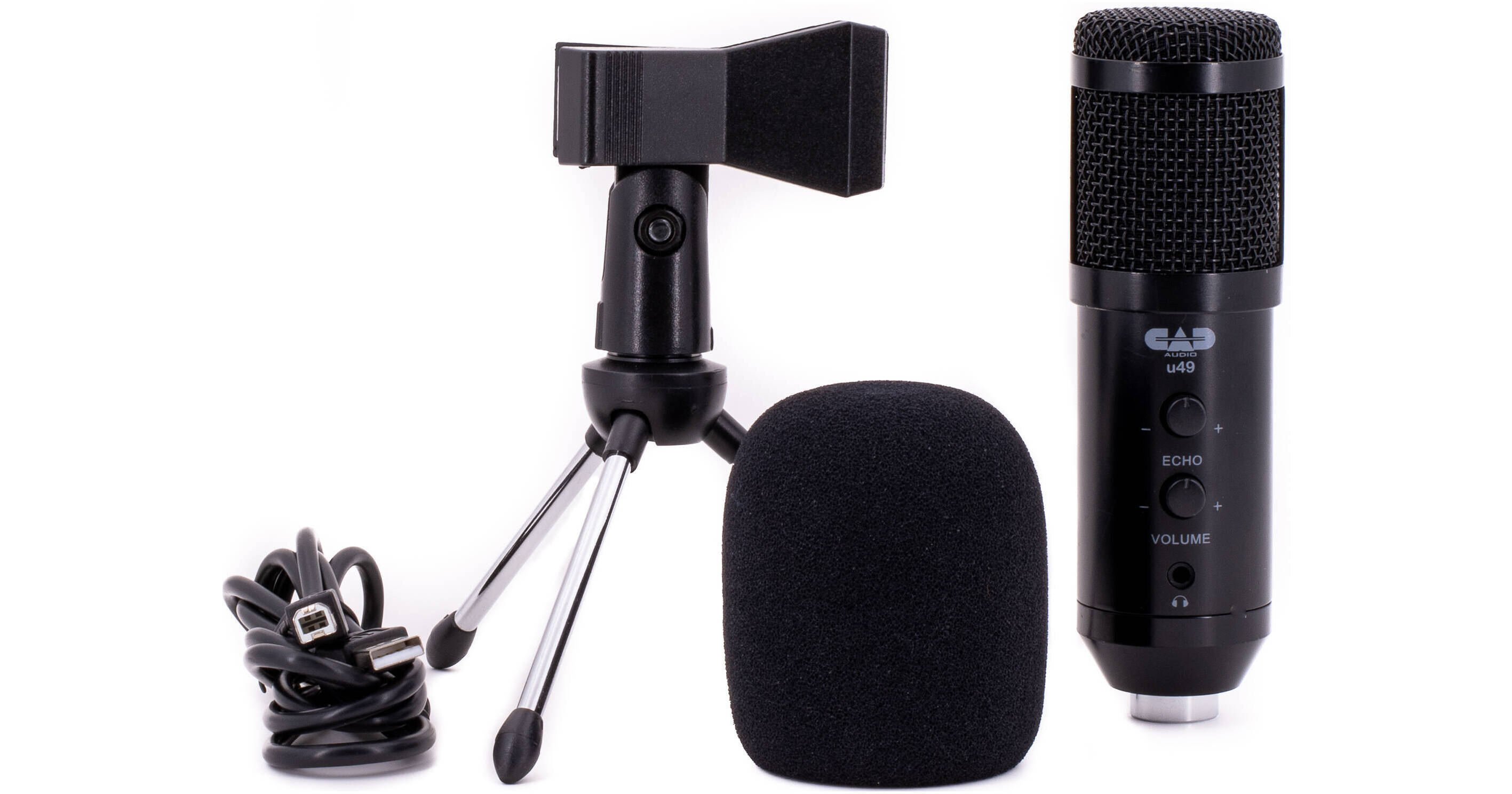
Whether you're recording podcasts, voice-overs, or songs, you can secure yourself a quality sound at a wallet-friendly cost with the CAD u49. This USB microphone delivers a smooth, yet articulate sound. It allows you to record audio straight to computers, monitoring through headphones all the while, with many of the necessary accessories included, and all at a reasonable price point. The mic includes a tripod stand, a mounting clip, a USB cable, and a windscreen.
More Details
Special Order
Expected availability: 7-14 Business Days
No Store Display
$39.00
Free Shipping for this Item
Protect Your Gear
Add a protection plan from $8.99
Ask an Expert
800-606-6969

CAD U49 Overview

Whether you're recording podcasts, voice-overs, or songs, you can secure yourself a quality sound at a wallet-friendly cost with the CAD u49. This USB microphone delivers a smooth, yet articulate sound. It allows you to record audio straight to computers, monitoring through headphones all the while, with many of the necessary accessories included, and all at a reasonable price point. The mic includes a tripod stand, a mounting clip, a USB cable, and a windscreen.

For Your Computer
This mic is perfect for recording directly to computers, be they mac or windows systems.
Quality Digital Capture
The mic records audio at 16-bit / 44 kHz, giving you the CD-standard in digital quality for a great sound.
Headphone Amp with 3.5mm Headphone Jack
The CAD u49 offers a high-powered headphone amp as well as a 3.5mm headphone jack for you to monitor your siglnal.
Useful Controls
A gain knob controls the mic level, and you'l also find an echo control, which could come in handy for VoIP uses.
Simple to Set Up
Just mount the mic on the included stand, plug the mic into your computer's USB port with the included cable, select it as a device in your recording or VoIP software, and you're ready to get to work. The mic runs off your device's power, so no need to plug it into a wall.
UPC: 631922109153

CAD U49 Specs

Key Specs
Microphone Type
Large Diaphragm
Polar Pattern
Cardioid
Element Type
Condenser
Frequency Response
20 Hz to 20 kHz
Maximum SPL
124 dB
Analog Output
No
USB/Digital Output
1x USB-B Female
Power Sources
USB Power
Microphone
Microphone Type
Large Diaphragm
Polar Pattern
Cardioid
Element Type
Condenser
Sound Field
Mono
Orientation
Side Address
Controls
Echo Cancelation, Gain/Sensitivity
Pad
No
Performance
Frequency Response
20 Hz to 20 kHz
Maximum SPL
124 dB
Sensitivity
-43 dBV/Pa
Connectivity
Analog Output Connector
No
USB/Digital Output
1x USB-B Female
Cable Length
5' / 1.5 m
Wireless
No
Digital Audio
A/D Conversion
16-Bit
Sample Rate
44.1 kHz
Digital Signal Processing & FX
No
OS Compatibility
Windows
macOS
Mobile App Compatible
No
Power
Power Sources
USB Power
Operating Voltage
Not Specified by Manufacturer
Physical
Color
Black
Mounting Thread Size
5/8"-27 Female
Packaging Info
Package Weight
1.19 lb
Box Dimensions (LxWxH)
10.4 x 6.2 x 2.6"

CAD U49 Reviews

EXCELLENT MICROPHONE

By Donald
Rated 5 out of 5
Date: 2021-04-29

GREAT SOUND CAPTURE AND ECHO AND VOLUME FEATURES ARE TERRIFIC!

Adds Professionalism to Video Conferences

By Tom
Rated 5 out of 5
Date: 2021-02-06

Great fidelity for the price point, and excellent for its designed purpose of recording for video conferencing and other streamed events which are highly compressed beyond the user's control. Still good for true recording circumstances beyond that, when compared to the ease of other USB microphones. Choose this model over the similar u29 as it has both Volume Control and Echo; echo is rather extreme, but adding a touch for conferencing helps round out the sound. The headphone monitor is useful, but more for recording than video conferencing setups.

See any errors on this page?
Whatever You Need, We've Got It