Video Chat with a Photography Expert - Live

Metabones Canon EF/EF-S Lens to FUJIFILM X-Mount T CINE Smart Adapter

BH #MEMBEFXBT2 • MFR #MBEF-X-BT2
Print
Metabones Canon EF/EF-S Lens to FUJIFILM X-Mount T CINE Smart Adapter
Key Features
  • Canon EF/EF-S Lens to FUJIFILM X-Mount
  • For Canon and Third Party EF/EF-S Lenses
  • Supports Phase-Detection Autofocus
  • Enables Lens Aperture and Stabilization
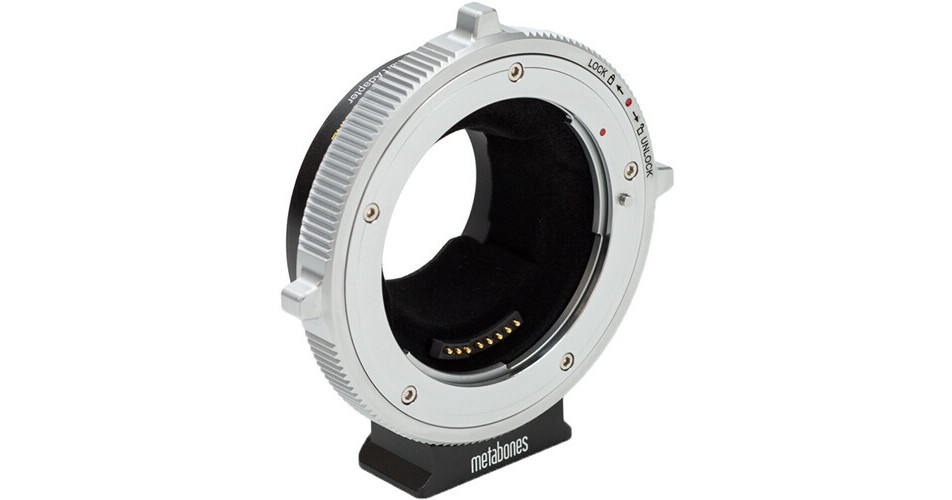
The Canon EF/EF-S Lens to FUJIFILM X-Mount T CINE Smart Adapter from Metabones allows a Canon EF or EF-S mount lens to be mounted onto a FUJIFILM X-Mount camera. It features precision-machined, chromium-plated mounting surfaces, and the adapter is designed to support electronic communication between the camera and lens. Aperture is set by the controls on the camera body, and optical image stabilization is also supported. Phase-detection autofocus (PDAF) is supported and the adapter supports PDAF by translating pertinent metadata about the optics between the lens interfaces. In this way, broad support of the widest range of lenses is made possible. Additionally, if an attached lens is also capable of generating EXIF metadata, the adapter passes that information for the camera to record in its metadata stream.
More Details
In Stock
No Store Display
Free Expedited Shipping
Protect Your Gear
Add a protection plan from $59.99
Ask an Expert
800-606-6969

Metabones MBEF-X-BT2 Overview

The Canon EF/EF-S Lens to FUJIFILM X-Mount T CINE Smart Adapter from Metabones allows a Canon EF or EF-S mount lens to be mounted onto a FUJIFILM X-Mount camera. It features precision-machined, chromium-plated mounting surfaces, and the adapter is designed to support electronic communication between the camera and lens. Aperture is set by the controls on the camera body, and optical image stabilization is also supported. Phase-detection autofocus (PDAF) is supported and the adapter supports PDAF by translating pertinent metadata about the optics between the lens interfaces. In this way, broad support of the widest range of lenses is made possible. Additionally, if an attached lens is also capable of generating EXIF metadata, the adapter passes that information for the camera to record in its metadata stream.

The adapter features a positive-lock EF mount, providing a sturdy, wiggle-free, solid attachment of the lens to your camera, and internal flocking reduces the chance of internal reflections, which can degrade your image. A rubber gasket protects the X-mount connection from dust and moisture. For mounting, a detachable tripod foot is included, which is compatible with Arca-type ball heads, and the foot can also be connected to a quick release plate by a 1/4"-20 screw. The adapter uses the camera to power the lens and does not require an additional power source.

  • Allows a Canon EF or EF-S mount lens to be mounted onto a FUJIFILM X-Mount camera
  • Aluminum alloy and brass construction with chromium plating
  • Supports electronic communication between the camera and lens
  • Lens aperture is set by the controls on the camera body
  • Supports phase-detection autofocus and optical image stabilization
  • Supports parallax correction on the X-Pro series rangefinders
  • Transmits EXIF metadata from lens to camera
  • Positive-lock EF mount provides sturdy and solid attachment of lens to camera
  • Internal flocking reduces internal reflections
  • Rubber gasket to protect the X-mount connection from dust and moisture
  • Detachable tripod foot compatible with Arca-type ball heads
  • 1/4"-20 tripod connection
  • Uses camera to power the lens and does not require an additional power source
EAN: 4897050182727

Metabones MBEF-X-BT2 Specs

Item Type
1x Lens Mount Adapter
Camera Compatibility
FUJIFILM X Mount
Lens Compatibility
Canon EF/EF-S Mount
Electronic Communication
Yes
Included Shims
Mounting
Tripod Mount: 1/4"-20 Female Thread
Materials
Aluminum, Brass
Packaging Info
Package Weight
0.835 lb
Box Dimensions (LxWxH)
4.7 x 4.7 x 2.4"

Metabones MBEF-X-BT2 Reviews

See any errors on this page?

what is the button on the main body of the ...

what is the button on the main body of the adapter for?
Asked by: Benjamin
The button is used to change exposure modes. Depending on which body you have. The button will work or have no function. You can find the detail on Metabones' site link below. https://bit.ly/3WCjIE0
Answered by: David B
Date published: 2023-05-29
  • y_2026, m_8, d_28, h_8CST
  • bvseo_bulk, prod_bvqa, vn_bulk_3.0.48
  • cp_1, bvpage1
  • co_hasquestionsanswers, tq_1
  • loc_en_US, sid_1569430, prod, sort_[SortEntry(order=HAS_STAFF_ANSWERS, direction=DESCENDING)]
  • clientName_bhphotovideo
Whatever You Need, We've Got It