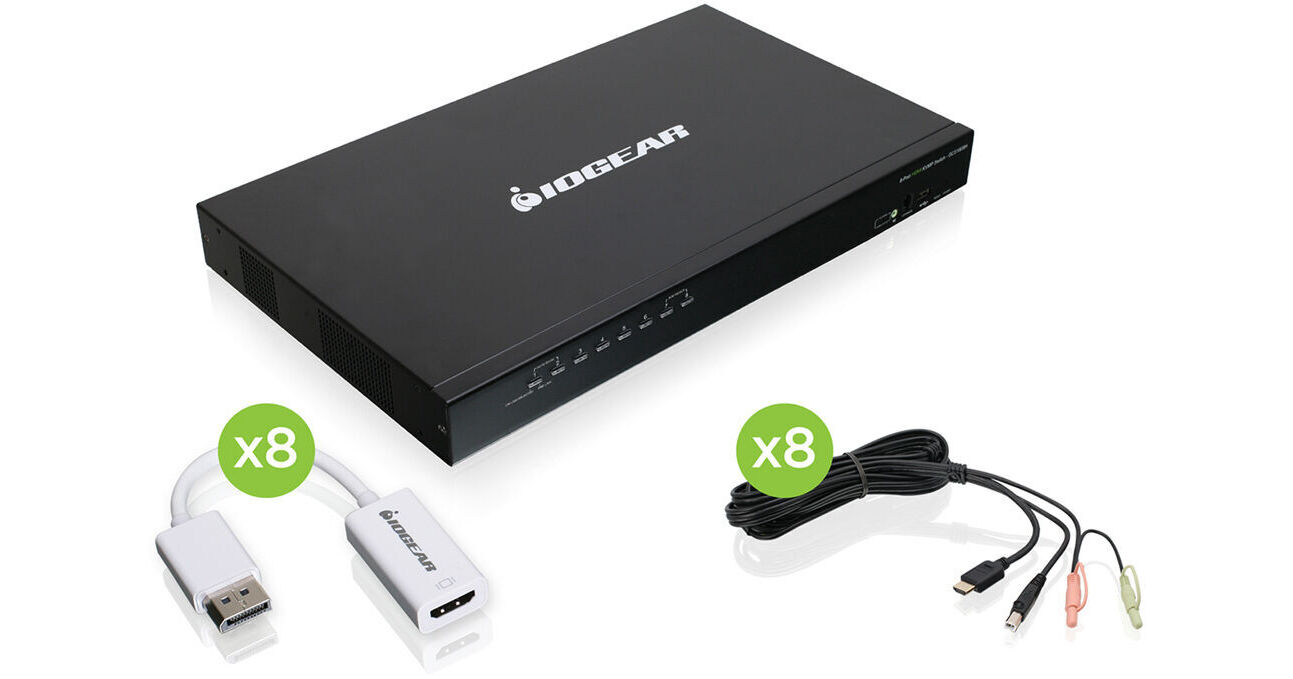
Connect the 8-Port USB PS/2 Combo HD Displayport KVM Kit from IOGEAR to control up to eight systems simultaneously using a single monitor, keyboard, and mouse. Custom KVM cables and adapters are included to connect HDMI and DisplayPort-compatible computer systems that are equipped with PS/2, USB, and separate 3.5mm speaker and microphone jacks. Host peripherals such as an 1920 x 1200 resolution HDMI monitor, a USB keyboard, and USB mouse connect directly to the switch. Additionally, the switch includes two USB 2.0 Type-A connectors, one on the front and the other on the rear, to share connected devices such as printers and storage drives. There are also two 3.5mm audio jacks for switching between speakers and headphones. You can daisy chain multiple KVMs in a massive level-3 cascade setup to manage up to 512 computers with one set of peripherals. Designed for both desktop or rack mounted use with the included kit, the versatile switch offers an efficient and powerful solution for controlling and managing a multitude of systems.
Ask Our Experts800-606-6969
Hello, Log InAccount & Orders
Key Features
- Connects to 8 Computers
- USB and PS/2 Peripheral Support
- HDMI and DisplayPort Monitor Support
- 2 x Shared USB 2.0 Ports
Connect the 8-Port USB PS/2 Combo HD Displayport KVM Kit from IOGEAR to control up to eight systems simultaneously using a single monitor, keyboard, and mouse. Custom KVM cables and adapters are included to connect HDMI and DisplayPort-compatible computer systems that are equipped with PS/2, USB, and separate 3.5mm speaker and microphone jacks. Host peripherals such as an 1920 x 1200 resolution HDMI monitor, a USB keyboard, and USB mouse connect directly to the switch. Additionally, the switch includes two USB 2.0 Type-A connectors, one on the front and the other on the rear, to share connected devices such as printers and storage drives. There are also two 3.5mm audio jacks for switching between speakers and headphones. You can daisy chain multiple KVMs in a massive level-3 cascade setup to manage up to 512 computers with one set of peripherals. Designed for both desktop or rack mounted use with the included kit, the versatile switch offers an efficient and powerful solution for controlling and managing a multitude of systems.
More DetailsIn Stock
Protect Your Gear
Add a protection plan from $64.99
See Options
IOGEAR GCS1808 Overview
Supports USB, PS/2, HDMI, and DisplayPort 1.1a peripherals
Includes custom KVM cables and adapters
Supports up to 1920 x 1200 resolution
Two USB 2.0 Type-A ports for sharing devices
Cascade up to 3 levels and control up to 512 computers from a single console
Computer selection via front panel LED's, intuitive OSD (on screen display) and hotkeys
The switch is secure with password protection for OSD
DynaSync technology optimizes the screen resolution when booting-up or switching between ports
Includes installation kit for a 19" (1U) system rack
Auto-Scan Mode detects and monitors connected computers
Broadcast Mode sends commands to all connected computers
Supports Windows, Mac, Oracle Solaris, and Linux operating systems
UPC: 881317519801
IOGEAR GCS1808 Specs
Key Specs
| # of Systems Supported | |
| Console I/O | |
| KVM I/O | |
| Supported Resolutions |
| # of Systems Supported | |
| Console I/O | |
| KVM I/O | |
| Supported Resolutions | |
| Scan Interval Range | |
| USB Keyboard/Mouse Emulation | |
| Power Source | |
| Power Consumption | |
| Operating Conditions | |
| Storage Conditions | |
| Rack Mountable | |
| Material of Construction | |
| Cable Length | |
| Weight |
Packaging Info
| Package Weight | |
| Box Dimensions (LxWxH) |
IOGEAR GCS1808 Reviews
Works great
By John
Rated 5 out of 5
Date: 2020-04-19
I've only had a for a couple weeks but so far it has been great
Tried the rest - this is the best
By Keith Eggel
Rated 5 out of 5
Date: 2014-12-08
We use several USB KVM's and this one is great for two reasons: 1. it comes complete with a full set of cables, and 2. it has keyboard commands that allow switching capability from the keyboard if the KVM itself is not located conveniently in the rack. - I have ordered more of these. Keith Eggel
See any errors on this page?
Can this KVM switch be controlled via http or ...
Can this KVM switch be controlled via http or other network commands? I am looking to integrate this with Companion.
The IOGEAR 8-Port USB HDMI KVMP Switch does not have network support.
Date published: 2023-02-20
question
is this product UL certified?
Iogear lists this with FCC, and CE certifications. They do not provide documentation of UL certification.
Date published: 2018-08-27
question
Can i connect 8 Mac Mini to 1 monitor/keyboard/mouse with this or do I need to by additional equipment?
Thank you for choosing IOGEAR and we apologize for the inconvenience. We would need to know more about your setup. To better service you and understand your set up, please feel to contact our customer support at 1-866-946-4327 or email us: [email protected]. Once again, thank you for choosing IOGEAR.
Date published: 2018-08-27