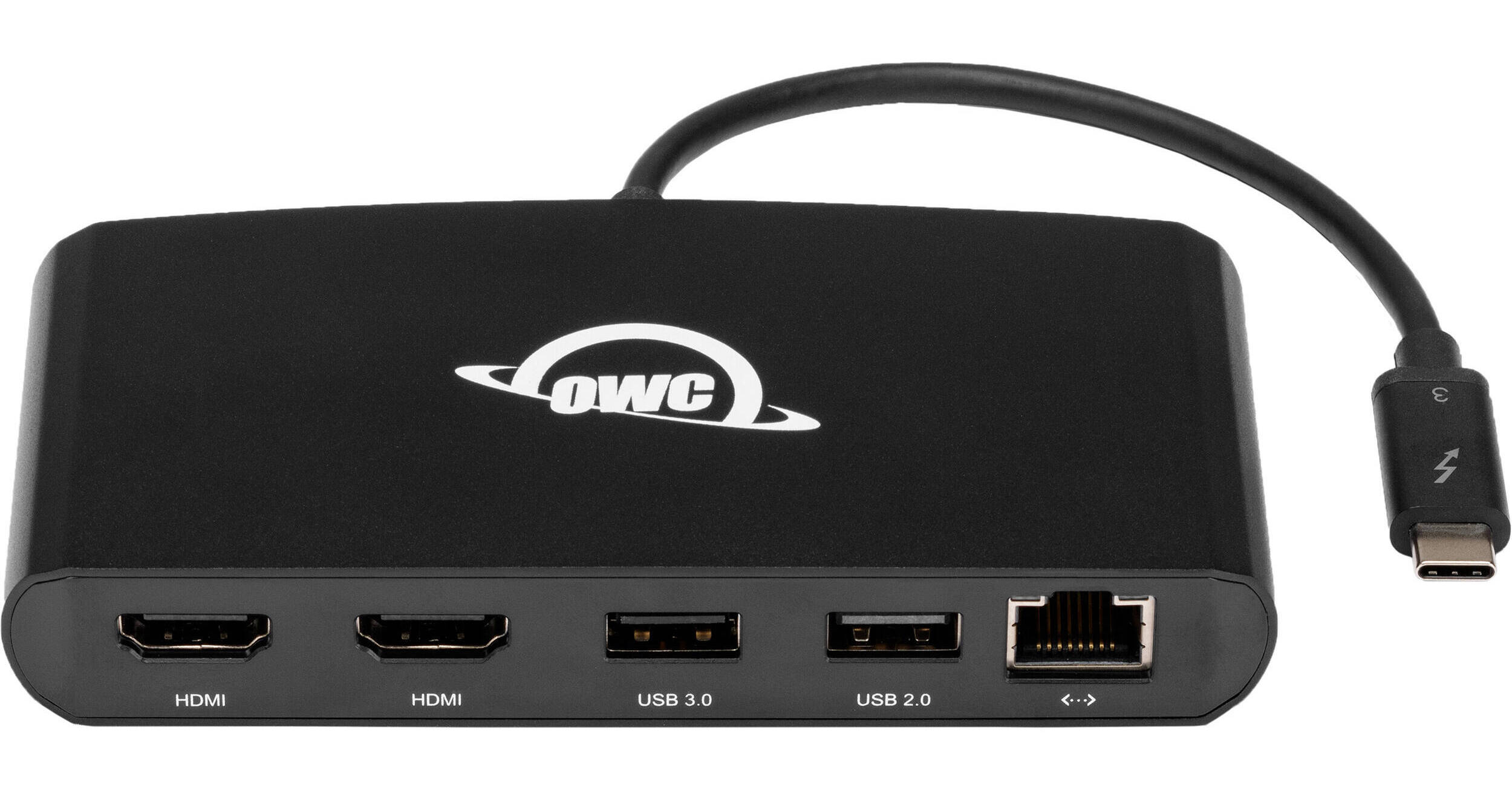
OWC 5-In-1 Thunderbolt 3 mini Dock

BH #OWCTB3MDK5P • MFR #OWCTB3MDK5P
Print
OWC 5-In-1 Thunderbolt 3 mini Dock
Key Features
  • 1 x USB 3.1 Gen 1 Type-A Port
  • 1 x USB 2.0 Type-A Port
  • 2 x HDMI Ports
  • 1 x RJ45 Gigabit Ethernet Port
Expand your connection options with the Thunderbolt 3 mini Dock from OWC. Featuring a Thunderbolt 3 host connection, this bus-powered dock sports single USB 3.1 Gen 1 and USB 2.0 Type-A ports as well as two HDMI ports. A fifth port features an RJ45 connection supporting Gigabit Ethernet. Transfer speeds can reach up to 40 Gb/s using Thunderbolt 3 or up to 5 Gb/s using USB 3.1 Gen 1. This adapter dock is compatible with MacOS, Windows, and Windows Server.
More Details
In Stock
No Store Display
Free 2-Day Shipping
Protect Your Gear
Add a protection plan from $18.50
Ask an Expert
800-606-6969

OWC mini Dock Overview

Expand your connection options with the Thunderbolt 3 mini Dock from OWC. Featuring a Thunderbolt 3 host connection, this bus-powered dock sports single USB 3.1 Gen 1 and USB 2.0 Type-A ports as well as two HDMI ports. A fifth port features an RJ45 connection supporting Gigabit Ethernet. Transfer speeds can reach up to 40 Gb/s using Thunderbolt 3 or up to 5 Gb/s using USB 3.1 Gen 1. This adapter dock is compatible with MacOS, Windows, and Windows Server.

UPC: 810586035101

OWC mini Dock Specs

Key Specs
USB I/O
1x USB-A 3.0 / 3.1/3.2 Gen 1
1x USB-A 2.0
Video I/O
2x HDMI
Max Resolution
2 Displays Supported:
4096 x 2160 at 60 Hz (Dual)
Audio I/O
No
Network I/O
1x RJ45 (10/100/1000 Mb/s)
Host Connection
USB-C (Thunderbolt 3) via Integrated Cable
USB I/O
1x USB-A 3.0 / 3.1/3.2 Gen 1
1x USB-A 2.0
Video I/O
2x HDMI
Max Resolution
2 Displays Supported:
4096 x 2160 at 60 Hz (Dual)
Audio I/O
No
Network I/O
1x RJ45 (10/100/1000 Mb/s)
Host Connection
USB-C (Thunderbolt 3) via Integrated Cable
Power Source
Bus Powered
OS Compatibility
Windows / Windows Server / macOS
Enclosure Material
Aluminum
Lock Slot
No
Certifications
BSMI, CE, FCC, RCM
Cable Length
7.9" / 20 cm
Dimensions
4.9 x 2.6 x 0.7" / 12.4 x 6.5 x 1.9 cm
Weight
0.3 lb / 150 g
Packaging Info
Package Weight
0.59 lb
Box Dimensions (LxWxH)
8.2 x 5.7 x 1.5"

OWC mini Dock Reviews

Works great w/o software

By Thomas
Rated 5 out of 5
Date: 2025-03-03

This hardware works great without using ANY software to extend 2 additional monitors.

Does What It Is Supposed To Do

By Will
Rated 5 out of 5
Date: 2021-07-22

I purchased this to pair with my 16 Intel Mac Pro mainly for adding two external monitors and to have a wired network connection. When the unit arrived, I simply plugged everything in and it just worked. My two monitors came up just fine and I can still use the laptop screen too. The ethernet port works great. When I unplug the dock to use the laptop by itself, then plug it back in, everything goes back to the way it was. Simply a great little dock.

See any errors on this page?

Would this work with non thunderbolt ports like ...

Would this work with non thunderbolt ports like USB 3.2?
Asked by: Nate
No, the 5-in-1 Thunderbolt 3 Mini Dock only features a Thunderbolt 3 Host connection and will not work on a USB 3.2 connection.
Answered by: Alex D
Date published: 2024-03-28

will this work with a mac mini m1 to add a third ...

will this work with a mac mini m1 to add a third 1080p monitor?
Asked by: Antonio
No, the M1 Mac mini is limited to a total of two monitors total.
Answered by: OWC Andy
Date published: 2021-02-08

Is there an extension cable that would be ...

Is there an extension cable that would be compatible with this hub to move it 3' or 6' from the MacBook?
Asked by: David
No, I'm afraid not.
Answered by: OWC Andy
Date published: 2020-11-19

does this support one 4k monitor and one 1080p ...

does this support one 4k monitor and one 1080p monitor at the same time?
Asked by: Anonymous
Yes, it will support both simultaneously!
Answered by: OWC Andy
Date published: 2020-10-12

Does this work with Macbook Air M2 (2022)?

Does this work with Macbook Air M2 (2022)?
Asked by: Vadim
Yes, the OWC 5-In-1 Thunderbolt 3 mini Dock will work with a Macbook Air M2.
Answered by: Zev
Date published: 2022-12-19

What is the maximum refresh rate when driving a ...

What is the maximum refresh rate when driving a 4k monitor?
Asked by: Arne
60Hz maximum with 4k monitors.
Answered by: OWC Andy
Date published: 2021-02-22
  • y_2026, m_10, d_6, h_17CST
  • bvseo_bulk, prod_bvqa, vn_bulk_3.0.48
  • cp_1, bvpage1
  • co_hasquestionsanswers, tq_6
  • loc_en_US, sid_1577765, prod, sort_[SortEntry(order=HAS_STAFF_ANSWERS, direction=DESCENDING)]
  • clientName_bhphotovideo
Whatever You Need, We've Got It