
Video Chat with a Pro Video Expert - Live

ANDYCINE HDMI to USB 2.0 Video Capture with Audio

BH #ANU2H42 • MFR #U2H42
Print
ANDYCINE HDMI to USB 2.0 Video Capture with Audio
Key Features
  • Converter for Streaming & File Transfer
  • UHD 4K30 HDMI Input & Loop Output
  • 1080p30 USB Host Connection
  • Mic Input & Headphone Output
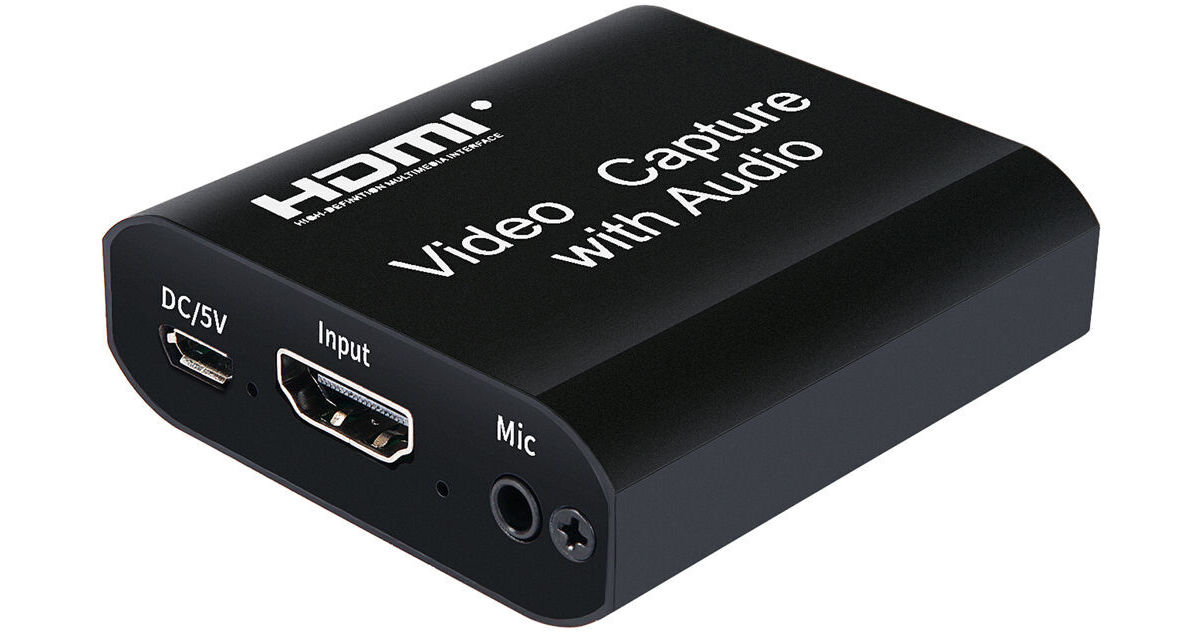
The ANDYCINE HDMI to USB 2.0 Video Capture with Audio allows you to run an HDMI camera signal along with an embedded microphone signal to your computer. It lets you use the signals in professional live streaming applications and gameplay streaming. It also allows you to transfer camera files to your computer for storage and editing.
More Details
In Stock
No Store Display
Protect Your Gear
Add a protection plan from $5.99
Ask an Expert
800-606-6969

ANDYCINE U2H42 Overview

The ANDYCINE HDMI to USB 2.0 Video Capture with Audio allows you to run an HDMI camera signal along with an embedded microphone signal to your computer. It lets you use the signals in professional live streaming applications and gameplay streaming. It also allows you to transfer camera files to your computer for storage and editing.

In an ultracompact design, the converter also provides an HDMI loop output and a headphone jack for local monitoring of the video and audio signals. It supports up to a UHD 4K30 signal via the HDMI input and loop output, and delivers up to a 1080p30 signal to your Mac or Windows computer's USB port over a USB host connection, automatically downscaling from 4K where necessary.

The pocket-size converter is powered via a micro-USB port. Two USB cables are included, one for the computer connection and one for power. HDMI cables are sold separately. Up to 49' HDMI cables are supported if using 26 AWG cables.

Key Features
UHD 4K30 HDMI input and mic input embedded into the HDMI signal
1080p30 USB host connection (automatic downscaling from 4K)
4K HDMI loop output and headphone jack for local monitoring
Computer Hardware Requirements
  • CPU: i5-3400 or above (PC); i7-3537U 2.0 GHz or above (laptop)
  • Graphics card: NVIDIA GT630 or above (PC);NVIDIA GT735M or above (laptop)
  • RAM: 4Gb
UPC: 719209320481

ANDYCINE U2H42 Specs

Inputs/Outputs
System Connection
USB-A 2.0
Video I/O
Input
1x HDMI

Output
1x HDMI (Loop Output)
Audio I/O
Input
1x 1/8" / 3.5 mm TRS

Output
1x 1/8" / 3.5 mm TRS
Format Support
Video Resolution
HDMI Input
3840 x 2160 at 30 fps

HDMI Output
3840 x 2160 at 30 fps

USB-A Output
1920 x 1080p at 30 fps
Reclocking
No
Standards
HDCP Support
No
HDR Support
No
Hardware
OS Compatibility
macOS
Windows
Power
Power I/O
1x Micro-USB Input
Power Consumption
5 VDC at 0.7 A
General
Operating Conditions
23 to 86°F / -5 to 30°C
Dimensions
2.3 x 2.2 x 0.7" / 59 x 56 x 19 mm
Weight
2 oz / 56 g
Packaging Info
Package Weight
0.395 lb
Box Dimensions (LxWxH)
4.8 x 4.5 x 2.1"

ANDYCINE U2H42 Reviews

Yes, This Product Works In Linux

By Marcel
Rated 5 out of 5
Date: 2025-11-18

Product Works As Advertised And Out Of The Box Under Linux (in My Case: Debian 13 AMD). Just Wanted To Add This Here Because The Product Specs Do Not Explicitly Mention This. They Only Mention Mac And Windows. Does Not Get Excessively Hot And For Me The Monitor Pass-through Option Is Essential.

Just works!

By Arnar
Rated 5 out of 5
Date: 2024-11-15

Just tried it on a laptop with OBS. Power and data from same USB cable. Showed up without any need to install drivers. Mic in and Hdmi audio both work and easily switchable within OBS.

See any errors on this page?

Does the mic jack provide plug-in power?

Does the mic jack provide plug-in power?
Asked by: Toby
No, the mic input does not provide plug-in power microphones.
Answered by: gracem
Date published: 2022-01-17

With this I could "monitor" audio signal from my ...

With this I could "monitor" audio signal from my Panasonic DC G100?
Asked by: Vincent
Theoretically you could use the audio output from this device to monitor the audio on your camera. However the audio output is not designed to be used as a headphone output. if your goal is get a haedphone output for your camera we recommend using a field monitor such as the FeelWorld F5 5.0" Full HD HDMI On-Camera Monitor with 4K Support and Tilt Arm BH #FEFWF5 • MFR #F5
Answered by: jabarih
Date published: 2021-12-09
  • y_2026, m_7, d_22, h_8CST
  • bvseo_bulk, prod_bvqa, vn_bulk_3.0.48
  • cp_1, bvpage1
  • co_hasquestionsanswers, tq_2
  • loc_en_US, sid_1590562, prod, sort_[SortEntry(order=HAS_STAFF_ANSWERS, direction=DESCENDING)]
  • clientName_bhphotovideo
Whatever You Need, We've Got It