Video Chat with a Pro Video Expert - Live

SmartSystem SmartCAM Zen Digital Level System

BH #SMART7552 • MFR #7552
Print
SmartSystem SmartCAM Zen Digital Level System
Key Features
  • Multiaxial Digital Level for Stabilizers
  • Dual 23-LED Bars + Display Window
  • Multicore CPU, 6 x Sensors
  • Roll, Tilt, Pan + 4 x Combo Axis Viewing
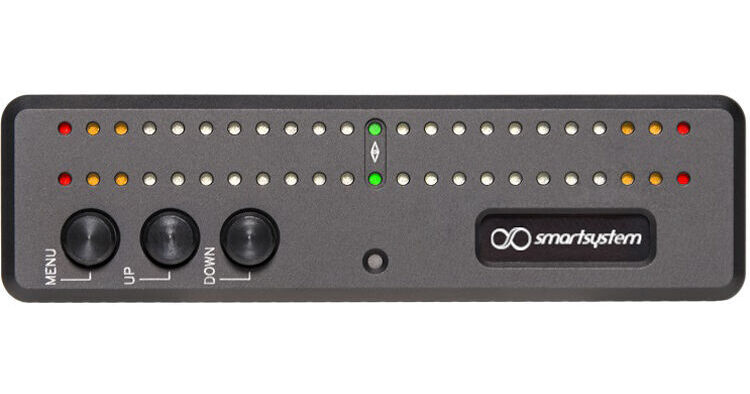
The SmartCAM Zen Digital Level from SmartSystem provides accurate level readings for your Steadicam or other stabilizer systems. This system uses dual LED bands to display up to two axes simultaneously. In addition to roll, tilt, and pan, the Zen can display roll/tile, roll/pan, tilt/pan, and roll/side-to-side combinations. Four display speeds, auto-zeroing, and a beta-zeroing by gesture function make it easy to set the display for multiple takes. The Zen digital level can be powered via USB or a 2-pin LEMO input.
More Details
Special Order
Expected availability: 7-14 Business Days
No Store Display
This item cannot be canceled or returned.
Free Standard Shipping
Ask an Expert
866-842-7675

SmartSystem Zen Overview

The SmartCAM Zen Digital Level from SmartSystem provides accurate level readings for your Steadicam or other stabilizer systems. This system uses dual LED bands to display up to two axes simultaneously. In addition to roll, tilt, and pan, the Zen can display roll/tile, roll/pan, tilt/pan, and roll/side-to-side combinations. Four display speeds, auto-zeroing, and a beta-zeroing by gesture function make it easy to set the display for multiple takes. The Zen digital level can be powered via USB or a 2-pin LEMO input.

Multiaxial Digital Level
Digital level designed for use with Steadicams and other stabilizers
Multiple Sensors
Multicore CPU and six sensors for accurate leveling
Single and Multiaxial Views
Choose between:

  • Roll, Tilt, or Pan
  • Roll + Tilt
  • Roll + Pan
  • Tilt + Pan
  • Roll + Side to Side
Zeroing
  • Reset all axes or just those currently displayed
  • Beta version of gesture zeroing
  • Selectable countdown time to zeroing
Multicolor LED Bars
  • Display up to two axes simultaneously
  • Fixed or automatic ambient brightness adjustment
Display Features
  • Selectable maximum ranges
  • Realtime, Fast, Medium, Slow, and Sloth response speeds
  • Display flip mode
  • Moving Dot and Sliding Bar 
  • Set marker limits
  • Selectable center space LED
Power Options
  • 5 to 20V 2-pin LEMO power option with daisy chaining
  • USB power and updating port
  • Auto-shutdown feature for over/underpowering
  • Reverse polarity protection
Durable Construction
  • Milled from solid aluminum
  • Anodized finish

SmartSystem Zen Specs

Power Input
2-Pin LEMO
Voltage Range
5 to 20 VDC
Power Consumption
1.6 W
Material of Construction
Anodized Aluminum
Operating Temperature Range
14 to 113°F / -10 to 45°C
Operating Humidity Range
10 to 80%
Dimensions
4.1 x 1.4 x 1.1" / 104 x 35.6 x 29 mm
Weight
3.5 oz / 100 g
Packaging Info
Package Weight
1.79 lb
Box Dimensions (LxWxH)
11.2 x 10.4 x 4.1"

SmartSystem Zen Reviews

An essential Steadicam tool

By David
Rated 5 out of 5
Date: 2022-03-25

Rarely do I fly my Steadicam without my Zen attached. The precision and accuracy is phenomenal, and calibrating it right after I've found my perfect balance is a breeze. Though I'm not always trying to keep it all green and centered up because ether shot will demand otherwise, I still love having the visual indicator in my periphery (I mount mine below my monitor with a custom 3D printed bracket) because it helps me understand the exact movement that my sled is going through or where it is in space without having to rely on visual indicators on the monitor. The pan function is really interesting but I haven't found a use for it yet. I've already done a software update through the USB-C (which can also be used to power the unit) and it's super easy, gave me new features! The customization on how you can display what axis or axes, or G-forcd even, and define the sensitivity and format of display and everything. So much packed into this simple little rectangle, it's my favorite!

See any errors on this page?
Whatever You Need, We've Got It