Video Chat with a Photography Expert - Live

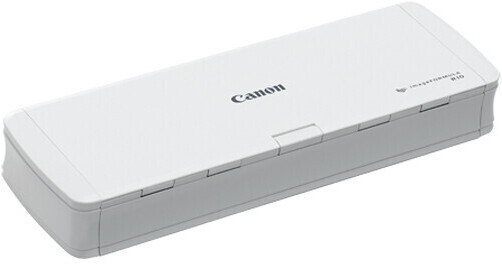
Canon imageFORMULA R10 Office Document Scanner

BH #CAIFR10S • MFR #4861C001AA
Print
Canon imageFORMULA R10 Office Document Scanner
Key Features
  • Optical Resolution: 600 dpi
  • Scan Speed: 12 ppm / 14 ipm
  • Maximum Scan Size: 8.5 x 14"
  • Minimum Scan Size: 2 x 2.8"
The imageFORMULA R10 Mobile Document Scanner from Canon is simple to set up and easy to use. USB-powered, it scans a wide variety of media including letter-size paper, receipts, business cards, plastic cards, and legal documents up to 8.5 x 14". Featuring a 20-sheet automatic document feeder, the R10 scans both sides of the document at the same time at resolutions up to 600 dpi. The scanning software automatically starts when a document is loaded into the feeder and converts paper documents to searchable digital files. The unit processes documents at speeds of up to 12 ppm, and you can save your scans as searchable PDF files, JPEG, TIFF, PNG, and more. Built-in software allows you to preview the scan, edit the image, straighten, trim, and more, and you can even create buttons with custom scanning settings and destinations.
More Details
In Stock
Free 2-Day Shipping
Protect Your Gear
Add a protection plan from $29.99
Ask an Expert
800-606-6969

Canon R10 Overview

From Manufacturer

The imageFORMULA R10 Mobile Document Scanner from Canon is simple to set up and easy to use. USB-powered, it scans a wide variety of media including letter-size paper, receipts, business cards, plastic cards, and legal documents up to 8.5 x 14". Featuring a 20-sheet automatic document feeder, the R10 scans both sides of the document at the same time at resolutions up to 600 dpi. The scanning software automatically starts when a document is loaded into the feeder and converts paper documents to searchable digital files. The unit processes documents at speeds of up to 12 ppm, and you can save your scans as searchable PDF files, JPEG, TIFF, PNG, and more. Built-in software allows you to preview the scan, edit the image, straighten, trim, and more, and you can even create buttons with custom scanning settings and destinations.

  • USB-powered
  • 20-sheet automatic document feeder
  • Single-sided and duplex scanning
  • Scans documents up to 8.5 x 14"
  • Scans business cards and embossed plastic cards
  • Converts paper documents to searchable digital files
  • High resolution scanning up to 600 dpi
  • Built-in software includes automatic software updates
  • Meets ENERGY STAR guidelines
UPC: 013803338522

Canon R10 Specs

Key Specs
Scanner Type
Automatic Document Feeder (ADF)
Scanner Maximum Resolution
600 dpi (Optical)
Scanner Color Depth
24-Bit (Internal)
Wireless
Yes
Power Source
USB Power (Cable Built-In/Included)
Scanner
Type
Automatic Document Feeder (ADF)
Maximum Resolution
600 dpi (Optical)
Scan Modes
Color, Grayscale, Monochrome
Color Depth
24-Bit (Internal)
Grayscale Depth
8-Bit (Internal)
Light Source
LED
Image Sensor
2x Contact Image Sensor (CIS)
Duplex Scanning
Yes
Single Pass Duplex
Yes
Scan Speed
Simplex Speed
9 ppm in Color
12 ppm in Grayscale/Black & White

Duplex Speed
10 ipm in Color
14 ipm in Grayscale/Black & White
Automatic Image Corrections
Yes
File Formats
JPEG, PNG, TIFF
Scanner Media Handling
Scan Sizes
ADF
Minimum: 2 x 2.8"
Maximum: 8.5 x 14"
Paper Capacity
ADF: 20x Sheet
Multi-Feed Detection
Yes
Media Weight
60 to 132 gsm / 17 to 34 lb
Daily Duty Cycle
500 Scans
Special Media Support
Business Card, Check, Envelope, ID Card, Index Card
Connectivity
Data I/O
1x Micro-USB Input
Wireless
Yes
OS Compatibility
Windows / macOS
General
Power Source
USB Power (Cable Built-In/Included)
Battery
No
Power Consumption
USB
2.5 W (Maximum)
Dimensions (W x H x D)
11.2 x 1.6 x 3.8" / 28.4 x 4.1 x 9.7 cm (with Paper Tray Closed)
Weight
2.2 lb / 1 kg
Packaging Info
Package Weight
3.23 lb
Box Dimensions (LxWxH)
13.2 x 10.6 x 4.4"

Canon R10 Reviews

Scan quality: A / Document handling: D

By Mark
Rated 3 out of 5
Date: 2026-07-10

The R10 is a nice, portable scanner that produces excellent scans. No complaints about the image quality. However, the scanning process is very frustrating, because the pages either scan in bunches or don't go through at all. Forget putting five pages in the assembly at once and expecting an error-free scan. The first page always has to be positioned by itself. Then you can place the remaining pages on top. If you're VERY lucky, it will scan the pages without incident. More than likely, the rollers will grab at least two sheets at a time and you either have to start over or scan the missed pages and edit them into the .pdf file. Either way, its not fun. Also, be very careful about placing the pages in the tray. Crooked scans are not unusual. The guides need to be quite snug. ** I didn't realize, until after I purchased the scanner that the vast majority of people giving five stars are "Product testers" or "customers from Canon." **

Excellent small-footprint scanner

By wwilk
Rated 4 out of 5
Date: 2025-05-30

Great piece of equipment. I’ve wanted a good, small scanner for more than a year. The small scanners I bought from three other companies were mediocre quality and failed way too soon. This Canon unit is heavier than those other units, but that’s not an issue for me because I won’t travel with it. Excellent software, clear instruction manual, lots of customizable settings, well thought-out physical design, and a dedicated business card scanning slot. Why four stars instead of five? Connection. it has a USB Mini connector on the scanner end and a USB 3.0 connector on the other. USB 3.0 is going away in the Mac world. Since the scanner must plug directly into a computer (no hubs), that limits its utility. I run the scanner on an older laptop with several USB 3.0 ports. A very little bit inconvenient. Hopefully Canon will offer a newer model with USB-C (or later) when the marketing life of this ImageFormula R10 ends.

See any errors on this page?

Can I Scan 4" by 6" Photos with this scanner?

Can I Scan 4" by 6" Photos with this scanner?
Asked by: Freddie A
Yes. Maximum Scan Size: 8.5 x 14".
Answered by: hectorm
Date published: 2022-04-11
  • y_2026, m_8, d_2, h_9CST
  • bvseo_bulk, prod_bvqa, vn_bulk_3.0.48
  • cp_1, bvpage1
  • co_hasquestionsanswers, tq_1
  • loc_en_US, sid_1598897, prod, sort_[SortEntry(order=HAS_STAFF_ANSWERS, direction=DESCENDING)]
  • clientName_bhphotovideo
Whatever You Need, We've Got It