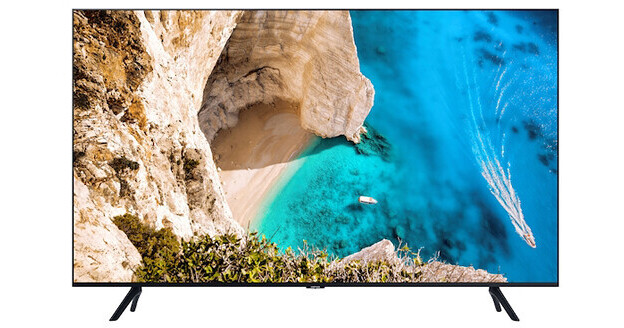
Provide your hotel guests with a welcoming experience securely with the Samsung NT690U 65" Class HDR 4K UHD Hospitality LED TV. It lets you set your own welcome message and hotel logo. The TV uses 4K UHD native resolution with HDR10, HDR10+, and HLG support to provide clear, vibrant images with compatible content. Three HDMI inputs let you connect your source devices of choice, or enable your guests to plug in their own. The USB ports can be used to clone the settings from one TV to another, and your guests can use it to play media files from their compatible drive.
Samsung LYNK REACH 4.0 CMS Delivers More than Just Content
Control Content on Hundreds of TVs at Once
Eliminate room-by-room visits to each guest room by using a single-location remote solution. The REACH (RF) Server delivers updated firmware and other settings to TVs through RF signals. REACH (IP) is also available for centralized control of SMART hospitality TVs without the need for additional hardware. Updates are simple and simultaneous, so there's no need to go from room to room to update each display with USB Cloning. This way, your staff has more time to focus on other ways of improving the guest experience.
Reinforce Your Brand
Extend your hospitality beyond your front lobby and into your rooms for a tailored, personalized guest experience. With the fully customizable graphical user interface (GUI), you can choose from the pre-built templates or upload your own assets to develop a GUI from scratch. Plus, Samsung has a network of certified REACH integration partners who can also provide turnkey solutions.
Keep Your Guests Entertained
LYNK REACH provides channel management capabilities including a customizable interactive program guide. Additionally, with third-party casting services, your guests can connect their mobile devices to the in-room screen. With a few easy steps, they can access over 1000 apps for an exceptional entertainment experience.
Samsung LYNK HMS 2.0 Turns Rooms into Smart Rooms
Guests Can Create Their Ideal Room Environment Using the Samsung TV Remote
With LYNK HMS, guests can control lighting, drapes, and room temperature, all from their Samsung TV remote. Room preferences can be saved, then quickly activated with a single push of a button. Guests can also activate a digital Do Not Disturb, which automatically alerts the entire hotel staff.
LYNK HMS Streamlines Daily Operations for Hotel Staff
By leveraging the in-room TV, hotel staff can remotely check room occupancy, cleaning status, and room security. And it can be done either from a single central location or from a mobile app. Data can also be pushed to the HMS mobile app, for real-time alerts to housekeeping staff, or for fast response to other guest requests.
More Energy Efficiency Through the Energy Management System
The EMS allows real-time monitoring and remote control of heating and cooling, which can greatly reduce energy costs while also improving guest comfort. Before check-in, hotel staff can remotely set temperatures in blocks of rooms at a time. If there's a heat wave or a cold spell, temperatures can be changed easily. For added guest comfort and greater energy efficiency, sensors in each TV can detect occupancy and adjust heat and air settings to guest preferences as they return from outings.
Digital Rights Management (DRM)
Samsung LYNK HD Content Decryption DRM (IP/RF)
Samsung's software-based DRM technology is integrated into the entire Samsung Hotel TV line. Samsung LYNK offers a robust solution to unlock premium HDTV content from content providers such as cable, satellite, and VOD providers, with maximum efficiency and security.
Pro:Idiom HD Content Decryption DRM (IP/RF)
The NT690U Series is equipped with Pro:Idiom MPEG4 technology, making the TVs compatible with most major VOD/PPV systems. You can offer your guests premium HDTV content from cable, satellite, or video-on-demand services with no optional cards or external box needed.
Extensive Connectivity
Anynet + (HDMI-CEC)
This Samsung protocol allows the user to control other HDMI devices connected to the TV, such as DVD players, computers, and soundbars.
ConnectShare (USB 2.0)
Connect a thumb drive or digital camera quickly and easily. User-friendly interface allows access to videos, a music playlist, and pictures via the remote.
Hotel TV (RJ12/IR Pass-Through) & Hotel TV RJ45
Hotel TV allows you to connect an interactive STB/SBB (set top box/set back box). Hotel TV RJ45 enables connection to hotel LAN using a custom H-browser or Samsung LYNK REACH.
Samsung Smart View
Enjoy your favorite digital content from any of your DLNA-connected Samsung devices. Samsung Smart View lets you wirelessly access and share content between your Samsung devices regardless of where you are. And there's no need for any cables or connected devices. It's also equipped with cloud technology, so you can upload your favorite content to a central web storage account and access it wherever you are.
Wi-Fi
With built-in Wi-Fi, no additional equipment is needed to connect with an existing wireless router in your hotel network and start accessing Samsung Apps or other smart TV features.
Management and Guest Convenience
Anti-Theft Battery Cover
The battery door is secured, ensuring batteries remain in the remote controller.
Channel Remapping
This allows the hotelier to change channel and TV source to a different channel.
Clock-On Timer and Alarm Key
These features allow guests to program their TVs to turn on as a wake-up alarm.
Closed Captioning
A text display of all audio content, including spoken dialog and non-speech information such as the identity of the speakers and symbols for sound effects and music.
Hotel Channel List
As a guest master channel listing of program content, this will display content in analog or HD.
Hotel Logo Display with Time Out Setting
Display hotel logo bitmap files as a greeting startup display.
Hotel Mode Plug & Play
Interactive and Stand-Alone modes are available.
Lockout Controls
The hotelier can enable front panel and menu display lockouts.
Multi-Code Remote
This feature eliminates interference when two or more TVs are used in close proximity to each other.
Power-On Status Setting
Settings include Power Always On, Last Option, Standby, or Virtual Standby.
Samsung H.Browser
As an IP-based open platform for hospitality display management solutions, H.Browser is fully customizable and highly flexible, so luxury hotels can deliver state-of-the-art services. Powered by the Samsung Tizen OS, H.Browser offers VOD and world-renowned applications for an incomparable in-room experience. Samsung provides a software development kit (SDK) that enables system integrators to build superior customized hotel TV solutions with an intuitive UI and powerful features.
Sleep Timer
The sleep timer allows guests to set TV turn-off time in 30-minute intervals up to 180 minutes.
USB Cloning
A quick and easy way to copy the ideal settings off one television to others on the property. This saves time and helps provide a consistent viewing experience for all televisions.
Picture and Audio Features
4K UHD Resolution
The NT690U features 3840 x 2160 UHD resolution and delivers the sharp, clear, colorful images Samsung is known for.
Auto Volume Limiter
During initial product setup, minimum and maximum volume levels can be locked to help minimize disturbance to other hotel guests.
Music Mode (Via the HDMI, PC, A/V, and Component Inputs)
This function allows audio feedback when picture is muted.
Premium Slim Direct-Lit LED Technology
Direct-lit LED technology provides the brilliance and energy savings advantages of LED technology, along with the uniform brightness typical of CCFL displays. And it does it all with an efficiency that makes it a more affordable technology. When you add the energy savings of up to 50% that LED offers over CCFL, you end up with the perfect solution for both you and your guests.
Quad-Core Processor
Quad-core processing makes multitasking fast. Browse the web faster and quickly. Hotel personnel can easily download apps to the TV.
Samsung Soundbar Compatible
Samsung hospitality displays enable soundbar compatibility by supporting HDMI-CEC. When you connect the soundbar to the TV with an HDMI cable, the TV audio settings and menu lock feature are automatically applied, so you don't have to set up the soundbar separately. You can also prevent guests from changing the settings. With a single remote, guests can control both the TV and soundbar simultaneously.
Additional Features
- Auto Motion Plus
- PurColor
- Film Mode
- Mega Contrast + Contrast Enhancer
- Motion Rate 120 technology
- Natural Mode support
- UHD Mastering Engine
- ARC via HDMI 3
- Variable audio output
- Auto Channel Search
- Auto power off
- BT HID built-in
- Caption (Subtitle)
- Digital Clean View
- EPG (electronic program guide)
- Game Mode
- IPv6 support
- USB HID support
- V-Chip
- Mobile device to TV mirroring via DLNA
- 360 video player & 360 camera support
- Integrated web browser
- Auto Source Mode
- Energy Saving Mode (BLU control)
- Home Menu 2017
- Hospitality Plug & Play (easy setup)
- Channel Menu Display
- Mixed Channel List
- My Channel
- Power-on Mode
- Security Mode
- Smoovie compatibility
- Welcome Message
- Mobile device to TV audio streaming via Bluetooth
- Clock backup supply
- S/W EPG (Solution EPG)
- Soft AP
- Eco sensor