
Video Chat with a Pro Video Expert - Live

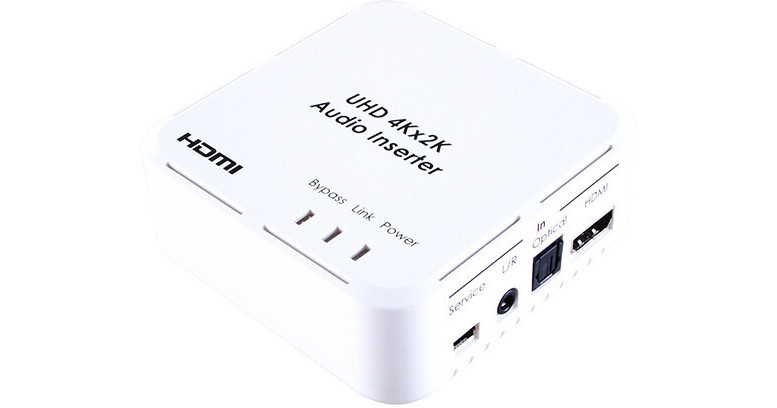
A-Neuvideo 4K30 HDMI Audio Inserter

BH #ANIHDAINS4K3 • MFR #ANI-HDAINSERT4K3
Print
A-Neuvideo 4K30 HDMI Audio Inserter
Key Features
  • Insert Audio into your HDMI Signal
  • HDMI and Analog/Optical Audio Inputs
  • HDMI Output, CEC Bypass, DVI Support
  • HDMI, HDCP 1.2 and DVI 1.0 Compliant
The ANI-HDAINSERT4K3 4K30 HDMI Audio Inserter from A-Neuvideo allows an external audio signal to be inserted into your HDMI or DVI (with an optional HDMI to DVI adapter) signal path. The unit allows you to insert analog stereo or multichannel surround sound (via the digital optical input), giving you the flexibility to add your choice of audio to the video while extending your HDMI signal. It also has the added benefit of DCI/UHD 4K and 3D support, allowing full-resolution video and eliminating the need to downscale the image.
More Details
Special Order
Expected availability: 2-4 Weeks
No Store Display
This item cannot be canceled or returned.
Free Standard Shipping
Protect Your Gear
Add a protection plan from $17.00
Ask an Expert
800-606-6969

A-Neuvideo INSERT4K3 Overview

The ANI-HDAINSERT4K3 4K30 HDMI Audio Inserter from A-Neuvideo allows an external audio signal to be inserted into your HDMI or DVI (with an optional HDMI to DVI adapter) signal path. The unit allows you to insert analog stereo or multichannel surround sound (via the digital optical input), giving you the flexibility to add your choice of audio to the video while extending your HDMI signal. It also has the added benefit of DCI/UHD 4K and 3D support, allowing full-resolution video and eliminating the need to downscale the image.

UPC: 859777007626

A-Neuvideo INSERT4K3 Reviews

See any errors on this page?

Can the inserted audio play through the HDMI out, ...

Can the inserted audio play through the HDMI out, even if no HDMI is plugged into the HDMI input?
Asked by: Adam
Yes, the A-Neuvideo 4K30 HDMI Audio Inserter's HDMI out will play through any audio connected on the Input side of the device, so long as the switch on the unit is set to the correct input (HDMI, Optical, or L/R).
Answered by: Zacky
Date published: 2022-10-23
  • y_2026, m_7, d_22, h_8CST
  • bvseo_bulk, prod_bvqa, vn_bulk_3.0.48
  • cp_1, bvpage1
  • co_hasquestionsanswers, tq_1
  • loc_en_US, sid_1610288, prod, sort_[SortEntry(order=HAS_STAFF_ANSWERS, direction=DESCENDING)]
  • clientName_bhphotovideo
Whatever You Need, We've Got It