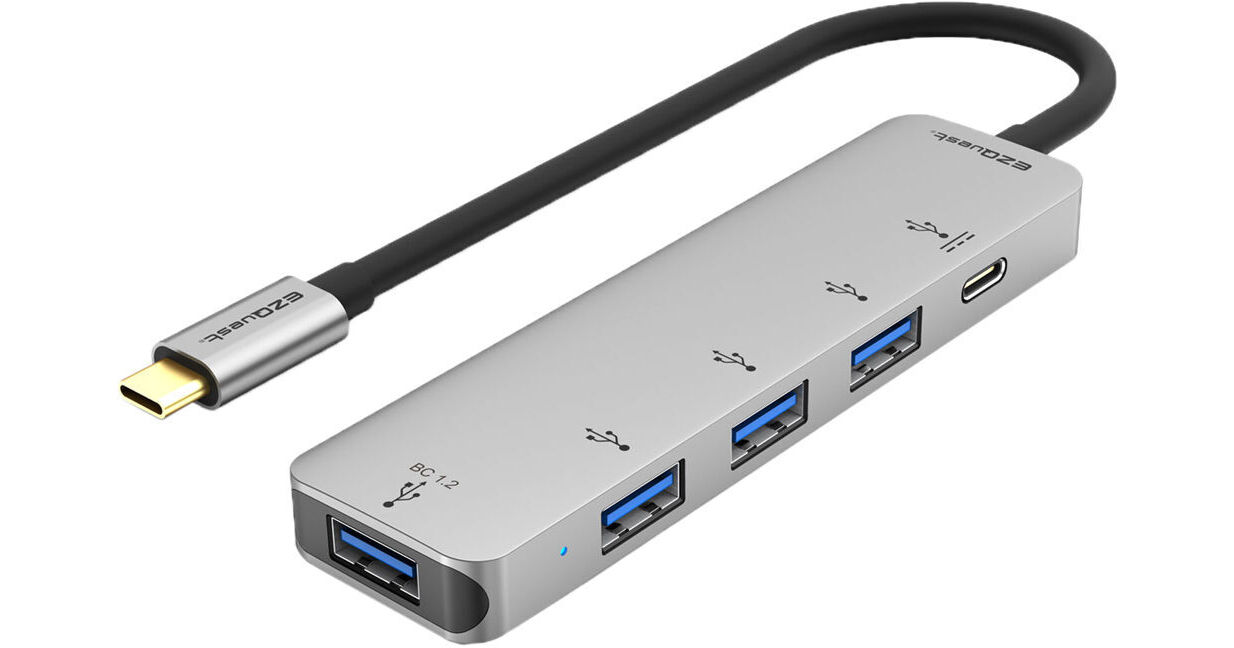
Designed for those who need to expand the connectivity of their USB Type-C host system, the 4-Port USB 3.0 Hub Adapter with USB Type-C PD 3.0 from EZQuest is equipped with one USB Type-C port and four USB 3.0 Type-A ports, all of which will allow them to charge, sync, and transfer data. The USB Type-C port supports the Power Delivery (PD) 3.0 spec and delivers up to 100W (20V/5A) of passthrough charging for your compatible device, as well as Fast Role Swap (FSR) technology, which helps to prevent data loss if the USB Type-C power cable is disconnected from the hub. One of the USB Type-A ports supports the the Battery Charging (BC) 1.2 spec, which helps ensure proper device charging. This hub connects to your compatible device using an integrated 9" USB Type-C cable and may also be used with Thunderbolt 3.
Ask Our Experts866-839-7214
Hello, Log InAccount & Orders
Key Features
- 1 x USB Type-C Port with PD 3.0 (100W)
- 1 x USB 3.0 Type-A Port with BC 1.2
- 3 x USB 3.0 Type-A Ports
- Fast Role Swap (FRS) for USB Type-C
Designed for those who need to expand the connectivity of their USB Type-C host system, the 4-Port USB 3.0 Hub Adapter with USB Type-C PD 3.0 from EZQuest is equipped with one USB Type-C port and four USB 3.0 Type-A ports, all of which will allow them to charge, sync, and transfer data. The USB Type-C port supports the Power Delivery (PD) 3.0 spec and delivers up to 100W (20V/5A) of passthrough charging for your compatible device, as well as Fast Role Swap (FSR) technology, which helps to prevent data loss if the USB Type-C power cable is disconnected from the hub. One of the USB Type-A ports supports the the Battery Charging (BC) 1.2 spec, which helps ensure proper device charging. This hub connects to your compatible device using an integrated 9" USB Type-C cable and may also be used with Thunderbolt 3.
More DetailsIn Stock
Protect Your Gear
Add a protection plan from $8.99
See Options
EZQuest X40024 Overview
General Features
Charge, Sync, and Transfer Data
Use any of the four standard USB 3.0 Type-A ports to connect devices such as your flash drives, camera, and external hard drives, as well as charging and syncing your smartphones or tablets.
Battery Charging 1.2 Technology
Due to the wide variety of portable devices with different in USB ports, as well as complicated nature of rechargeable batteries, the USB Battery Charging (BC) 1.2 spec is a critical standard for establishing the proper way to charge a battery from a USB port. One of the USB 3.0 ports has BC 1.2 so you can charge your device with peace of mind.
Power Delivery 3.0 with Fast Role Swap Technology
This hub utilizes Power Delivery version 3.0 with passthrough charging of up to 100W (20V/5A) for quick and safe charging. The PD 3.0 Fast Role Swap ( FRS ) feature will also help to prevent data loss if the USB Type-C power cable is disconnected from the hub.
Integrated 9" USB Type-C Cable
The integrated 9" USB Type-C cable allows the hub to lay flat on your desk.
UPC: 694307400245
EZQuest X40024 Specs
Key Specs
| USB I/O | |
| Host Connection | |
| Power Source |
| USB I/O | |
| Host Connection | |
| Power Source | |
| OS Compatibility | |
| Enclosure Material | |
| Certifications | |
| Cable Length | |
| Dimensions |
Packaging Info
| Package Weight | |
| Box Dimensions (LxWxH) |
EZQuest X40024 Reviews
Wireless mouse users must read (update)
By Matthew
Rated 5 out of 5
Date: 2021-10-15
This is an update of the review I posted. After the investigation, I found the hub causes interference on wireless mouse receiver. Solution: use short USB extension cable to keep the receiver away. The lag problem is gone after short extension cable added and now it's perfect.
It's 99% perfect
By Matthew
Rated 4 out of 5
Date: 2021-10-02
This hub works well with ThinkPad E15 and various of smartphones with one minor caveat: it has lag with wireless mouse even it's rare. The phone charge port can charge the phone with 15 watts while laptop can access the phone.
See any errors on this page?
Is the USB C port (female) fully functional, will ...
Is the USB C port (female) fully functional, will it work as a data port? Or is it only for inbound power-to-hub-and-computer?
It's power input only.
Tip: to avoid interference on wireless mouse, use either USB extension cable or plug the receiver away from DC in
Date published: 2021-10-15
Does the PD port supply power to the A ports, ...
Does the PD port supply power to the A ports, i.e. does it allow for running multiple connected drives, or is it connected only to the C cable that connects to the computer?
Yes, if the PD is connected to power source such your computer power cable, it does provide power to the A ports.
Here are the specification for power for each ports on the X40024 hub:
It's 5V/0.9A for three of the USB-A ports, and 5V/1.5A for the BC1.2 Port one, they share a total power of 5V/3A (15W)
Yes, you can connect multiple bus powered drives as long as the total power they needs is not more that 15W.
Off course, external drive that has its own power adapter, will not have any limitation.
Date published: 2022-05-16
Does the hub operate at 5gbs or 10gbs?
Does the hub operate at 5gbs or 10gbs?
Hi,
All the USB 3.0 ports are 5Gbps.
Thanks
Date published: 2021-03-04
Will the laptop take a charge with the power ...
Will the laptop take a charge with the power supply going through the hub?
Assuming you plug the hub into a port with adequate power it has up to 100w PD 3.0.
Date published: 2022-02-17