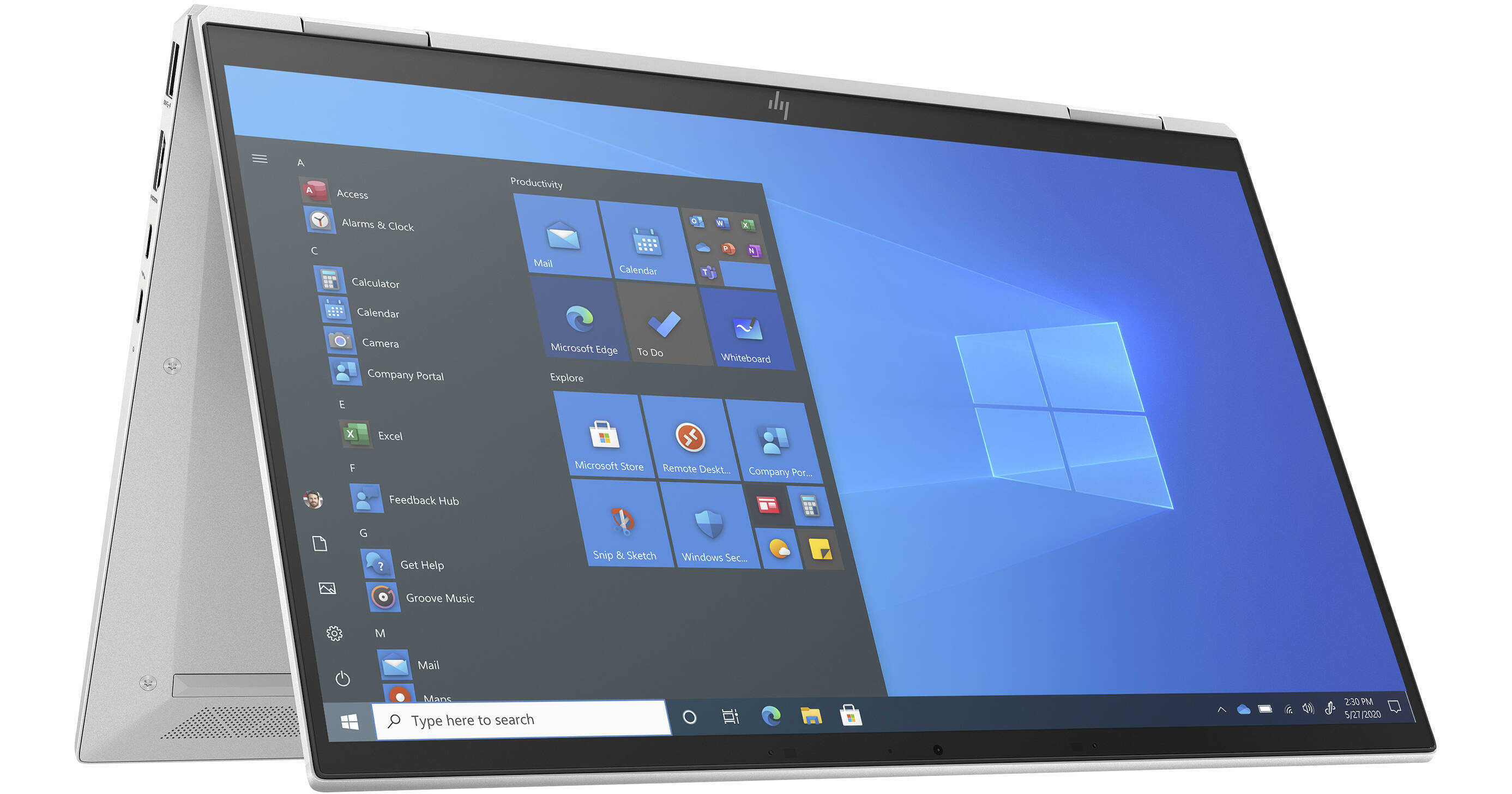
HP 13.3" EliteBook x360 1030 G8 Multi-Touch 2-in-1 Laptop (Wi-Fi Only)

BH #HEEBG8369N7 • MFR #369N7UT#ABA
Print
HP 13.3" EliteBook x360 1030 G8 Multi-Touch 2-in-1 Laptop (Wi-Fi Only)
Key Features
  • 3.0 GHz Intel Core i7 4-Core (11th Gen)
  • 16GB LPDDR4x | 256GB M.2 NVMe SSD
  • 13.3" 1920 x 1080 IPS Touchscreen
  • Integrated Intel Iris Xe Graphics
Transform your system to the workstyle of your choice with the thin and light 14" EliteBook x360 1030 G8 Multi-Touch 2-in-1 Laptop from HP, which helps keep you productive while on to go, while backed by power and security. Built with a 360° hinge, you'll be able to take advantage of four different setup modes. They include the traditional laptop mode, a stand mode with the keyboard folded back, a flat tablet mode, and a tent mode where the computer stands on its screen edges.
More Details
No Longer Available
No Store Display
Microsoft 365 Subscription not included: add to your purchase
Ask an Expert
800-606-6969

HP 1030 G8 13.3" Overview

Transform your system to the workstyle of your choice with the thin and light 14" EliteBook x360 1030 G8 Multi-Touch 2-in-1 Laptop from HP, which helps keep you productive while on to go, while backed by power and security. Built with a 360° hinge, you'll be able to take advantage of four different setup modes. They include the traditional laptop mode, a stand mode with the keyboard folded back, a flat tablet mode, and a tent mode where the computer stands on its screen edges.

This system is powered by an 11th generation 3.0 GHz Intel Core i7 Quad-Core processor, which allows you to run multiple applications simultaneously. When running demanding tasks, the processor can increase to a max clock speed of 4.8 GHz. The 16GB of 4266 MHz DDR4 RAM helps to ensure smooth multitasking and also allows the computer to quickly access frequently used files and programs. Please note that the memory is soldered down and cannot be upgraded.

The 13.3" Sure View Reflect In-Plane Switching (IPS) display features a Full HD 1920 x 1080 resolution, a 16:9 aspect ratio, a typical contrast ratio of 1500:1, a refresh rate of 60 Hz, 1000 cd/m2 brightness, viewing angles of 85/85/85/85°, and multi-touch functionality that is protected by Corning Gorilla Glass 5. The built-in multi-touch functionality allows you to utilize the touch features and functions in Windows 10 Pro to further improve accessibility and productivity. Integrated Intel Iris Xe Graphics delivers a sharp, clear picture, and you'll also be able to output video to an external display using the HDMI 2.0b port.

For storage of your files, the EliteBook x360 1030 G8 is equipped with a 256GB NVMe PCIe M.2 SSD. If you want to add external storage, optical drives, memory card readers, printers, and more, there two 40 Gb/s Thunderbolt 4 / USB4 ports, as well as two 5 Gb/s USB 3.2 Gen 1 Type-A ports, both of which double as charging ports. Network connectivity may be achieved using Wi-Fi 6 (802.11ax), while Bluetooth 5.0 technology allows you to connect additional compatible peripherals. There is a Hybrid 720p HD IR webcam with an integrated privacy shutter, plus face-detection security and system unlocking via Windows Hello. Also featured is a touch fingerprint sensor for fingerprint authentication, a three-mic array (two user-facing and one world-facing), and dual 2W speakers by Bang & Olufsen.

The 13.3" EliteBook x360 1030 G8 includes a 65W Smart External AC adapter. It may also be operated using its Long Life 3-cell / 53Wh lithium-ion battery that lasts for up to 13.25 hours before recharging is required and can recharge up to 50% in 30 minutes. The installed operating system is Windows 10 Professional (64-bit) and protection is provided by a limited 3-year parts & labor warranty.

General Features
Designed for You
Quickly switch from taking notes to presenting to a group. The HP EliteBook x360 1030, with a screen-to-body-ratio of 82%, provides an AI-based audio experience and the flexibility you need for your dynamic workday.
Work with Peace of Mind
Security features from HP work together to create an always-on, always-acting, resilient defense. From the BIOS to the browser, above and below the OS, these constantly evolving solutions help protect your system from threats
Pursue Success
Do your best work when and where you like. Stay connected with optional LTE wireless, a long battery life of up to 13.25 hours, and a powerful 11th Gen 3.0 GHz Intel Core i7 Quad-Core processor.
HP Patch Assistant
Save time by automating driver, BIOS, and HP software updates with HP Patch Assistant. This tool, available in the HP Manageability Integration Kit, helps simplify the monitoring of HP device health and security across your fleet.
HP Rechargeable Active Pen G3
Write and draw precisely with the optional HP Rechargeable Active Pen G3 that notifies you when you leave it behind with a pen proximity alert.
Tile
Not sure where you last saw your laptop? With the Tile solution, you can use an intuitive app to help you find your device near or far even when your system is turned off.
Windows 10
Start Menu
After its hiatus in Windows 8, the Start Menu has returned. Utilizing a combination of the traditional menu system and Windows 8's Live Tiles, the improved Start Menu gives you more information at a glance, showing notification information alongside your applications and other pinned items.
Cortana
Microsoft's digital personal assistant, Cortana can answer your questions with information gleaned from both your device and the internet at large. You can type or even talk with her, if your system has a microphone. Using her Laptop, Cortana keeps track of your needs and wants, and she learns over time to improve her information gathering skills.
Microsoft Edge
After nearly 20 years, Microsoft has finally replaced its Internet Explorer web browser. With Microsoft Edge, users can write directly on web pages and share notes with friends and colleagues. It also improves the online reading experience by adding a distraction-free mode and read-it-later functionality. Edge also has built-in Cortana integration; you can have her help you find a restaurant, make a reservation, and pull up directions without leaving your browser.
Windows Store
For Windows 10, Microsoft has unified the Windows Store. Now, apps for PCs, tablets, and phones will all be accessible from one place. And with support for Universal Apps, one version of an app can work across all your compatible devices automatically.
Windows 10 Pro
The Pro version of Windows 10 includes all the features of Windows 10 Home plus many designed specifically for business users, including Hyper-V virtualization, BitLocker disk encryption, and remote desktop access. Devices will also be able to join domains and the Azure Active Directory, and they can even access a specialized version of the Windows Store featuring custom, company-specific applications.
Xbox on Windows 10
Gaming is a big focus of Windows 10. Xbox integration allows for PC players to match up against Xbox One players on supported games, and if you have an Xbox One, you can even stream compatible titles to your PC. Native support for recording with the new Game DVR feature makes it easy to capture and share your gameplay. The new DirectX12 takes better advantage of multi-core processors, giving games a performance boost, even on older hardware. Windows 10 also features native support for virtual reality headsets, such as the Oculus Rift.
Windows Continuum
Windows 10 was designed for a variety of screen sizes and input styles, and with its Continuum feature, it automatically adapts to fit your needs. A Windows 10 tablet on its own requires a touch-centric approach, but attaching a mouse and keyboard will shift everything to a more traditional interface. You can even attach an external monitor to your Windows 10 phone for a near-desktop experience. But it's not just the operating system; Windows Universal Apps take advantage of Continuum as well.

HP 1030 G8 13.3" Specs

Key Specs
Operating System
Windows 10 Pro (64-Bit)
Processor
Intel Core i7-1185G7 (11th Gen)
Installed RAM
16 GB
Display Size
13.3"
Native Resolution
1920 x 1080
Touchscreen
Yes
Total Installed Storage
256 GB
Ports
2 x USB-A 3.0 / 3.1/3.2 Gen 1
USB-C
2 x Thunderbolt 4
Display I/O
1x HDMI 2.0b
Wi-Fi
Wi-Fi 6 (802.11ax); Dual-Band (2.4 & 5 GHz)
Weight
2.68 lb / 1.22 kg
Operating System
Windows 10 Pro (64-Bit)
Performance
Processor
Intel Core i7-1185G7 (11th Gen)
CPU
3 to 4.8 GHz Quad-Core
L3 Cache
12 MB
Installed RAM
16 GB
Buffered Memory
No
Graphics Type
Integrated
Display
Panel Type
IPS-Type LCD
Size
13.3"
Aspect Ratio
16:9
Native Resolution
1920 x 1080
Touchscreen
Yes
Finish
Glossy with Antireflective Coating
Maximum Brightness
1000 nits / cd/m2
Color Gamut
72% NTSC
Refresh Rate
60 Hz
Contrast Ratio
:1
Viewing Angle (H x V)
170 x 170°
Storage and Expansion
SSD Slots
1 x M.2 2280 PCIe (Unspecified Interface) x4 (In Use)
Total Installed Storage
256 GB
Optical Drive
No
Inputs / Outputs
Ports
2 x USB-A 3.0 / 3.1/3.2 Gen 1
USB-C
2 x Thunderbolt 4
Display I/O
1x HDMI 2.0b
Audio I/O
1x 1/8" / 3.5 mm Headphone/Microphone Input/Output
Built-In Speakers
: x W
Built-In Microphones
:
Media/Memory Card Slot
No
Communications
Ethernet
No
Wi-Fi
Wi-Fi 6 (802.11ax); Dual-Band (2.4 & 5 GHz)
MU-MIMO Support
2 x 2
Bluetooth
5.0
GPS
No
NFC
No
Webcam
User-Facing: 0.9 MP (720p)
Battery
Battery Chemistry
Lithium-Ion
Capacity
3-Cell: 53 Wh
Keyboard & Mouse
Keyboard
Chiclet-Style Keyboard with Backlight
Pointing Device
TouchPad
General
Security
Kensington Lock Slot, Fingerprint Reader, Facial Recognition, Dedicated TPM Security Chip, Webcam Blocker
Power Supply
65 W with Barrel/Proprietary
Operating Temperature
32 to 95°F / 0 to 35°C
Operating Humidity
10 to 90%
Certifications
A-TICK, BSMI, CE, CSA, ENERGY STAR, EPEAT, FCC, SABS, UL, VCCI, as per Manufacturer
Dimensions
11.96 x 7.63 x 0.63" / 30.38 x 19.38 x 1.6 cm
Weight
2.68 lb / 1.22 kg

HP 1030 G8 13.3" Reviews

See any errors on this page?
Whatever You Need, We've Got It