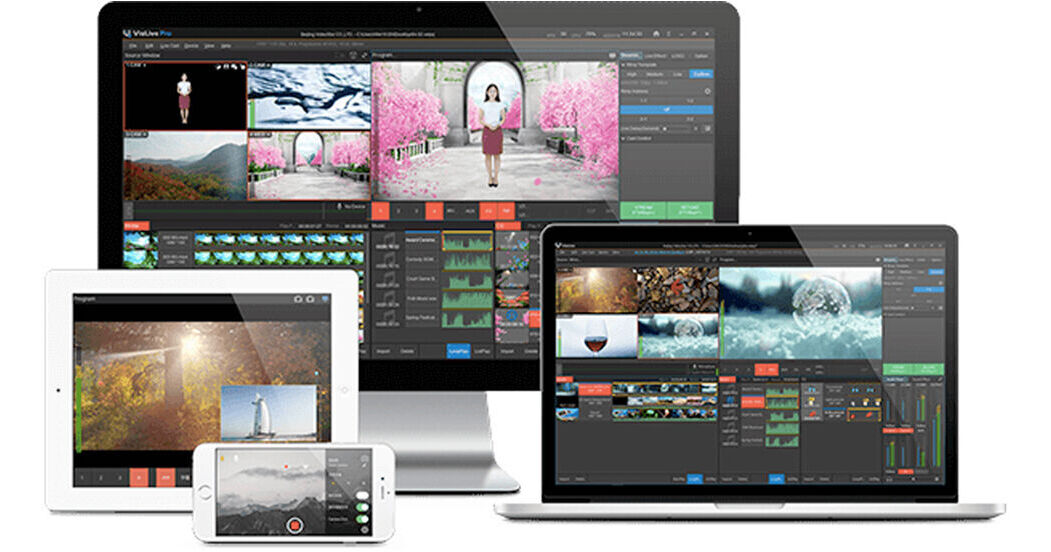
VisTitle VisLive Pro v3 is a professional all-in-one live streaming software for Windows designed to support common hardware such as Blackmagic DeckLink I/O cards and Z CAM E2 cameras connected to a network, in resolutions up to 1080p30. It also supports mobile phone screen casting, with iOS accessible via screen mirroring and Android over the VisLive iOS/Android mobile app, which is provided for free for users of VisLive Pro.
Supporting five inputs in a 6-window split, with the sixth a monitoring window, VisLive Pro v3 allows you to stream to five platforms at the same time, over the common RTMP/RTSP/UDP/HTTP protocols and the popular NDI network protocol, providing direct support for IP cameras, NDI-capable devices, and more. The application can be used for live events, for online education, video podcasts, e-sports, and various types of conferences.
Your five signals can be switched by cut or mix functions. You can apply transitions, PIP, beauty effects, GPU-based professional chroma keying, sound mixing, and other features. You can also convert one camera signal into four virtual camera positions, and digital zooming can be applied by camera duplication, without touching the actual camera.
Check out some of the other key features below.
Ask Our Experts800-606-6969
Hello, Log InAccount & Orders
Video Chat with a Pro Video Expert - Live
Key Features
- All-in-One Live Streaming Software
- DeckLink I/O & Z CAM E2 1080p30 Support
- NDI & RTMP/RTSP/UDP/HTTP Protocols
- 5+1 Inputs / Stream to 5 Platforms
VisTitle VisLive Pro v3 is a professional all-in-one live streaming software for Windows designed to support common hardware such as Blackmagic DeckLink I/O cards and Z CAM E2 cameras connected to a network, in resolutions up to 1080p30. It also supports mobile phone screen casting, with iOS accessible via screen mirroring and Android over the VisLive iOS/Android mobile app, which is provided for free for users of VisLive Pro.
More DetailsDigital
Electronic Download
This item cannot be returned.
VisTitle VisLive Pro V3 Overview
Multi-Layer Graphics Overlay
Up to four logos, with support for displacement, zoom, transparency adjustment, and other operations. Support for one dynamic or static CG and foreground animation.
Supported Resolutions
720p25, 720p29.97, 720p30, 720p50, 720p59.94, 720p60, 1080p24, 1080p25, 1080p29.97, 1080p30, 1080i50, and 1080i59.94. Record PGM as MP4 (H.264).
Beauty Effects
The Beauty FX toolset includes retouch, whiten, and slim adjustment. You can adjust skin tone, edge blue, brightness, and contrast as well as the direction and degree of face-slim.
Color Correction and LUT Import
Hue, saturation, brightness, contrast, and gamma adjustment using a variety of color adjustment effects presets for quick application. Import third-party LUT presets. Support for RGB and alpha channel curve adjustment.
Audio Mixing & More
Mix embedded and analog audio input with volume adjustment. Apply sound effects templates. Apply noise suppression to remove background noise.
Multi-Channel PIP and Custom Scene
One fast PIP with I/O effects. All the input channels support functions such as zoom, crop, rotate, flip, and masking. Customize a scene and add layers. Dozens of custom scene templates are applicable with just a couple of clicks.
Virtual Composition
Use the custom scene tool to create a virtual set. Support for GPU keying. Add a target channel for virtual set production.
Smartphone Support via VisLive App
Access smartphone camera signals via the VisLive app for iOS/Android, or access remote camera signals via VisLive Cloud. The VisLive app is provided as a free download for users of VisLive Pro. The app supports Wi-Fi mode for LAN connection and RTMP mode for WAN (to push smartphone camera signals to third-party network platforms). The VisLive app features beauty effects, tally indication, audio output, autofocus, auto lighting, and other tools. It supports signal transmission in high, medium, and low quality for different network environments.
Audio Format Support
MP3, WAV, W64, WMA
VisTitle VisLive Pro V3 Specs
| Delivery Format | |
| License Type | |
| User Support | |
| System Compatibility/Requirements |
VisTitle VisLive Pro V3 Reviews
See any errors on this page?