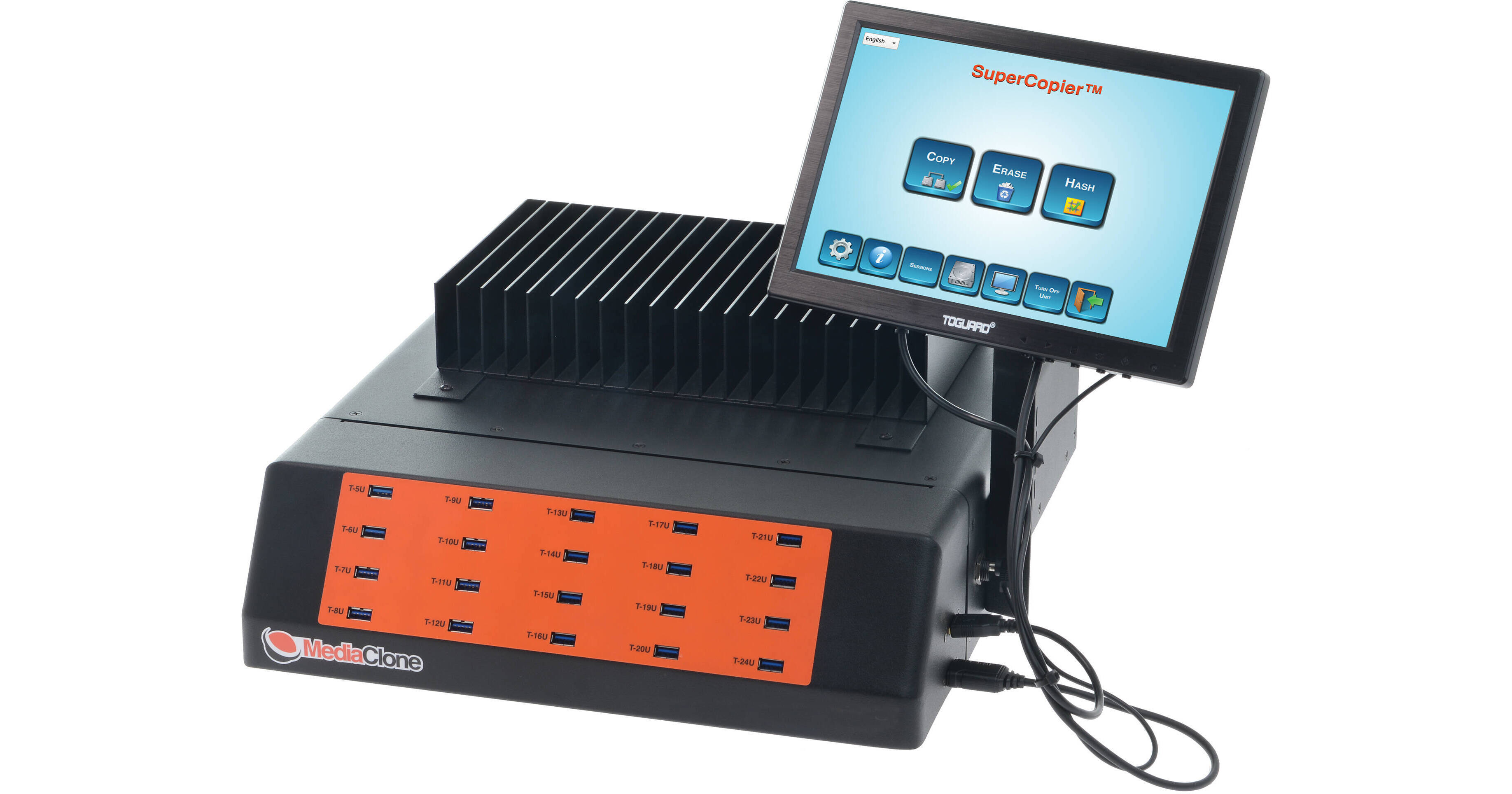
MediaClone SuperCopier Desktop Multi-USB Flash Drive Copier

BH #MESCU0001 • MFR #SCU-0001
Print
MediaClone SuperCopier Desktop Multi-USB Flash Drive Copier
Key Features
  • Standalone Duplication Unit
  • 20 x USB 3.2 Gen 1 Type-A Ports
  • 4 x SATA Ports with Power
  • 10" Touchscreen LCD
Copy and distribute information efficiently with the flexible MediaClone SuperCopier Desktop Multi-USB Flash Drive Copier. This standalone industrial-grade duplicator enables you to quickly copy information to as many as 19 USB Type-A drives or 3 SATA drives, making this an essential tool for professionals looking to securely share content across multiple storage devices.
More Details
Special Order
Expected availability: 7-14 Business Days
No Store Display
$6,200.00

Shipping Restriction:

This item cannot be canceled or returned.
Free Standard Shipping
Protect Your Gear
Add a protection plan from $679.99

Business Financing Options

Ask an Expert
800-891-3971

MediaClone SuperCopier Overview

Copy and distribute information efficiently with the flexible MediaClone SuperCopier Desktop Multi-USB Flash Drive Copier. This standalone industrial-grade duplicator enables you to quickly copy information to as many as 19 USB Type-A drives or 3 SATA drives, making this an essential tool for professionals looking to securely share content across multiple storage devices.

With the 20 USB 3.2 Gen 1 Type-A ports, you can quickly insert and remove drives for efficient copying. The 10" touchscreen LCD enables you to initiate multiple modes including copy, duplicate, clone, and erase, as well as access drive diagnostic operations so you can monitor your connected drives. You can clone information from a single USB source to as many as 19 targets, or manually adjust parameters so you can copy at a 10:10 host to target ratio. The SuperCopier's rear SATA ports support 2.5", 3.5", and M.2 SATA devices, allowing you to copy from one source to three targets. You can clone from one type of port, storage protocol, and interface, and save it to a different port, storage protocol, or interface. It supports multiple file formats, including NTFS, FAT, exFAT, EXT2-4, and HFS.

Operations
Each of the unit's ports are hot pluggable allowing you to quickly plug another drive and select it to run a new operation. You can script the unit to repeat operations. Detailed logs for drive duplication and drive erase sessions, along with SQL erase logs and certificates, are available with the ability to a USB drive or share it over a network. When plugged into a network, you can access the SuperCopier remotely for streamlined operation.
Application Settings
The SuperCopier can automatically open HPA and DCO areas and resize the drive to its full native capacity to erase any hidden data on select drives up to 256TB. The application is built with large simple, easy-to-navigate icons. In a few clicks, you can set the operation and it will quickly start up and run.
Cloning
You have a suite of options when duplicating information. You can mirror image a drive, which copies its entire contents with the operating system if both drives are the same size. You can select and copy a range of files, copy to a folder, scale down information, and even copy to multiple drives simultaneously.
Erase and Format
The SuperCopier also erases and formats drives so you can start off fresh. You get DoD 5220-22M, DoD Lite, Security Erase, Enhanced Security Erase, and Sanitize options to ensure nothing remains. You can set your drives in NTFS, FAT, exFAT, HFS+, and EXT4 formats.
Drive Diagnostics
You get an array of diagnostic options to monitor the health of your connected drives. You can run four different health tests, including read-verify, short test, extended full test, and conveyance test. You also gain access to logs and erase certifications that can be exported to a flash drive for storage.
Continuous Mode
The user can run continuous operations with multiple sessions. Each storage device attached to the unit can be selected to run in an independent session. Each session runs independently of others and can run simultaneously to maximize the use of the machine. When a session is completed/aborted, regardless of the status of other running sessions, the user can replace the finished device with another one and start a new session.
Connections
You have access to multiple ports, allowing additional flexibility for greater efficiency. You get twenty USB 3.2 Gen 1 Type-A ports, one USB 2.0 Type-A port, one USB 3.2 Gen 2 Type-C port, one Gigabit Ethernet port, an HDMI port, one DisplayPort, and four SATA III ports.

MediaClone SuperCopier Specs

Key Specs
Number of Targets
19
Supported Memory Cards
No
Standalone Operation
Yes
Inputs/Outputs
20x USB-A 3.0 / 3.1/3.2 Gen 1
4x eSATA (Input)
1x USB-A 2.0
1x HDMI
1x RJ45
General
Number of Targets
19
Supported Memory Cards
No
Standalone Operation
Yes
Inputs/Outputs
20x USB-A 3.0 / 3.1/3.2 Gen 1
4x eSATA (Input)
1x USB-A 2.0
1x HDMI
1x RJ45
Built-In Storage Capacity
No
Electrical
Power Consumption
450 W
Input Power
100 to 240 VAC, 50 / 60 Hz
Physical
Operating Conditions
40 to 130°F / 4 to 54°C
Status Monitoring
LCD Screen
Dimensions
15.7 x 3.9 x 15" / 400 x 100 x 380 mm

MediaClone SuperCopier Reviews

See any errors on this page?
Whatever You Need, We've Got It