Add quick and easy visual control to your PTZ multi-camera production with this Visual Presets software key from Panasonic. The software add-on is designed to install on your Windows control computer or server and allows you to group PTZ cameras and preset positions and then choose them visually using still photos in the GUI control panel.
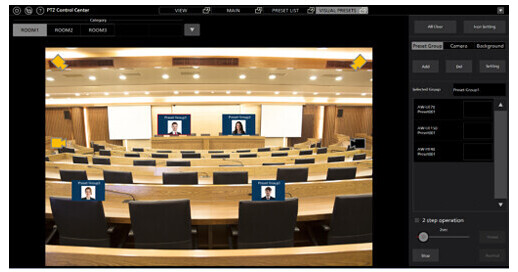
The software adds onto freely downloadable PTZ Control Center and allows you to group multiple PTZ cameras, then assign presets to each camera. You can then create screenshots or add photos to visually represent the position, such as a person or set piece. The icons are then added to the overall view and you can then select the icons to go to that preset position. It also allows you to create simple diagrams with on-screen icons to set up your space and create multiple room setups.
This software license is delivered electronically by email. Read below for a list of compatible PTZ cameras.
Ask Our Experts800-606-6969
Hello, Log InAccount & Orders
Video Chat with a Pro Video Expert - Live
Key Features
- Software Key for PTZ Cameras
- Visually Switch Between Cameras/Presets
- GUI Supports Multiple PTZ Cameras
- Create Custom Preset Photo Icons
Add quick and easy visual control to your PTZ multi-camera production with this Visual Presets software key from Panasonic. The software add-on is designed to install on your Windows control computer or server and allows you to group PTZ cameras and preset positions and then choose them visually using still photos in the GUI control panel.
More DetailsDigital
Electronic Download
This item cannot be returned.
Protect Your Gear
Add a protection plan from $89.99
See Options
Panasonic AW-SF300Z Overview
Supported Panasonic Camera Models
AW-UE150W/K
AW-UE100W/K
AW-HN130W/K, AW-HE130W/K (discontinued model)
AW-UN70W/K, AW-UE70W/K
AW-HE42W/K
AW-HN40HW/HK, AW-HE40SW/SK, AW-HE40HW/HK
AW-HN38HW/HK, AW-HE38HW/HK
AW-UE4WG/KG
Key Features
GUI screens can be set for each shooting location and Preset Groups with registered subject positions can be managed.
All cameras registered in a group can be directed toward the subject with a single press of the Preset Group icon on the GUI screen.
Camera positions are displayed as icons on the GUI screen. The icons of cameras in the currently selected Preset Group are highlighted, enabling the user to see which cameras are shooting at a glance.
Operation using a mouse and GUI screen provides ease of use for users who are unfamiliar with the operation of video equipment.
EasyIP Setup Tool Plus is included with this product, no separate installation is required.
Panasonic AW-SF300Z Reviews
See any errors on this page?