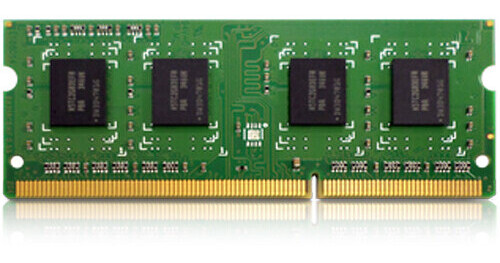
QNAP 8GB DDR4 2666 MHz ECC SO-DIMM Memory Module

BH #QNR8GDR42666 • MFR #RAM-8GDR4ECT0-SO-2666
Print
QNAP 8GB DDR4 2666 MHz ECC SO-DIMM Memory Module
Key Features
  • 8GB (1 x 8GB) Capacity
  • 2666 MHz Clock Speed
  • PC4-21300
  • 260-Pin SO-DIMM
Enhance the performance of your compatible QNAP device with the 8GB DDR4 2666 MHz ECC SO-DIMM Memory Module. This 8GB DDR4 ECC SO-DIMM module is designed with an integrated error correction code (ECC) that automatically detects and corrects memory errors, delivering enhanced system stability and reliable data transfers. It installs into an available 260-pin SO-DIMM slot and performs at up to 2666 MHz (PC4-21300).
More Details
Special Order
No Store Display
This item is not available for purchase online. Please call us at 800.606.6969
Free Standard Shipping
Ask an Expert
800-606-6969

QNAP DDR4 2666 MHz SO-DIMM Overview

Enhance the performance of your compatible QNAP device with the 8GB DDR4 2666 MHz ECC SO-DIMM Memory Module. This 8GB DDR4 ECC SO-DIMM module is designed with an integrated error correction code (ECC) that automatically detects and corrects memory errors, delivering enhanced system stability and reliable data transfers. It installs into an available 260-pin SO-DIMM slot and performs at up to 2666 MHz (PC4-21300).

UPC: 885022021222

QNAP DDR4 2666 MHz SO-DIMM Specs

Key Specs
Compatibility
QNAP: NAS
Capacity
8 GB
Memory Type
DDR4
Compatibility
QNAP: NAS
Capacity
8 GB
Maximum Speed
Up to PC4-21300 (2666 MT/s)
Memory Type
DDR4
DIMM Type
260-Pin SO-DIMM
Error Correction (ECC)
ECC

QNAP DDR4 2666 MHz SO-DIMM Reviews

See any errors on this page?

Must buy this memory in pairs?

Must buy this memory in pairs?
Asked by: Francis
No, you can buy and use in singles
Answered by: jaime
Date published: 2020-07-26

Must buy in pairs?

Must buy in pairs?
Asked by: Francis
You don't have to buy in pairs but if you wanna upgrade it to 32 GB then better to buy in pairs
Answered by: ilich
Date published: 2020-07-09

Clarification: When adding or replacing memory in ...

Clarification: When adding or replacing memory in the QNAP TVS-872XT must both memory slots be filled? And must they both be the same size, and therefore I would need to buy 2 of these 16 GB memory modules to max it out?
Asked by: Francis
RAM should be installed in pairs as the device can access memory more efficiently when working in parallel. In order to max out the RAM, you would replace the two 8GB modules with two 16GB modules.
Answered by: Christopher
Date published: 2020-06-15

I have Qnap TVS-H474. It comes with 8gig of ram. ...

I have Qnap TVS-H474. It comes with 8gig of ram. Can I add this board in the second memory slot for a total of 24 gigs? thanks!
Asked by: Robert
Yes, you can add this QNAP 16GB DDR4 2666 MHz SO-DIMM Memory Module to the QNAP TVS-h474 for a total of 24GB of RAM.
Answered by: Kenneth C
Date published: 2024-06-05

I purchased two of these, just wondering if ...

I purchased two of these, just wondering if upgrading the ram from 16 GB total to 32 GB total with two of these cards, what processes will it speed up? What will the added Ram benefit? Faster encoding speeds if all other items are ticked for processor, 10 Gbe ethernet, cat6, i7, and 10 Gbe switch? Just trying to make this work faster with two computers using media on it.
Asked by: Rob
For this type of question, a phone consultation with our Pro Video Editing Department would be best. Please call 800-606-6969. Thank you.
Answered by: Daniel
Date published: 2020-06-24
  • y_2026, m_7, d_17, h_8CST
  • bvseo_bulk, prod_bvqa, vn_bulk_3.0.48
  • cp_1, bvpage1
  • co_hasquestionsanswers, tq_5
  • loc_en_US, sid_1643404, prod, sort_[SortEntry(order=HAS_STAFF_ANSWERS, direction=DESCENDING)]
  • clientName_bhphotovideo
Whatever You Need, We've Got It