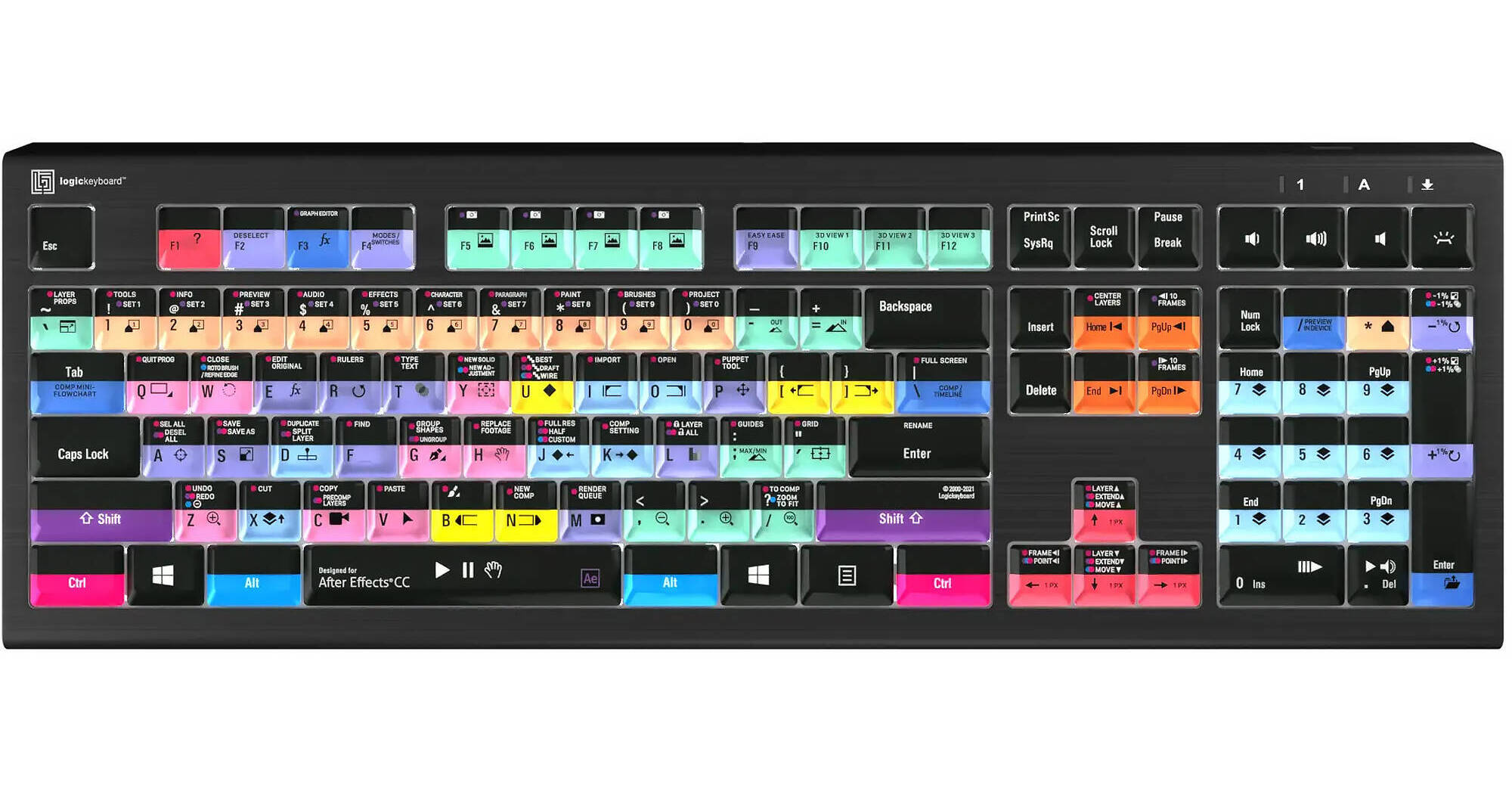
Logickeyboard ASTRA 2 Backlit Keyboard for Adobe After Effects CC (Windows, US English)

BH #LOAECCA2PCUS • MFR #LKB-AECC-A2PC-US
Print
Logickeyboard ASTRA 2 Backlit Keyboard for Adobe After Effects CC (Windows, US English)
Key Features
  • For Adobe After Effects CC
  • Wired USB Connection
  • Backlit Scissor Switch Keys
  • Works with Windows XP or Later
The Logickeyboard ASTRA 2 Backlit Keyboard for Adobe After Effects CC features an elegant, black keyboard with low-profile scissor-switch keys for a light, yet responsive feel. With five selectable light levels, the ASTRA 2 is the perfect choice for any lighting conditions. The keyboard features a USB 3.0 hub to enable you to connect a mouse, phone, contour shuttle, or a USB-dongle.
More Details
Special Order
Expected availability: 7-14 Business Days
No Store Display
$149.90
Free Standard Shipping
Protect Your Gear
Add a protection plan from $13.99
Ask an Expert
800-891-3971

Logickeyboard Astra 2 Overview

The Logickeyboard ASTRA 2 Backlit Keyboard for Adobe After Effects CC features an elegant, black keyboard with low-profile scissor-switch keys for a light, yet responsive feel. With five selectable light levels, the ASTRA 2 is the perfect choice for any lighting conditions. The keyboard features a USB 3.0 hub to enable you to connect a mouse, phone, contour shuttle, or a USB-dongle.

The ASTRA 2 keyboard is developed with two USB cables; a gray one for the keyboard itself, and a black one for the USB hub to avoid problems with installations that require a KVM extender. In addition, the ASTRA 2 has a full-sized F-row and multimedia keys to provide full control and effectiveness.

To power the keyboard, you need to plug in the gray USB connector. If you need to activate the USB hub on the back of the keyboard, plug in the black USB connector. The Adobe After Effects Logickeyboard also features all the regular letters, numbers, and symbol labelling that you will find on a conventional keyboard, it can simply be used as a substitute for it. The keyboard is easy to plug in and requires no software installation.

Logickeyboard Astra 2 Specs

Key Specs
LED Illumination
Yes: White
Wrist Rest
No
Full-Functionality OS Support
Windows
Keyboard
Mechanical Switch
No
Maximum Key Rollover
No
Dedicated Multimedia Keys
No
LED Illumination
Yes: White
Wrist Rest
No
Connectivity
Connection
Wired: USB-A Cable (Non-Removable)
Input/Output
1x USB-A
Full-Functionality OS Support
Windows
General
Color
Black
Dimensions
17.6 x 5.9 x 1.2" / 446 x 150 x 30 mm
Weight
2.1 lb / 950 g
Packaging Info
Package Weight
2.655 lb
Box Dimensions (LxWxH)
18.7 x 7.5 x 1.4"

Logickeyboard Astra 2 Reviews

Solid Keyboard

By Michael
Rated 5 out of 5
Date: 2026-07-15

I've been editing with Avid Media Composer (MC) for over 30 years. I've gone through multiple keyboards, including the AVID and Macally keyboards over the years. This is a dedicated MC keyboard, and there's room at the top, above the keys, to add "macro" info. I had an earlier version where the "space" key eventually failed. These scissor keys seem more durable, but I did add the Allstate "drops and spills" coverage due to the heavy use. I recommend it.

Replacing an older one

By Gail
Rated 5 out of 5
Date: 2025-12-12

I love these keyboards. This is a newer version of one I already had. The silver is sleek.

See any errors on this page?

Is there a key to quickly add nodes in Davinci ...

Is there a key to quickly add nodes in Davinci Resolve?
Asked by: David
No, the Logickeyboard ASTRA 2 Backlit Keyboard for DaVinci Resolve 17 (Mac, US English) BH #LOBRESBA2MUS does not have a specific key to add nodes but you can use keyboard shortcuts to add nodes.
Answered by: Miguel M
Date published: 2024-09-09

Does the caps lock button have an additional ...

Does the caps lock button have an additional light on the key cap that illuminates when locked?
Asked by: Stanton
The Logickeyboard ASTRA 2 Backlit Keyboard for DaVinci Resolve 18 and 19 (Mac, US English), B&H # LOBRESBA2MUS, has a caps lock LED indicator on the top right of the keyboard. It does not have an LED built into the keycap.
Answered by: Miguel M
Date published: 2024-09-30

Do these keys also map correctly to Resolve 18?

Do these keys also map correctly to Resolve 18?
Asked by: Parke
Yes, it will work with Resolve 18 too :)
Answered by: Logickeyboard
Date published: 2023-06-09

Is the astra 2 for avid MC also compatible with ...

Is the astra 2 for avid MC also compatible with premiere? Can it be made compatible with premiere shortcut key mapping?
Asked by: Antony
Technically, the Logickeyboard ASTRA 2 Avid Media Composer Keyboard for macOS (Silver) could be used with Premiere and there are keyboard mapping options in Premiere which could approximately match the AVID commands, though it may not be quite exact. This may be useful if you need to switch between both programs on the same computer.
Answered by: ericsc
Date published: 2023-04-16

I use Adobe Photoshop and Lightroom CC with the ...

I use Adobe Photoshop and Lightroom CC with the MX Master mouse all the time, is this compatible with these programs?
Asked by: Hart
No, unfortunately this keyboard is designed for Adobe premier pro, however Logickeyboard does carry versions for Adobe Photoshop AND Lightroom CC that we have on our website.
Answered by: Luis A
Date published: 2022-02-07

Does this keyboard have a USB-C connection?

Does this keyboard have a USB-C connection?
Asked by: Jared
No, the Logickeyboard ASTRA 2 Large-Print White-on-Black Wired Keyboard (Mac, US English) has a wired USB-A connection.
Answered by: dariusb
Date published: 2022-02-13
  • y_2026, m_7, d_27, h_5CST
  • bvseo_bulk, prod_bvqa, vn_bulk_3.0.48
  • cp_1, bvpage1
  • co_hasquestionsanswers, tq_6
  • loc_en_US, sid_1644094, prod, sort_[SortEntry(order=HAS_STAFF_ANSWERS, direction=DESCENDING)]
  • clientName_bhphotovideo
Whatever You Need, We've Got It