Video Chat with a Pro Video Expert - Live

Lilliput 31.5" 12G-SDI/HDMI Broadcast Studio Monitor (V-Mount)

BH #LIQ31VBP • MFR #Q31-VBP
Print
Lilliput 31.5" 12G-SDI/HDMI Broadcast Studio Monitor (V-Mount)
Key Features
  • 31.5" 3840 x 2160 Resolution Monitor
  • Supports up to DCI 4K Input
  • Supports Accurate Color Calibration
  • HDR Support, Load Custom 3D LUTs
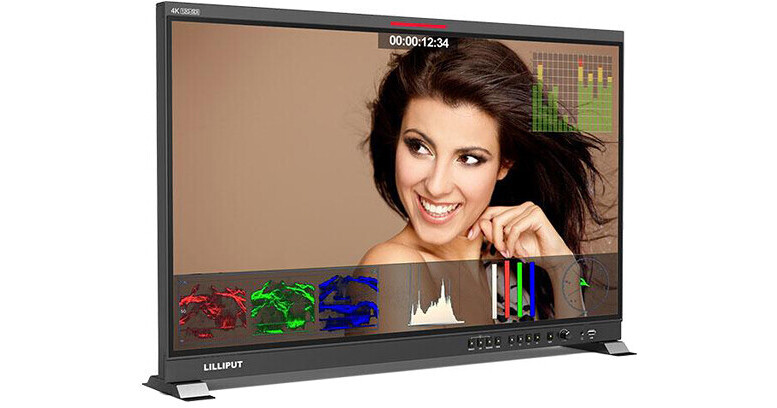
The Lilliput 31.5" 12G-SDI/HDMI Broadcast Studio Monitor is a 31.5" native UHD 4K monitor with a V-mount battery plate, useful for both studio and field situations. Supporting up to DCI 4K (4096 x 2160) and UHD 4K (3840 x 2160), the monitor features one HDMI 2.0 input and four SDI inputs (two 12G, two 3G), allowing for single-, dual-, and quad-link SDI input. The monitor also features loop-through HDMI and SDI outputs to pass the signal downstream. For critical color work, the monitor supports the PRO/LTE version of LightSpace CMS (not included).
More Details
Special Order
Expected availability: 7-14 Business Days
No Store Display
This item cannot be canceled or returned.
Free Standard Shipping
Protect Your Gear
Add a protection plan from $139.99
Ask an Expert
800-606-6969

Lilliput Q31 Overview

The Lilliput 31.5" 12G-SDI/HDMI Broadcast Studio Monitor is a 31.5" native UHD 4K monitor with a V-mount battery plate, useful for both studio and field situations. Supporting up to DCI 4K (4096 x 2160) and UHD 4K (3840 x 2160), the monitor features one HDMI 2.0 input and four SDI inputs (two 12G, two 3G), allowing for single-, dual-, and quad-link SDI input. The monitor also features loop-through HDMI and SDI outputs to pass the signal downstream. For critical color work, the monitor supports the PRO/LTE version of LightSpace CMS (not included).

Input video signals are automatically scaled to fit the entire 3840 x 2160 screen. Audio embedded in the HDMI and SDI signals play through the monitor's speakers, and a 3.5mm headphone jack allows you to monitor without outside noise. The monitor also supports adjustable HDR color spaces, including HLG, and you can select from 17 built-in 3D-LUTs or import six of your own. In the studio, the included power supply allows you to power the monitor from a mains outlet via the 4-pin XLR port, or you can power it from a V-mount battery using the included battery plate. The monitor comes with a mounting bracket for desktop use and a VESA mounting plate for mounting in the field.

Features
Monitoring Tools
  • Peaking
  • Check field
  • Image rotation/flip
  • Overscan
  • Underscan
  • Image freeze
  • Pixel-to-pixel
  • False color
  • Exposure 
  • Histogram 
  • Timecode (SDI-only)
  • Aspect ratio selection
  • Screen markers
  • Color space
  • HDR
  • Color temperature adjustment
HDR and 3D LUTs
When HDR is activated, the display reproduces a greater dynamic range of luminosity, allowing for colors and lighter and darker details to be displayed more clearly. You can use preset Logs or load your own custom LUTs in .cube format via the front panel USB port.
Supported Log Formats
SLog2. SLog3, CLog, NLog, ARRILiog, JLog, and User.
Supported HDR
ST2084 300/1000/10000/HLG.
Audio
The monitor can display the Lissajous shape, most useful when used in audio post-production work for detecting phase variance.
Assignable Buttons
Using the four assignable buttons on the front panel, you can quickly turn any four essential monitoring tools on and off without venturing into the monitor's menu system.
Remote Control
The monitor supports RS-422 via discrete in and out RJ45 connectors. This allows you to control the monitor from computer applications, as well as link multiple monitors together.
Calibration
The monitor supports color calibration using an optional PRO/LTE version of LightSpace CMS, to ensure your monitor is displaying your image accurately.
Fiber
An integrated slot accepts an optional SFP+ module, should you require an SFP+ fiber connection.

Lilliput Q31 Specs

Key Specs
Display Size
31.5" / 80.0 cm
Native Resolution
3840 x 2160
Touchscreen
No
HDR Support
Yes: Hybrid Log Gamma
Media/Memory Card Slot
No
Video Format
HDMI
DCI 4K: 60/50/30/25/24
UHD 4K: 60/50/30/25/24
1080p: 60/50/30/25/24
1080i: 60/50
720p: 60/50
SDI
DCI 4K: 60/50/30/25/24
UHD 4K: 60/50/30/25/24
1080p: 60/50/30/25/24
1080PsF: 30/25/24
1080i: 60/50
720p: 60/50
Battery
1x V-Mount on Fixed Plate
Power Consumption
65 W
Display
Panel Type
LCD
Display Size
31.5" / 80.0 cm
Native Resolution
3840 x 2160
Aspect Ratio
16:9
Viewing Angle
Horizontal: 178°
Vertical: 178°
Touchscreen
No
Maximum Brightness
350 nits / cd/m2
Contrast Ratio
1300:1
HDR Support
Yes: Hybrid Log Gamma
LUT Support
Yes
Image Controls
Blue Only, Check Field, Color Temperature Selection, False Color, Focus Peaking, Green Only, H/V Delay, Histogram, Pixel-to-Pixel Zoom, Red Only, Scaling, Screen Markers, Screen Split - Half, Screen Split - Quarter, Underscan, Vectorscope, Waveform, Zebra
Inputs/Outputs
Video I/O
1x HDMI 2.0 Input
2x BNC (12G-SDI) Input
2x BNC (3G-SDI) Input
1x HDMI 2.0 Output
2x BNC (12G-SDI) Output
2x BNC (3G-SDI) Output
Embedded Audio
HDMI: 8-Channel
SDI: 16-Channel
Audio I/O
1x 1/8" / 3.5 mm Headphone Output
Built-In Speaker
Stereo
Power I/O
1x XLR 4-Pin (24 VDC) Input
Other I/O
1x RJ45 (GPI) Input
1x RJ45 (LAN) Input
1x RJ45 (RS-422) Input
1x RJ45 (RS-422) Output
1x USB-A 2.0 Input
Media/Memory Card Slot
No
Wireless
Wi-Fi
No
Bluetooth
No
Mobile App Compatible
No
Format Support
Video Format
HDMI
DCI 4K: 60/50/30/25/24
UHD 4K: 60/50/30/25/24
1080p: 60/50/30/25/24
1080i: 60/50
720p: 60/50

SDI
DCI 4K: 60/50/30/25/24
UHD 4K: 60/50/30/25/24
1080p: 60/50/30/25/24
1080PsF: 30/25/24
1080i: 60/50
720p: 60/50
Power
Input Power
12 to 24 VDC at 1.2 A
Battery
1x V-Mount on Fixed Plate
Power Consumption
65 W
General
Operating Conditions
32 to 104°F / 0 to 40°C
Storage Conditions
32 to 104°F / 0 to 40°C
Material of Construction
Metal
Dimensions
28.2 x 17.9 x 1.9" / 717.5 x 454.7 x 47.4 mm
Weight
26.46 lb / 12.00 kg
Packaging Info
Package Weight
34.4 lb
Box Dimensions (LxWxH)
23.1 x 6.4 x 1"

Lilliput Q31 Reviews

See any errors on this page?

DOES THIS HAVE A "BLUE ONLY MODE?" IF NOT, WHAT ...

DOES THIS HAVE A "BLUE ONLY MODE?" IF NOT, WHAT IS THE ALTERNATIVE TO PROPERLY CALIBRATE? THANKS!
Asked by: Christopher
No blue mode available. The unit does offer a calibration mode to Rec.709 with optional calibration tool such as the ColorChecker Display Pro BH #CACCDIS3 • MFR #CCDIS3 https://bhpho.to/3NYgENe / Connect the device with the PC via HDMI interface / It will generate a document “Rec709.cube” after calibrated, then copy this document to a USB flash disk. / Insert the USB flash disk to the device and save the document. This document “Rec709.cube”will be found under Color Space Option and the apply settings. / Then good to go.
Answered by: hectorm
Date published: 2022-06-16

Can you do a 2up or 4up split screen?

Can you do a 2up or 4up split screen?
Asked by: David
The Lilliput Q31 Monitor only displays as a quad split or full screen view.
Answered by: Chris H
Date published: 2023-09-19
  • y_2026, m_8, d_7, h_10CST
  • bvseo_bulk, prod_bvqa, vn_bulk_3.0.48
  • cp_1, bvpage1
  • co_hasquestionsanswers, tq_2
  • loc_en_US, sid_1645112, prod, sort_[SortEntry(order=HAS_STAFF_ANSWERS, direction=DESCENDING)]
  • clientName_bhphotovideo
Whatever You Need, We've Got It