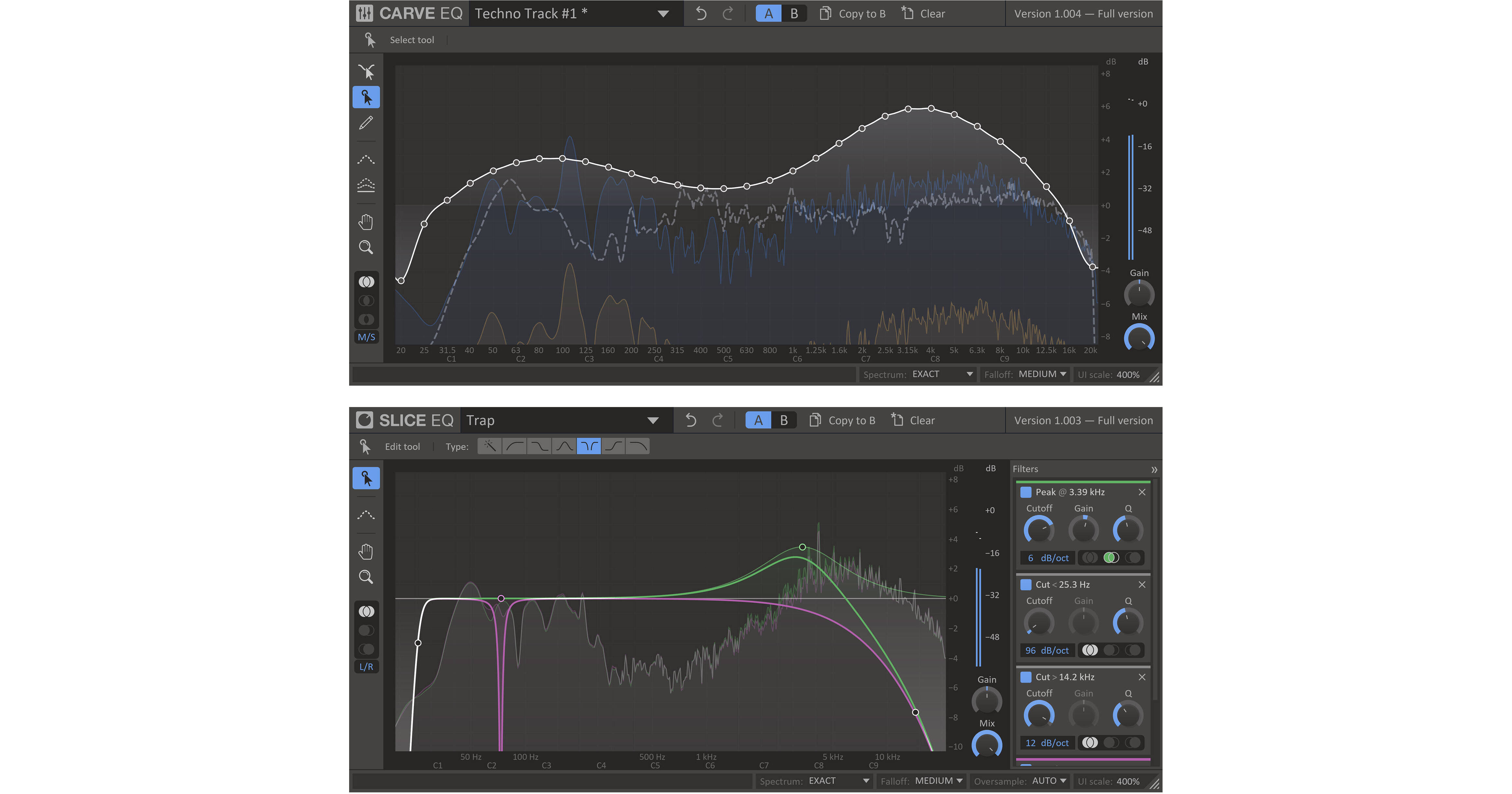


The Kilohearts Equalizers Plug-In Software Bundle includes the Slice parametric EQ and the Carve 31-band graphic EQ, both with advanced filtering and precise adjustment capabilities for VST, AU, and AAX platforms.
The Carve EQ Plug-In Software from Kilohearts gives you a 31-band graphic EQ with advanced filtering and precise adjustment capabilities in an easy-to-use plug-in for VST, AU, and AAX platforms. The software offers intuitive Point Select and Sculpt tools that let you easily visualize the frequencies being affected and the amount of boost or reduction being applied.
Helpful comparison features along with a Match function and a library of EQ profiles are provided to assist you in getting professional-sounding results quickly. The Carve EQ plug-in can be used on a vast range of audio material, allows for mid-side EQing, and is compatible with 64-bit DAW software and the Kilohearts Snapin ecosystem, which offers advanced features for hosting multiple plug-ins.
- With a recognizeable workspace layout, the Carve EQ's user interface makes sure you will quickly find your way to all the features.
- The Point Selection tool lets you control single bands perfectly with clearly labeled axes. You can also select multiple bands at once and make exact changes where you need them.
- Carve EQ excels at letting you smoothly work with sections of the spectrum through the awesome Sculpt tool that adds a peak that you can drag around and modify easily.
- Comparing your work by using others' sounds or songs as a reference has never been easier. Choose from the factory profiles, or create your own from any WAV file. You can also use a sidechain channel as a reference.
- When EQing, you can sometimes start having problems determining if your are actually making things better or worse. Use the A/B Comparison tool to make your way forward.
- Match EQ lets you match settings from a library of EQ profiles. Do you like that special Taylor Swift sound, or the whole Surrender album by The Chemical Brothers? Simply steal the mastering of any audio and let Carve EQ apply it to your song in seconds.
- Carve supports stereo content and mid/side adjustments, allowing you to EQ only the mid portion of the sound or only side content if your prefer.
- The workspace is freely resizable and you can set the UI scale to match your preference—this can be very handy at times.
- Carve EQ can be used as a traditional plug-in but is also compatible with the Kilohearts Snapin series including the Snap Heap, Multipass, and Phase Plant hosts
- These hosts make it easy to combine multiple Snapin plug-ins to create serial and parallel effect chains for powerful audio processing and modulation capabilities
- Snap Heap is available as a free download
- Multipass is available for purchase and offers a more advanced feature set including frequency-dependent processing
- Phase Plant is a modular-style synthesizer engine that can host Snapin plug-ins
Slice EQ Plug-In Software from Kilohearts is a parametric EQ plug-in with advanced filtering and precise adjustment capabilities for the VST, AU, and AAX platforms. The software offers both point-select and graphical knob-based editing styles along with a spectrum analyzer, so you can easily visualize the frequencies being affected and the amount of boost or reduction being applied.
Helpful comparison features along with a library of EQ profiles are provided to assist you in getting professional-sounding results quickly. The Slice EQ plug-in can be used on a vast range of audio material, allows for mid-side EQing, and is compatible with 64-bit DAW software and the Kilohearts Snapin plug-in ecosystem.
- Slice EQ is a truly modern parametric equalizer, it cuts or enhances frequencies with surgical precision using razor sharp digital filters up to 96 db/Oct.
- With a recognizeable workspace layout the Slice EQ's user interface makes sure you will quickly find your way to all the features.
- By default Slice EQ will help you out with a context aware filter creation tool. Depending on where on the filter curve you click, you can create the most common filter type for that frequency range.
- If you need a specific filter the Edit Tool can be set to create any of six different filter types that will cover your every need.
- Comparing your work by using others sounds or songs as a reference has never been easier. Choose from the factory profiles or create your own. You can also use a sidechain channel as a reference.
- When EQing you can sometimes start having problems determining if your are actually making things better or worse; use the A/B Comparison tool to make your way forward.
- Zoom and pan the workspace anyway you like to get the best view of what you are doing.
- You can also zoom and pan with the mouse wheel and click and drag on the axis labels.
- Slice supports stereo content and mid/side adjustments, allowing you to EQ only the mid portion of the sound or only the side content if your prefer.
- The workspace is freely resizable and you can set the UI scale to match your preference—this can be very handy at times.
- Slice EQ can be used as a traditional plug-in but is also compatible with the Kilohearts Snapin series including the Snap Heap, Multipass, and Phase Plant hosts.
- These hosts make it easy to combine multiple Snapin plug-ins to create serial and parallel effect chains for powerful audio processing and modulation capabilities.
- Snap Heap is available as a free download.
- Multipass is available for purchase and offers a more advanced feature set including frequency-dependent processing.
- Phase Plant is a modular-style synthesis engine that can also host Snapin plug-ins.