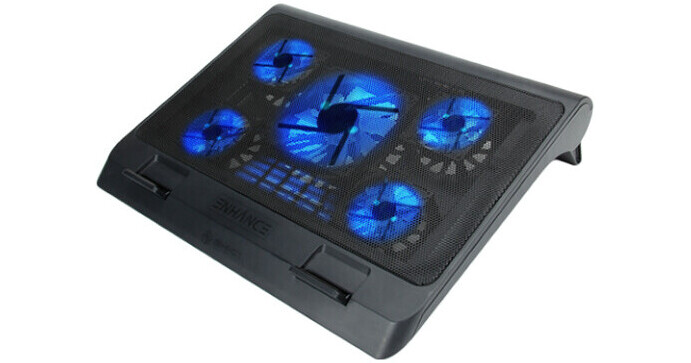
Enhance GX-C1 Laptop Cooling Stand (Blue LED)

BH #ENGXC10100BK • MFR #ENGXC10100BKEW
Print
Enhance GX-C1 Laptop Cooling Stand (Blue LED)
Key Features
  • 5 x Blue LED Fans
  • 2 x USB-A Ports
  • Three Adjustable Height Settings
  • Fan & LED Control Dial
Keep your laptop in peak performance with the GX-C1 Laptop Cooling Stand from Enhance. The stand houses five ultra-quiet blue LED fans to manage thermals during long gaming sessions and its metal mesh surface helps further dissipate heat from the bottom of your laptop. The built-in radial dial can be used to easily adjust the fan speed and LED light intensity. It has two USB-A 2.0 ports and supports USB pass-through, allowing the use of one port for peripheral devices, such as a mouse, keyboard, or microphone. Designed for comfort and portability, this stand has foldable legs with three adjustable height settings, a bumper plate, and the ability to accommodate laptops up to 17".
More Details
In Stock
No Store Display
Free Shipping for this Item
Protect Your Gear
Add a protection plan from $8.99
LED Color
Ask an Expert
800-606-6969

Enhance ENGXC10100BKEW Overview

Keep your laptop in peak performance with the GX-C1 Laptop Cooling Stand from Enhance. The stand houses five ultra-quiet blue LED fans to manage thermals during long gaming sessions and its metal mesh surface helps further dissipate heat from the bottom of your laptop. The built-in radial dial can be used to easily adjust the fan speed and LED light intensity. It has two USB-A 2.0 ports and supports USB pass-through, allowing the use of one port for peripheral devices, such as a mouse, keyboard, or microphone. Designed for comfort and portability, this stand has foldable legs with three adjustable height settings, a bumper plate, and the ability to accommodate laptops up to 17".

Five Quiet Blue LED Cooling Fans
Five LED fans keeps your laptop cool, with adjustable speeds up to 1264 rpm for the large 140mm fan, and four smaller 70mm fans at 2630 rpm.
USB-A Ports and Control Dial
The stand has two USB-A ports. One is used to power the stand and the other is for USB peripherals. Use the control dial to easily change the fan speed as well as the LED lighting intensity.
Portable and Ergonomic Design
This portable stand allows flexibility with three different height settings, foldable legs, and a built-in bumper plate to prevent your laptop from sliding off the stand when angled.
UPC: 637836583539

Enhance ENGXC10100BKEW Specs

Maximum Laptop Size
Laptops up to 17" / 43 cm
Number of Fans
5
Fan Speed
1264 to 2630 rpm
Material
Mesh, Metal
USB
USB-A wit Additional Port for USB 2.0 Passthrough
Color
Black with Blue LED Lighting
Dimensions (W x H x D)
15.75 x 12.75 x 2.25" / 40.01 x 32.39 x 5.72 cm
Packaging Info
Package Weight
2.935 lb
Box Dimensions (LxWxH)
17.8 x 13.4 x 3.1"

Enhance ENGXC10100BKEW Reviews

fatal flaw when used

By robert
Rated 1 out of 5
Date: 2024-02-27

as someone who has spent several thousand $ with B&H, and am a long-term customer. B&H however dropped the ball on this product, the FATAL FLAW is the 2 tabs that hold the laptop in position, the pins broke (exceptionally poor design) and failed within 3 days of usage. Had to engineer a fix. SO unless you want a product that will be workable (without home repairs) STAY AWAY FROM THIS COOLER. Respectfully submitted, Robert

Does its job, if a bit loud

By Nathan
Rated 4 out of 5
Date: 2023-09-28

This cooler brings my laptop temps down by at least 10 degrees when used for my 13-inch, which fits comfortably on top. However, one of the 2 USB ports on the unit is occupied by the power USB cable- which makes me wish there was some sort of micro or USB-C input for power. The noise at full blast is audible from about a foot or two from where I usually sit when using my laptop at my desk, but I use noise-cancelling headphones so it's not much of a big deal.

See any errors on this page?

Is there a power on/ off button?

Is there a power on/ off button?
Asked by: Cheung Wai Eric
No, the Enhance GX-C1 does not have a power button. Instead it has a dial which is used to control fan speed and light brightness.
Answered by: Calvin M
Date published: 2022-11-22

can i switch the light off?

can i switch the light off?
Asked by: Ricardo
The Enhance GX-C1 Laptop Cooling Stand (Blue LED), B&H # ENGXC10100BK, does not allow you to turn off the lights completely unless you also turn down the fans all the way down. The control dial controls both the LED brightness and the fan speed.
Answered by: Miguel M
Date published: 2023-12-12
  • y_2026, m_10, d_19, h_5CST
  • bvseo_bulk, prod_bvqa, vn_bulk_3.0.48
  • cp_1, bvpage1
  • co_hasquestionsanswers, tq_2
  • loc_en_US, sid_1652713, prod, sort_[SortEntry(order=HAS_STAFF_ANSWERS, direction=DESCENDING)]
  • clientName_bhphotovideo
Whatever You Need, We've Got It