Sony Global

Video Chat with a Pro Audio Expert - Live

ART USBDI Stereo USB D/A Converter with Isolated Outputs

BH #ARUSBDI • MFR #USBDI
Print
ART USBDI Stereo USB D/A Converter with Isolated Outputs
Key Features
  • Convert USB Audio into Analog Audio
  • 2 Balanced XLR Outputs
  • Transformer-Isolated Outputs
  • 3.5mm Headphone Jack
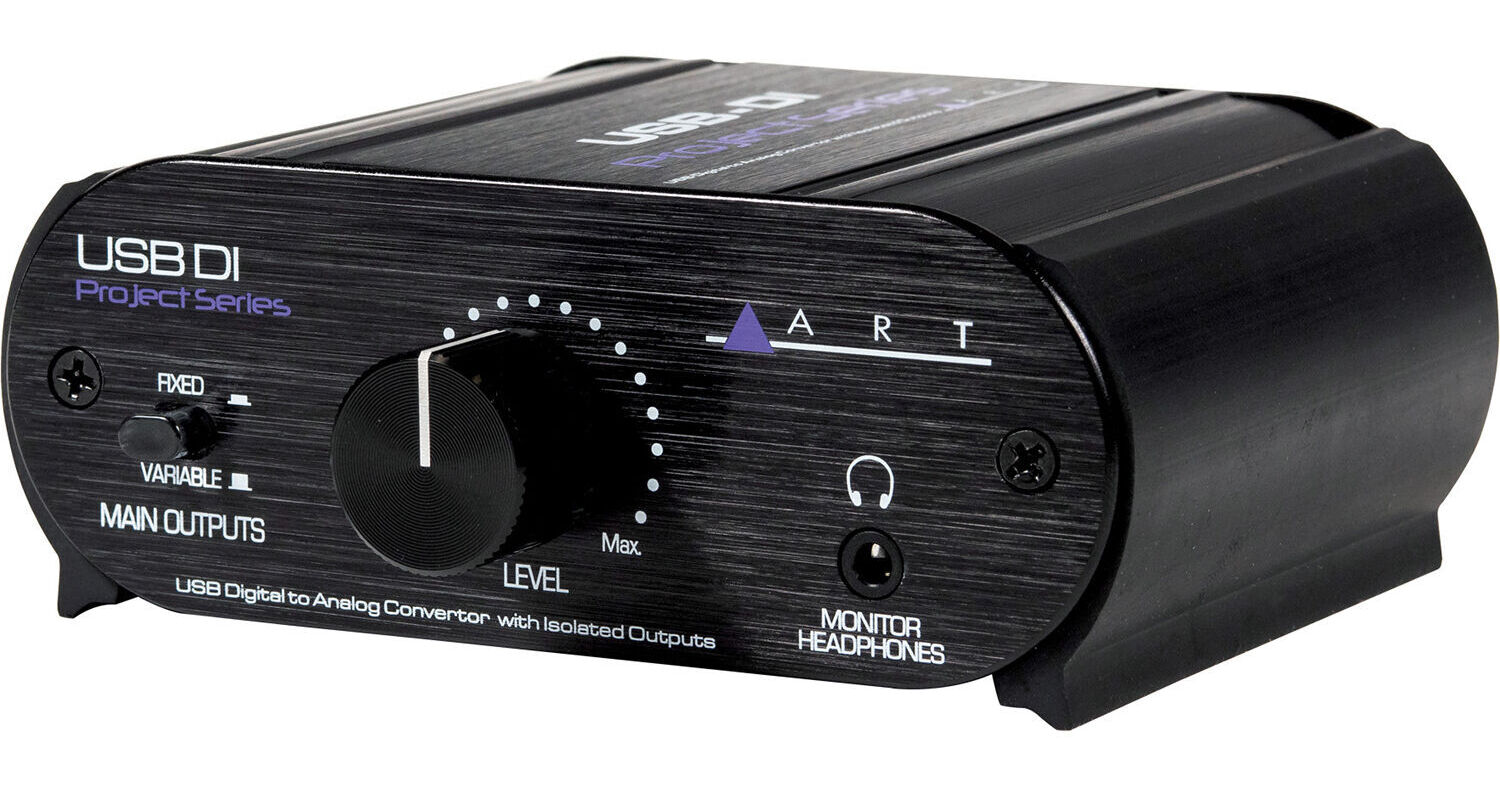
The ART USBDI simply converts the USB stereo digital audio signal from your computer into analog audio signal, enabling you to play higher-quality sound over your headphones and speakers. It can be connected to a variety of line-level input devices including mixers, receivers, and powered speakers. The two transformer-isolated balanced XLR line-level outputs are key to removing buzz, hum, and other system noise that could occur between the computer and your analog audio system. A Ground Lift switch adds another level of hum protection. The separate 3.5mm headphone output allows users to monitor the sound using a wide variety of headphone models.
More Details
In Stock
No Store Display
Free 2-Day Shipping
Protect Your Gear
Add a protection plan from $16.00
Ask an Expert
800-606-6969

ART USBDI Overview

The ART USBDI simply converts the USB stereo digital audio signal from your computer into analog audio signal, enabling you to play higher-quality sound over your headphones and speakers. It can be connected to a variety of line-level input devices including mixers, receivers, and powered speakers. The two transformer-isolated balanced XLR line-level outputs are key to removing buzz, hum, and other system noise that could occur between the computer and your analog audio system. A Ground Lift switch adds another level of hum protection. The separate 3.5mm headphone output allows users to monitor the sound using a wide variety of headphone models.

A large knob on the USBDI's front panel allows quick and precise control over the output level. The Main Outputs Fixed/Variable switch allows you to either keep the main XLR outputs at a fixed level while controlling the level of the headphones (Fixed Mode) or adjust the level of the main XLR outputs (Variable Mode). The unit is powered via USB bus power from your computer, eliminating the need for an external power source.

D/A Converter with Protection Against Hum and Buzz
  • Converts digital audio from your computer into analog audio for speakers and headphones
  • Sample rates from 32 to 48 kHz
  • Switchable transformer-isolated balanced XLR outputs eliminate hum and buzz
  • Ground lift adds another level of hum protection
  • Front-panel volume control
  • Front-panel 3.5mm headphone monitor output
  • Fixed/Variable switch decouples main output volume level from headphone output level
  • Powered via USB from computer
  • Compact, rugged all-aluminum chassis
  • Stackable chassis
UPC: 840402046820

ART USBDI Specs

General
Item Type
Standard DI
Number of Channels
2-Channel
Active/Passive
Active
Circuitry
Solid-State
Preamp
Pad
No
Ground Lift
Yes
Polarity Reverse
No
EQ & Tone Shaping
Low-Cut/High-Pass Filter
No
Connectivity
Audio I/O
2x XLR 3-Pin Balanced Output
1x 1/8" / 3.5 mm TRS Unbalanced Headphone Output
USB I/O
1x USB-B (Audio, Device Charging)
Performance
Frequency Response
20 Hz to 20 kHz ±1 dB
Total Harmonic Distortion/Noise
< 0.02% (Typical)
Power
Operating Voltage
5 V (USB Bus Power)
Physical
Dimensions
4.61 x 4.27 x 1.87" / 11.71 x 10.85 x 4.75 cm
Weight
1.89 lb / 0.86 kg
Packaging Info
Package Weight
1.265 lb
Box Dimensions (LxWxH)
9.2 x 6.2 x 3.8"

ART USBDI Reviews

Love it!

By Peter
Rated 5 out of 5
Date: 2022-12-12

I had been using a USB audio interface to feed my M-Audio monitor speakers from my Mac. I rarely used the jnput functionality (XLR inputs for mics, etc.). It then stopped working - would not stay connected. After trying everything I could think of (cables, usb ports on my computer, ...) I figured I needed a new device and looked for an output only device. I found this one. It's rock solid and delivers great sound. It does this one thing and does it well. Plus, I like that it draws power from the USB cable, so no extra power cable is required. I've not tried it with headphones, but for some, it may be a problem that there's no separate volume control for the headphone output.

See any errors on this page?
Whatever You Need, We've Got It