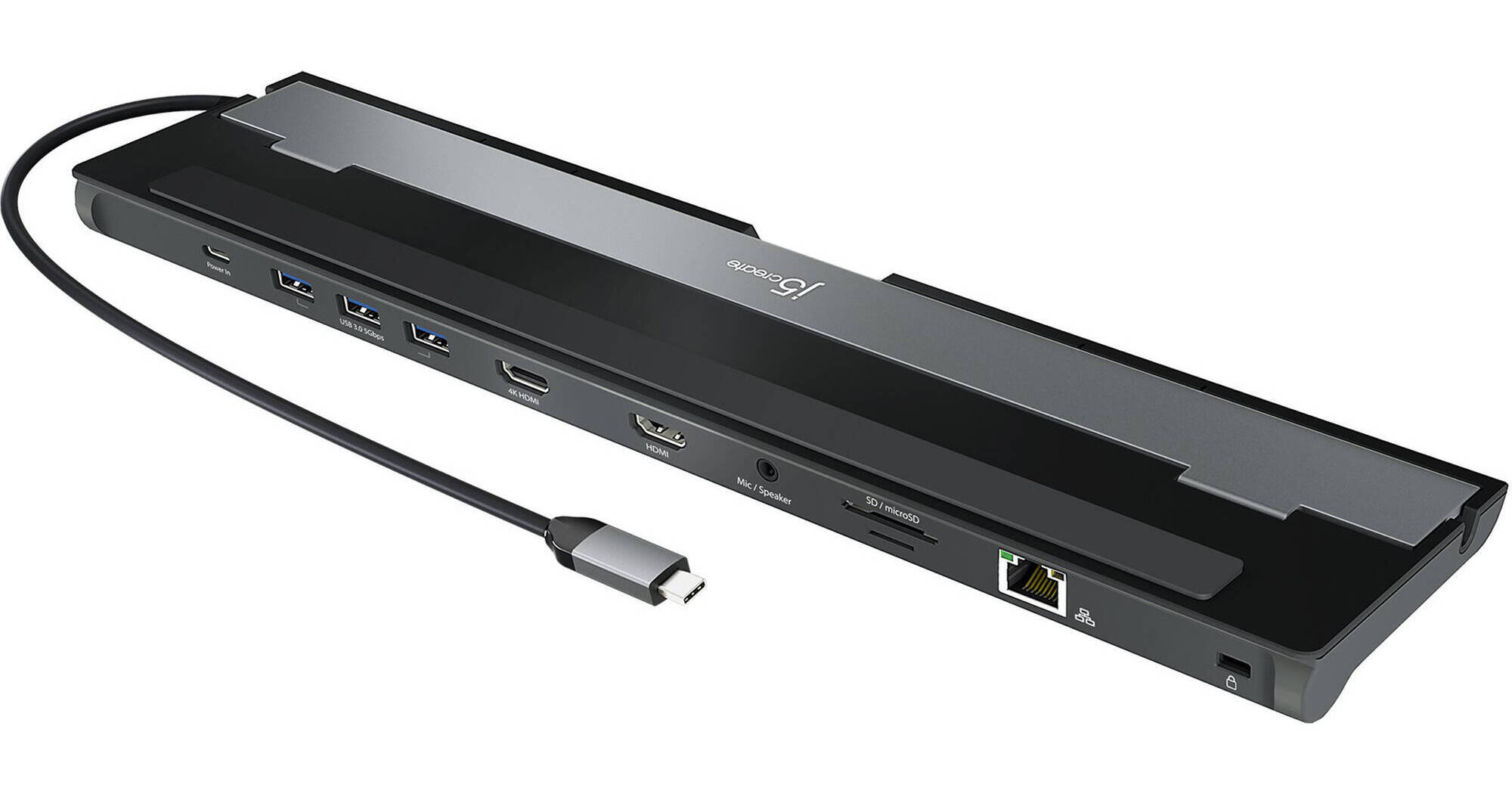
j5create USB Type-C Dual Display Docking Station

BH #J5JCD542 • MFR #JCD542
Print
j5create USB Type-C Dual Display Docking Station
Key Features
  • 1 x USB Type-C Power Delivery 3.0 Port
  • 3 x USB Type-A Gen 3.0 Ports
  • 1 x 4K and 1 x 2K HDMI Ports
  • 1 x SD & microSD Memory Card Reader
The USB Type-C Dual Display Docking Station from j5create is a laptop dock that allows you to charge multiple devices simultaneously and expand your workspace. Featuring two HDMI ports, this docking station will allow you to set up a multi-screen display to boost your productivity at home or at work. One of the HDMI ports can output resolutions up to 4K while the other HDMI port outputs up to 2K resolution. Transfer your favorite photos and videos from either microSD or SD memory cards with the onboard memory card reader/writer combination port. Additionally, with an onboard RJ45 Gigabit Ethernet port you can stay connected online at high speeds while working on any project.
More Details
In Stock
No Store Display
Free 2-Day Shipping
Protect Your Gear
Add a protection plan from $12.99
Ask an Expert
800-606-6969

j5create JCD542 Overview

The USB Type-C Dual Display Docking Station from j5create is a laptop dock that allows you to charge multiple devices simultaneously and expand your workspace. Featuring two HDMI ports, this docking station will allow you to set up a multi-screen display to boost your productivity at home or at work. One of the HDMI ports can output resolutions up to 4K while the other HDMI port outputs up to 2K resolution. Transfer your favorite photos and videos from either microSD or SD memory cards with the onboard memory card reader/writer combination port. Additionally, with an onboard RJ45 Gigabit Ethernet port you can stay connected online at high speeds while working on any project.

Anti-Theft Protection
Equipped with a security slot to protect against theft, making it perfect for use in business organizations.
Pass-Through Charging
Charge your notebook or desktop by plugging an optional USB Type-C adapter into the discrete power input port. The USB Type-C Dual Display Docking Station supports up to 100W of power delivery.
Heat-Dissipating Design
Transform your laptop into a workstation that supports your peripherals without having to worry about overheating.
UPC: 847626005602

j5create JCD542 Specs

Key Specs
USB I/O
3x USB-A 3.0 / 3.1/3.2 Gen 1
Video I/O
2x HDMI (Female)
Max Resolution
2 Displays Supported:
3840 x 2160 at 30 Hz (Single)
3840 x 2160 at 30 Hz (Dual)
Audio I/O
1x 1/8" / 3.5 mm Headphone/Microphone Combo Jack
Network I/O
1x RJ45 (10/100/1000 Mb/s)
Host Connection
USB-C 3.0 / 3.1/3.2 Gen 1 Supporting USB Power Delivery up to 100 W via Integrated Cable
USB I/O
3x USB-A 3.0 / 3.1/3.2 Gen 1
Video I/O
2x HDMI (Female)
Max Resolution
2 Displays Supported:
3840 x 2160 at 30 Hz (Single)
3840 x 2160 at 30 Hz (Dual)
Audio I/O
1x 1/8" / 3.5 mm Headphone/Microphone Combo Jack
Network I/O
1x RJ45 (10/100/1000 Mb/s)
Media Card Reader
1x microSD (Unspecified Type)
1x SD (Unspecified Type)
Host Connection
USB-C 3.0 / 3.1/3.2 Gen 1 Supporting USB Power Delivery up to 100 W via Integrated Cable
Power Source
Bus Powered or Optional AC Adapter with USB-C Connector
Wireless Charging
No
OS Compatibility
Windows / macOS
Operating Conditions
32 to 118°F / 0 to 47°C up to 85% Humidity
Enclosure Material
Aluminum
Lock Slot
Yes
Cable Length
1.48' / 45.11 cm
Dimensions
13.8 x 3.25 x 0.87" / 35.1 x 8.26 x 2.21 cm
Weight
10.79 oz / 306 g
Packaging Info
Package Weight
0.92 lb
Box Dimensions (LxWxH)
14 x 3.7 x 1.2"

j5create JCD542 Reviews

Dual display only if driver installed.

By Alexander
Rated 1 out of 5
Date: 2025-02-04

Incorrect product description. You have to install a driver (not even a single mentioning in the description) to get a second monitor working. After reading reports from many people having very sluggish performance and battery drain with the driver decided not to try that out. Product is a total garbage and waste of money. I don't need just 1-port HDMI, I can use a USB-c to HDMI cable for that. Product also lacks USB-c ports. If you have only one monitor it is fine, but you can find any other docking station for 1/3 of the price. ----- Cannot return the product because a lot o time passed by until I realized that this is not a Dual-monitor docking station.

Doesn't fully work

By Stefan
Rated 2 out of 5
Date: 2022-08-08

I bought this for use with my MacBook Pro and my Pixelbook Pro so I could quickly use one or the other but the HDMI never really worked with either on my 27 2560x1440 Asus display. It never reached full resolution (on either HDMI output). Power delivery and the USB part work fine but it didn't work as a on-plug solution.

See any errors on this page?
Whatever You Need, We've Got It