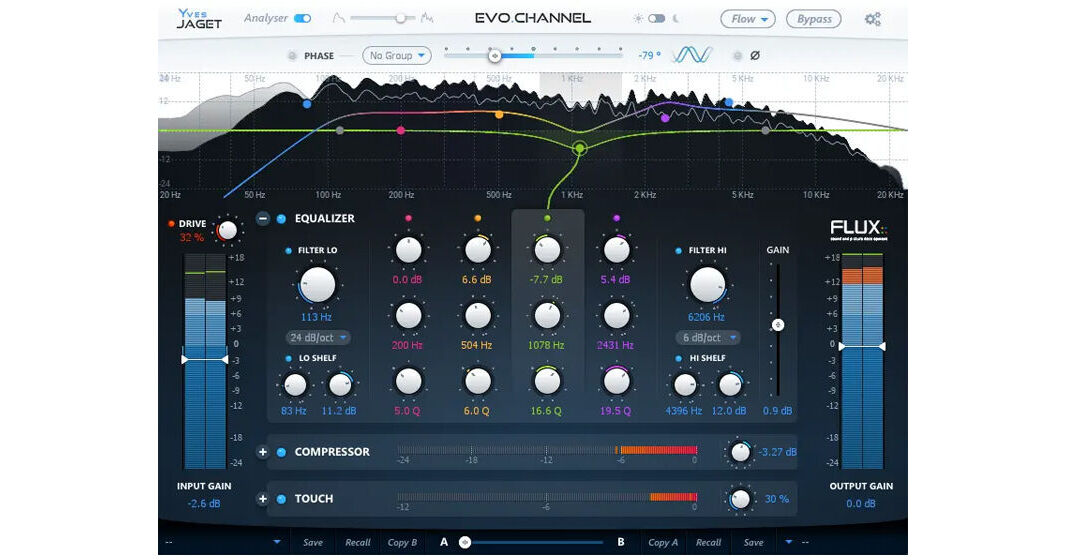
Add a flexible, analog-style channel strip to your audio tool kit with the Evo Channel software from Flux. The plug-in offers five processing modules that can be arranged in any order to suit your workflow including Gain/Drive, Phase, EQ, Compression, and Touch—a frequency-dependent transient shaper. An optimized spectrum analyzer is also on board and the software supports AAX Native, Audiosuite, AU, VST, and Waves WPAPI platforms, as well as the Dolby Atmos & Ambisonic formats for film and scoring work.
Designed to help streamline the mixing and mastering process, Evo Channel allows you to clearly visualize your audio with precise two-mode frequency analysis. Quickly add warmth via soft saturation and bring multiple microphones into focus with phase adjustment. The 4-band parametric EQ with additional shelf and filter offers detailed frequency tweaking. Nine compression modes and the sophisticated Touch transient shaper provide pin-point control over dynamics.
- A well-managed gain structure is paramount for creating an optimized signal-chain.
- A signal Drive, designed to add a soft saturation and warmth to the material, is available direct at the input Gain.
- If you're using several mics on the same sound source (a drum kit, for example), aligning the phase of the microphones can reduce smearing and bring your sounds into focus.
- Controlling the phase of microphones is universal and relevant both for studio and live use. In Evo Channel, an Arbitrary and Linear Phase Rotation throughout the spectrum is provided, designed to yeild the same results you'd get from physically moving the microphone.
- By activating the phase module on all of the tracks that were recorded at the same time and in the same room, the algorithm offers linear phase correction with zero latency
- The Evo Channel EQ is a straightforward, comprehensive 4-band parametric equalizer with additional low and high shelves and 6 to 24 dB low- and high-cut filters.
- Proprietary State Space technology in the parametric EQ and filters is tuned to preserve optimal signal-to-noise ratio independent of parameter settings.
- The graphical interactive EQ curve is layered on top of the built-in Spectrum Analyzer for hands-on editing with direct connection to the visual response.
- The spectrum analyzer originates from the Flux Pure Analyzer and has been optimized for the Evo Channel. It gives you an accurate direct view of what’s going on in the different frequency domains of your material.
- The multimode Compressor taken from Pure Compressor's engine offers 9 types of compressor choices (Start, Kick/Snare, Overhead, Drum Bus, Bass, Acoustic, Piano, Vocal, and Mix).
- Additional features include a unique auto-adaptable release control, parallel wet/dry, and easy parameter adjustment.
- Touch is multitool module defined by one of seven selected modes (Transient Boost, Transient Kill, Sustain Boost, Sustain Kill, DeEsser 1, DeEsser 2, and Expander).
- The processor is frequency-dependent allowing you to zero-in for precise dynamics adjustments.