
Video Chat with a Pro Video Expert - Live

Z CAM IPMAN Gemini

BH #ZCIPMANGEM • MFR #P0010
Print
Z CAM IPMAN Gemini
Key Features
  • HDMI to USB Converter for up to 4K Video
  • Supports Android Devices, Windows, macOS
  • Use Android Device as On-Camera Monitor
  • Camera Control for Select Cameras
Leverage the power of your Android device for monitoring and camera control of select cameras, or convert your camera's HDMI output to USB for easy ingestion into your Mac or Windows computer with the IPMAN Gemini HDMI to USB converter from Z CAM. Not just a basic HDMI to USB video converter, the IPMAN Gemini supports HDMI signals up to 4K30, as well as 1080p60 and 720p60, converting them to 1080p30 for output over a USB Type-C port. Connect the converter's output to your computer, which recognizes the device as a USB camera, for plug-and-play connectivity with no drivers to install on macOS or Windows.
More Details
In Stock
No Store Display
Free 2-Day Shipping
Protect Your Gear
Add a protection plan from $6.99
Ask an Expert
800-606-6969

Z CAM IPMAN Gemini Overview

Leverage the power of your Android device for monitoring and camera control of select cameras, or convert your camera's HDMI output to USB for easy ingestion into your Mac or Windows computer with the IPMAN Gemini HDMI to USB converter from Z CAM. Not just a basic HDMI to USB video converter, the IPMAN Gemini supports HDMI signals up to 4K30, as well as 1080p60 and 720p60, converting them to 1080p30 for output over a USB Type-C port. Connect the converter's output to your computer, which recognizes the device as a USB camera, for plug-and-play connectivity with no drivers to install on macOS or Windows.

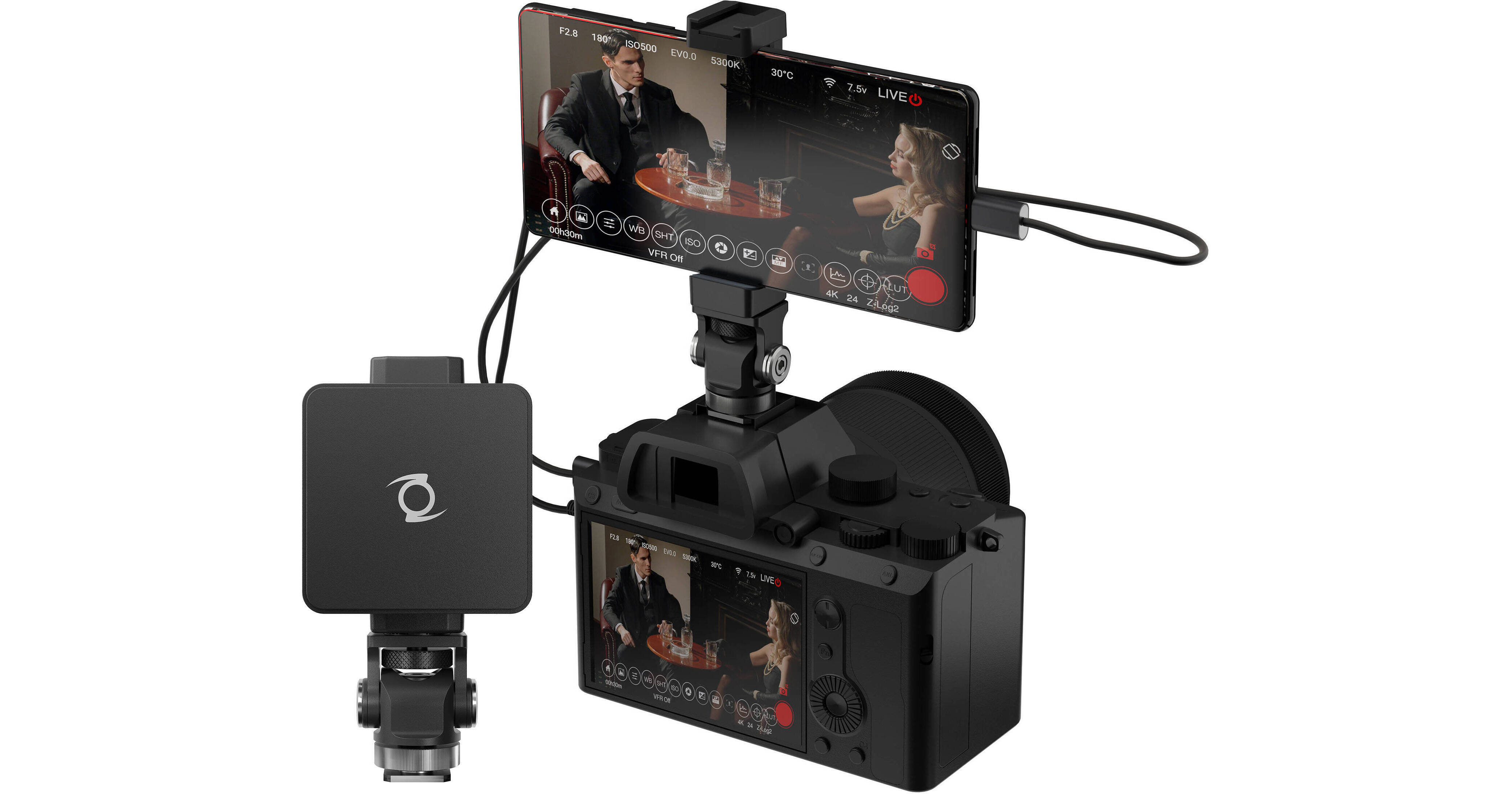
Connect the converter's USB Type-C output to an Android device to use it as a multifunction monitor including display of video and control of camera functions when connected to your camera (requires an optional cable). Output to an Android device and you can power the converter from the Android device, or use PD 3.0 charging to recharge your connected Android device. The included camera mount and smartphone holder enable attaching a smartphone to your camera's cold shoe.

Note:
Camera control via USB requires you to use a camera that supports camera USB with PTP.
USB Camera
The IPMAN Gemini is recognized as a USB camera by Windows and macOS computers without needing to install drivers on your computer to make it work.
Android Functionality
When connected to an Android device, the IPMAN Gemini is capable of the following:

  • Use the Android mobile device as a high-quality monitor display with professional features such as false color, grid line display, and magnifier feature for focus pulling.
  • Leverage your Android device's wireless connection to stream the HDMI video feed to other devices.
  • The HDMI video feed can be recorded on an Android mobile device.
  • Camera control such as record trigger, ISO, aperture, and EV adjustments is possible on select cameras when the IPMAN Gemini is connected to your camera's USB control port and an Android device; optional cables are required.
  • Only the Z CAM E2 series cameras, as well as the Panasonic GH5s and Sony Alpha series cameras, support camera control through the IPMAN Gemini at the time of its release.
UPC: 841687103024

Z CAM IPMAN Gemini Specs

Inputs/Outputs
System Connection
USB-C 3.0 / 3.1/3.2 Gen 1
Video Inputs
1x HDMI
Audio Inputs
No
Video Outputs
1x USB-C
Other I/O
1x USB-A Control
Format Support
Input Video Format
HDMI
UHD 4K at 30 fps
1080p 60 fps
720p 60 fps
Output Video Format
USB-C
1080p at 30 fps
Embedded Audio
HDMI/USB
Standards
HDR Support
No
Power
Power I/O
1x USB-C (9 VDC ) Input
General
Dimensions
2.4 x 2.4 x 0.6" / 60 x 60 x 16 mm
Weight
1.2 oz / 33.8 g
Packaging Info
Package Weight
0.615 lb
Box Dimensions (LxWxH)
5.4 x 5 x 2.4"

Z CAM IPMAN Gemini Reviews

Nice Design and Functionality

By Dave
Rated 3 out of 5
Date: 2025-02-12

I purchased this for the convenience of keeping an old phone in my kit as a quick and light alternative to a full monitor. Using it now with my ZCAM E2 s6. Previously relying on the ZCAM's wifi to phone works good on it's own, but this gives a more solid connection and no need for the camera wifi antenna. Fair price for a decent solution. Rare but at times, the latency gets poor and once, the preview screen froze and would not show the current image. I'd bet it's more my old phone.

very impressed

By nicholas
Rated 5 out of 5
Date: 2022-02-10

I have been very impressed with this product, low to no latency that i can notice. You would pay the same price for just the shoe mount and phone bracket, with it all being modular. Using it with my Sony fx6 for streaming so have yet to try the camera control features

See any errors on this page?

Will Facebook Live running on a connected Android ...

Will Facebook Live running on a connected Android phone use the IPMAN Gemini as its video source?
Asked by: Brian
The Z CAM IPMAN Gemini does not list that capability of streaming to a second app in the connected Android device.
Answered by: Dennis L
Date published: 2022-03-09

Will this device allow me to record fromthe Sony ...

Will this device allow me to record fromthe Sony A1 in manual stills mode? I want to record my viewfinder while taking stills.
Asked by: darryl
The Z CAM IPMAN Gemini simply converts HDMI output to USB. If your camera outputs from HDMI during stills it will output to the IPMAN.
Answered by: Chris H
Date published: 2023-01-09

Does it only support Sony brand? How about canon

Does it only support Sony brand? How about canon
Asked by: james
No, the Z CAM IPMAN gemini is currently supported by the Z CAM E2 series, Panasonic GH5s and Sony Alpha series are supported at the moment but can change overtime.
Answered by: hectorm
Date published: 2022-12-28

What it's power source and how long is the power ...

What it's power source and how long is the power life
Asked by: Humble
The Z CAM IPMAN Gemini (B&H# ZCIPMANGEM) uses a 5V DC power input though its USB C receptacle. The actual run time in practice will depend on the Watt hours of that power source.
Answered by: Yoni S
Date published: 2023-04-16

Will this device charge android phone at same ...

Will this device charge android phone at same time?
Asked by: Arshdeep
When using the Z CAM IPMAN Gemini you could add a USB-PD battery to charge the phone while in use.
Answered by: Chris H
Date published: 2023-06-08

Does it support touch to focus on the newer Sony ...

Does it support touch to focus on the newer Sony cameras?
Asked by: Jonathan
Is an Android App required to be installed in the phone? If so, which one would it be?
Answered by: Diego
Date published: 2022-07-29

Does the single USB-C connection between the ...

Does the single USB-C connection between the IPMAN module and the phone power the IPMAN module?
Asked by: NICHOLAS
Yes, You can power the Z CAM IPMAN Gemini converter from the Android device, or use PD 3.0 charging to recharge your connected Android device.
Answered by: Chris H
Date published: 2023-01-11

Does it support Sony A7S and A7sii?

Does it support Sony A7S and A7sii?
Asked by: SURYA
Yes, the Z CAM IPMAN Gemini will support any camera with an HDMI output at up to 4K30p.
Answered by: Nick Y
Date published: 2022-02-27
  • y_2026, m_7, d_22, h_8CST
  • bvseo_bulk, prod_bvqa, vn_bulk_3.0.48
  • cp_1, bvpage1
  • co_hasquestionsanswers, tq_8
  • loc_en_US, sid_1664658, prod, sort_[SortEntry(order=HAS_STAFF_ANSWERS, direction=DESCENDING)]
  • clientName_bhphotovideo
Whatever You Need, We've Got It