Please update your browser to take advantage of the latest technology security enhancements to ensure your B&H Shopping experience is as safe as it is enjoyable:
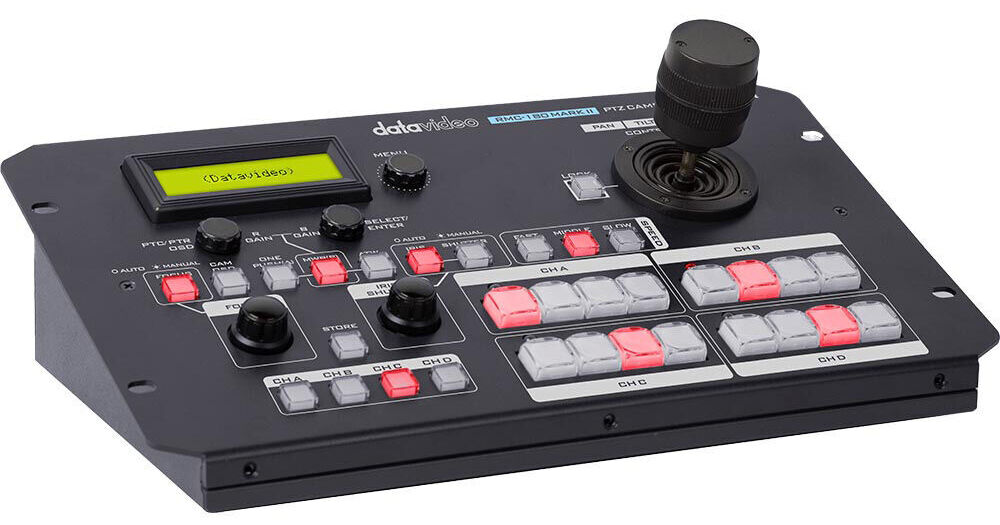
Use the Datavideo RMC-180 Mark II PTZ Camera Controller to adjust the focus, iris, zoom, and other settings of up to four PTZ cameras via RS-422 and VISCA protocols in live event or conference applications. One main joystick and various knobs and buttons allow for easy setup and control of connected cameras through four RJ45 inputs. Four shortcut keys per camera can be programmed into position presets for effects like close-ups and wide shots.
Plug-and-Play Interface
Connect your compatible PTZ camera units to the RMC-180 via four RJ45 inputs on the back panel. The ports feature RS-422 interface standards and are compatible with any RJ45 cable. VISCA protocols can also be utilized by the unit. The status of the controls can be viewed via the monochrome panel display, and firmware updates can be achieved via the USB-A input.
Multicamera Control
An ergonomic joystick and tactile button layout make for easy setup and control of up to four Datavideo PTZ cameras and robotic pan/tilt heads for any live production scenario.
Camera Position Presets
Shortcut keys on the RMC-180 control panel can save up to four preset positions for each connected camera (up to eight presets if only two cameras are connected). Program close-ups and wide shots, and recall them with the press of a button.
Manual Controls
Control each camera's focus and iris manually using the embedded dials. Other manual settings include pan, tilt, zoom, gain, and OSD functions on specific models. Commands are delivered via Cat 5/6 cable.
Speed Mode
The controller can move the PTZ cameras at slow, medium, and fast speeds. Select the speed of your camera movement with the quick option buttons to match the pacing of your event.
Tally Light Support
A DB-15 tally input port on the control unit allows for compatibility with Datavideo's switcher and camera tally indicators. Two different modes—tally user and tally input—can be implemented to suit your workflow.
Controls PTR-10 with Presets
The same four presets per camera can be used to control the PTR-10 robotic pan/tilt head. Iris and focus control extend to the mounted camera on the head.
For me the joystick is too short so the feedback is poor. The menu takes time to figure as the controller is designed for their line of PTZ more than PTR heads that I use them for. I'm not in love with this device.
Poor controls but works
By Kevin
Rated 3 out of 5
Date: 2023-11-27
The joystick is hardly a joy to use. It's to small, offers very average to poor control for such limited use. I'm sure this only works with Datavideo units. The stick is way to small. You have to be dedicated to the controls to have control. No seasaw as a back up to zoom the lens, and Datavideo offers no good way to use the presets for your camcorder without extra gear. Sure you make a preset and the pan tilt will move, but not zoom over lanc.
See any errors on this page?
When paired with the PTR heads, can you keyframe ...
When paired with the PTR heads, can you keyframe PTZ movements to be triggered with the presets or do the presets only recall saved stationary positions?
Asked by: Cole
The Datavideo RMC‐180 Mark II PTZ Camera Controller presets only recall saved stationary pan/tilt/zoom positions for PTZ or PTR heads and do not record or play back keyframed movement paths between positions.
Answered by: Nick Y
Date published: 2026-01-18
would this work with the first generation of ...
would this work with the first generation of PRT-10?
Asked by: Michael
Yes, the Datavideo RMC-180 Mark II PTZ Camera Controller is compatible with the original Datavideo PTR-10.
Answered by: Jonathan S
Date published: 2024-03-28
Is this capable of running automations? Like 10 ...
Is this capable of running automations? Like 10 seconds of Camera 1 auto fade to 10 seconds of camera 2 on a loop, etc?
Asked by: Philip
The Datavideo RMC-180 Mark II PTZ Camera Controller does have presets for camera positioning. But it does not offer automation features or fade.
Answered by: Chris H
Date published: 2023-06-22
What is the advantage of the Mark II over the ...
What is the advantage of the Mark II over the original RMC-180? How do the Mark II and HBT-11 connect (which connectors?)
Asked by: James
The Datavideo RMC-180 Mark II PTZ Camera Controller (B&H # DARMC180MKII) offers more clearly marked controls, more buttons, and also easier access to controlling the speed of actions relative to the original Datavideo RMC-180 PTZ Camera Control Unit (B&H # DARMC180). Also, two (of the maximum of four) cameras can have eight (rather than four) position presets. The Datavideo RMC-180 Mark II PTZ Camera Controller connects to the Datavideo HBT-11 via Ethernet cable to the DVIP port on the Datavideo HBT-11.