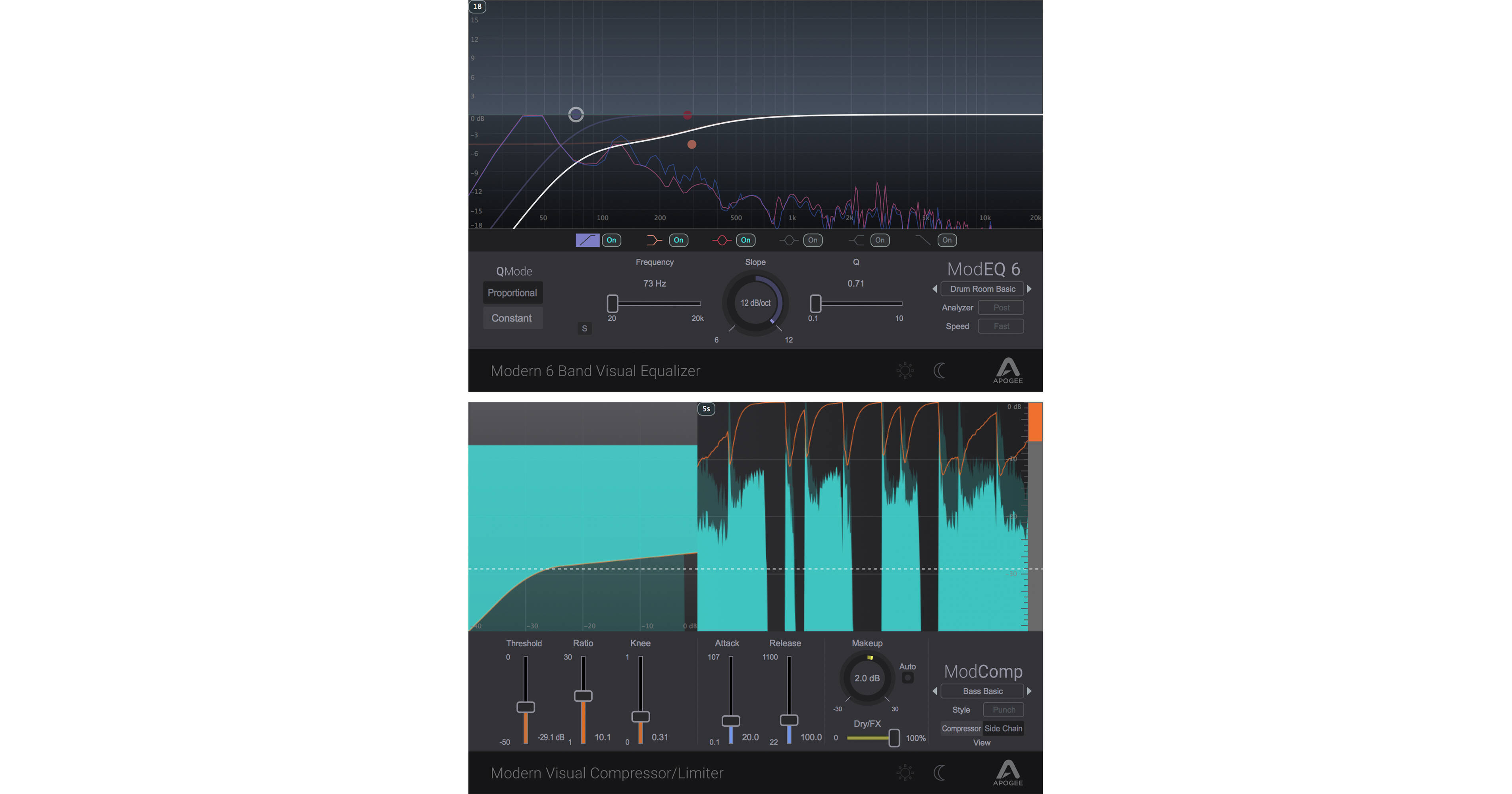


Featuring the ModEQ 6 equalizer plug-in and the ModComp compressor plug-in, the Apogee Electronics ModFX Bundle offers two powerful sound-sculpting tools at a substantial savings over purchasing them separately. Use the 6-band EQ and its spectrum analyzer to sweeten tone and hone in on problem frequencies, and insert the compressor to control dynamics, dial in parallel compression, set up sidechain-triggered pumping effects, and more. An Apogee interface is not required, but Ensemble and Element users can run the plug-ins on Apogee's FX Rack system for additional benefits.
Apogee Electronics ModEQ 6 is a 6-band parametric equalizer plug-in merging flexible controls with a simple visual user interface and multiple powering, routing, and monitoring modes. It can be powered by your computer's CPU without Apogee hardware, or via the DSP in Apogee Element Series or Ensemble Thunderbolt audio interfaces (available separately), making it ideal for producers, beatmakers, and audio engineers with mobile rigs or studio-based systems. When used with qualified Apogee hardware, it allows real-time printing through the Apogee Control Software, or low-latency monitoring while linked to a mirrored instance in your DAW.
With high- and low-pass filters, two peak/shelf bands, and two peak/notch bands, the ModEQ 6 offers versatility suitable for individual instruments, stems, and mixes. Each band features continuously adjustable frequency and bandwidth, which can set to proportional or constant Q mode. The customizable real-time spectrum analyzer and per-band solo functionality serve as powerful tools for determining tonal problems. When the ModEQ 6 is used in Apogee's FX Rack, large I/O meters and dedicated input and output faders allow you to view and manage your gain staging.
- Parametric equalizer with simple visual user interface
- Six configurable bands—two peak/shelf bands, two peak/notch bands, and high- and low-pass filters
- Spectrum analyzer shows frequency content in real time
- Per-band solo functionality
- Selectable proportional or constant-Q mode
- Runs on native CPU power or via Apogee hardware DSP in Element Series and Ensemble Thunderbolt audio interfaces
- Continuously adjustable frequency and bandwidth
- Variable slope on filters
- Variable gain on peak/shelf/notch bands
- Color-coded bands for easy identification
- Native Mode: Use Apogee FX Rack plug-ins like any standard native plug-in in your Mac-based DAW without Apogee hardware connected
- Print Mode: Apply Apogee FX directly to the Apogee hardware input—open the FX Rack in Apogee Control, apply the desired processing, then record—FX processing is printed to your DAW track
- DualPath Monitor Mode: Upon opening a native Apogee FX Rack in your DAW (and linking it to an Apogee hardware input), a parallel FX Rack is automatically opened in the low-latency monitoring path; changes made in either plug-in are instantly mirrored to maintain a consistent sound
- Large input and output meters
- Dedicated input and output faders
- Supports AAX Native, Audio Units, VST, and VST2 plug-in formats
- Compatible with macOS and Windows systems
Apogee Electronics ModComp is a compressor/limiter plug-in merging traditional compressor controls with a large visual user interface and multiple powering, routing, and monitoring modes. It can be powered by your computer's CPU without Apogee hardware, or via the DSP in Apogee Element Series or Ensemble Thunderbolt audio interfaces (available separately), making it ideal for producers, beatmakers, and audio engineers with mobile rigs or studio-based systems. When used with qualified Apogee hardware, it allows real-time printing through the Apogee Control Software, or low-latency monitoring while linked to a mirrored instance in your DAW.
With three selectable styles, a variety of ratios, and adjustable knee, threshold, attack, and release settings, the ModComp offers versatility suitable for individual instruments, stems, and mixes. Utilize the dry/FX slider for simple parallel processing, and apply make-up gain automatically or manually. A 2-band sidechain EQ enables tonal optimization of your trigger input signal. When the ModComp is used in Apogee's FX Rack, large I/O meters and dedicated input and output faders allow you to view and manage your gain staging.
- Compressor/limiter with large visual user interface
- Three user-selectable styles—punch, easy, and level
- 2-band sidechain EQ
- Automatic or manual make-up gain
- Dry/FX mix for simple parallel processing
- Runs on native CPU power or via Apogee hardware DSP in Element Series and Ensemble Thunderbolt audio interfaces
- Adjustable threshold and knee
- Selectable ratio from 1:1 to 30:1
- Adjustable attack time from 0.1 to 107 ms
- Adjustable release time from 22 to 1100 ms
- Native Mode: Use Apogee FX Rack plug-ins like any standard native plug-in in your Mac-based DAW without Apogee hardware connected
- Print Mode: Apply Apogee FX directly to the Apogee hardware input—open the FX Rack in Apogee Control, apply the desired processing, then record—FX processing is printed to your DAW track
- DualPath Monitor Mode: Upon opening a native Apogee FX Rack in your DAW (and linking it to an Apogee hardware input), a parallel FX Rack is automatically opened in the low-latency monitoring path; changes made in either plug-in are instantly mirrored to maintain a consistent sound
- Large input and output meters
- Dedicated input and output faders
- Supports AAX Native, Audio Units, VST, and VST2 plug-in formats
- Compatible with macOS and Windows systems