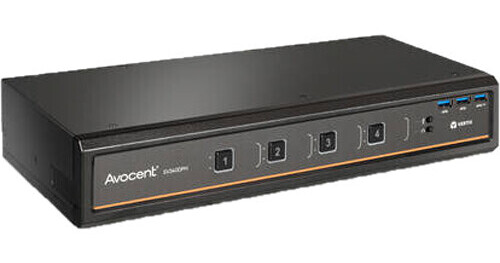
Vertiv Avocent SV340DPH 4-Port Dual-Head Secure KVM Switch

BH #VESV340DPH40 • MFR #SV340DPH-400
Print
Vertiv Avocent SV340DPH 4-Port Dual-Head Secure KVM Switch
Key Features
  • Control up to Four Systems
  • Dual-Head Video Support
  • 3840 x 2160 Max Resolution
  • 60 Hz Refresh Rate
Streamline productivity within your IT department by providing a single localized point-of-access for up to four systems with the Vertiv Avocent SV340DPH 4-Port Dual-Head Secure KVM Switch.
More Details
Special Order
Expected availability: 2-4 Weeks
No Store Display
Free Standard Shipping
Protect Your Gear
Add a protection plan from $79.99
Ask an Expert
800-606-6969

Vertiv Avocent SV340DPH-400 Overview

Streamline productivity within your IT department by providing a single localized point-of-access for up to four systems with the Vertiv Avocent SV340DPH 4-Port Dual-Head Secure KVM Switch.

Designed to provide flexibility while saving space, this KVM switch connects up to four systems using universal ports that combine DisplayPort and HDMI interfaces into a single convenient port, allowing you to use a wide range of video cables. Dual-head video ports support up to two host displays for systems that offer multi-monitor support, giving you a clear and smooth picture with 3840 x 2160 max resolution and 60 Hz refresh rate. Connect a single keyboard and mouse setup with two USB 2.0 Type-A ports, while front panel USB 3.2 Gen 1 Type-A ports support peripherals such as external storage drives, controllers, and more. Additionally, you gain enhanced audio support with speaker and microphone 3.5mm audio connections so you can conduct online calls and receive audio notifications.

Flexible Switching
The SV340DPH features front-facing push-buttons that allow you to easily switch between connected systems. You can also use keyboard shortcuts to swap between systems as well as access various settings with the press of a few buttons.
Peripheral Support
You can connect a wide range of peripherals with USB 2.0 and 3.2 Gen 1 support, allowing you to connect your standard mouse and keyboard for basic control and accessories such as external drives, respectively. The SV340DPH also supports USB accessory lock which keeps the attached accessory connected to a select computer.
Managed Copy & Paste
Easily copy text from one computer system to another with integrated managed copy and paste functionality with optional downloadable software.
UPC: 636430089409

Vertiv Avocent SV340DPH-400 Specs

Key Specs
# of Systems Supported
4
Console I/O
2x HDMI/DisplayPort Female
2x USB-A 2.0
3x USB-A 3.0 / 3.1/USB 3.2 Gen 1
1x 1/8" / 3.5 mm Audio-Out
1x 1/8" / 3.5 mm Line-In
KVM I/O
8x HDMI/DisplayPort Female
4x USB-B 2.0 Female
4x USB-B 3.0 / 3.1/3.2 Gen 1 Female
4x 1/8" / 3.5 mm Audio-Out Female
4x 1/8" / 3.5 mm Line-In Female
Supported Resolutions
3840 x 2160 @ 60 Hz
# of Systems Supported
4
Console I/O
2x HDMI/DisplayPort Female
2x USB-A 2.0
3x USB-A 3.0 / 3.1/USB 3.2 Gen 1
1x 1/8" / 3.5 mm Audio-Out
1x 1/8" / 3.5 mm Line-In
KVM I/O
8x HDMI/DisplayPort Female
4x USB-B 2.0 Female
4x USB-B 3.0 / 3.1/3.2 Gen 1 Female
4x 1/8" / 3.5 mm Audio-Out Female
4x 1/8" / 3.5 mm Line-In Female
Supported Resolutions
3840 x 2160 @ 60 Hz
USB Keyboard/Mouse Emulation
No
Power Source
AC Adapter
Input Power
100 to 240 VAC, 50 / 60 Hz
Certifications
CE, FCC-A, RCM, TUV, VCCI
Rack Mountable
No
Dimensions
13.7 x 5.0 x 2.2" / 34.8 x 12.7 x 5.6 cm
Weight
3.7 lb / 1.7 kg

Vertiv Avocent SV340DPH-400 Reviews

absolutely stable among systems

By mark
Rated 5 out of 5
Date: 2024-10-27

I have had the SV340D since 2020 and its extremely stable between a mix of Linux and Windows (now just Linux) systems. I don't use dual head anymore, since displays are so big, so if buying today I would have likely gone with the single head model & saved quite a bit. The only problem Ive had is HDMI, like me, sticking around for much longer than I expected. p.s. if you are converting from HDMI to DP KVM you might want to consider either the universal video interface model, which can handleDP, HDMI, and DVI-D (with an adapter cable) or the conversion cable, both from Vertiv. Common HDMI to DP and Thunderbolt to DP active cables work fine with static displays but not with any KVMs that I have ever seen or heard about.

See any errors on this page?
Whatever You Need, We've Got It