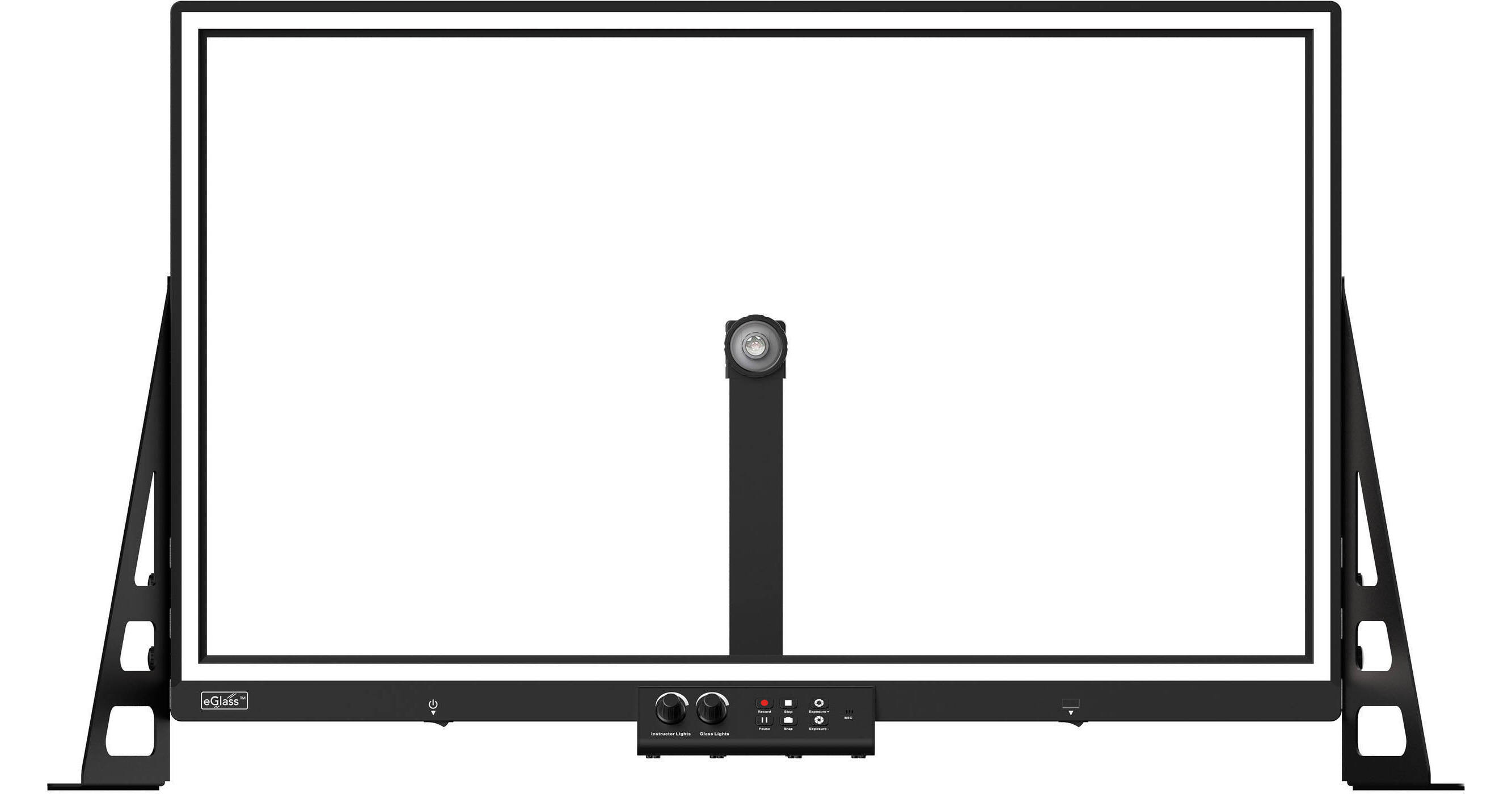
HoverCam eGlass Transparent Lightboard with Built-in Camera (35")

BH #HOHCEG35 • MFR #HCEG-35
Print
HoverCam eGlass Transparent Lightboard with Built-in Camera (35")
Key Features
  • For Remote Learning and Classrooms
  • Interactive LED Glass Lightboard
  • Built-In UHD 4K Camera
  • USB-A Plug-and-Play Interface
This 35" eGlass Transparent Lightboard with Built-in Camera from HoverCam bridges the gap between remote and in-person learning by providing a whiteboard-like display to either livestream or display your lessons more intuitively. The eGlass features a glass surface with LED lighting for drawing pictures, writing notes, or displaying diagrams with included software. A built-in webcam records you while you write and automatically flips the image for your students to read everything clearly. Communicate with your laptop or personal computer with the single USB-A port and included cable. All the tools you need to mount the lightboard on a tabletop are included with the display.
More Details
In Stock
No Store Display
Free Expedited Shipping
Protect Your Gear
Add a protection plan from $89.99
Size
Ask an Expert
800-952-1815

HoverCam eGlass Overview

Designed for the Remote and In-Person Classroom
This 35" eGlass Transparent Lightboard with Built-in Camera from HoverCam bridges the gap between remote and in-person learning by providing a whiteboard-like display to either livestream or display your lessons more intuitively. The eGlass features a glass surface with LED lighting for drawing pictures, writing notes, or displaying diagrams with included software. A built-in webcam records you while you write and automatically flips the image for your students to read everything clearly. Communicate with your laptop or personal computer with the single USB-A port and included cable. All the tools you need to mount the lightboard on a tabletop are included with the display.
Built-In Camera
The integrated webcam automatically flips the image so your remote students can read your handwriting clearly and without needing to adjust any settings. It's capable of capturing UHD 4K images and full HD 1080p video. An included polarizing filter and adapter can reduce glare from light reflections on the glass surface. Both manual and factory-calibrated focus are available, along with 4x digital zoom and 88.6° field of view. An integrated microphone with noise reduction technology ensures your lecture is heard by all without interruption.
Connectivity and Interface
Use the included USB cable and USB-A port to connect to your personal laptop and run the eGlassFusion software. Project your display to the entire classroom of in-person students.
ChromaClear Technology
With included neon markers and adjustable LED illumination, your writing remains clear and visible in both light and dark classrooms. Students will still be able to see your facial expressions and writing to better engage with the lesson.
eGlassFusion Software
  • MediaPlay pulls any media, lesson plan, or application on screen for you to interact with.
  • Chameleon automatically removes the background from your content.
  • It allows you to record lessons, take snapshots, and more.
UPC: 857548004775

HoverCam eGlass Specs

Key Specs
Display Size
35"
USB I/O
USB-A 3.2 Gen 1
Display
Size
35"
Display Orientation
Landscape
Surface
Touchscreen
No
Connectivity
USB I/O
1x USB-A 3.0 / 3.1/3.2 Gen 1
AC Input Power
100 to 240 VAC, 50 / 60 Hz
Hardware
Built-In Mic
Yes
Camera
Webcam
Yes: Included Accessory 8 MP (1080p)
General
Operating Conditions
-4 to 140°F / -20 to 60°C
Certifications
CE, FCC, RoHS
Dimensions
39.4 x 11" / 100.1 x 27.9 cm (with Stand)
Weight
22.04 lb / 10.00 kg
Packaging Info
Package Weight
43 lb
Box Dimensions (LxWxH)
37 x 24.5 x 9"

HoverCam eGlass Reviews

See any errors on this page?

Does this item connect to a PC or is it a ...

Does this item connect to a PC or is it a standalone device?
Asked by: Christopher
The HoverCam eGlass 50" Transparent Lightboard with Built-in Camera for K12 BH #HOHCEG50K12 connects to your computer. But it can stand-alone for a smple whiteboard functions. How it works: Integrated camera captures writing and teacher’s face The image is ‘flipped’ so writing reads left-to-right Connects to computer via USB cable LED lighting is injected into glass Live video is displayed on projector or flat panel Any existing lesson plans, any format can be brought on eGlass and written on Write on the glass normally, facing your students. ChromaClear technology injects light into the glass, giving the ink a vivid glow. The built-in camera captures your face and writing in the same frame, and flips the image so text reads correctly Connect eGlass to your PC, Mac, or Chromebook with the included USB cable, and run the eGlassFusion software. Project onto your classroom display by connecting your laptop. Your writing is larger than life and every student has MAIN SPECIFICATIONS: Model Numbers HCEG-35, HCEG-50 What’s in the Box Main eGlass Frame, Adjustable Support Legs (2x), Camera Arm Assembly, Polarizing Filter, Filter Adapter, AC Power Cable, AC Power Adapter, USB Cable, Support Leg Thumb Screws (6x), Camera Arm Thumb Screws (2x), Neon Glassboard Pens (Unactivated) (4x), Cleaning Rag, Foam Camera Arm Support Bricks, Anti-reflection Hood (Unassembled in Carrying Bag), Quick Start Guide Physical Controls Instructor lights (+/-), Glass lights (+/-), Record Video, Pause Recording, Stop Recording, Capture Snapshot, Exposure (+/-), Bottom Instructor Light Panel On/Off Writing Surface Size(s) 35” diagonal (30.50” L x 17.50” H) • 50” diagonal (43.59” L x 24.52” H) Writing Glass High strength 6mm scratch resistant tempered glass Illumination Adjustable External LED Instructor Illumination, Adjustable Internal LED Glass Illumination with ChromaClear technology Instructor Lights Brightness eGlass 35” = Min: 6,000 lumens, Max: 12,000 lumens • eGlass 50” = Min: 9,000 lumens, Max:15,000 lumens Microphone 94 dB-SPL@1k Hz Built-in Microphone, with Noise Reduction SYSTEM & SOFTWARE Interface USB 3.0 Type A, eGlass 35" DC-In 24V 3.5A (Max) • eGlass 50" DC-In 24V 4.5A (Max) Power Adapter Input: 100-240V AC 50-60Hz 2A, Output: 24V/5A Compatible OS Microsoft Windows 10, Mac OS Catalina and above, Chromebook OS 80+ System Requirements CPU 1.6 GHz , 2.0 GHz recommended, RAM 1 GB minimum, 2 GB or more recommended Software Downloadable from www.hovercam.com/eglass/help eGlassFusion PC Live video streaming, Image Capture, Video Recording, Rich Media Insertion, Built-In Browser, and other lesson delivery tools eGlassFusion Mac Live video streaming, Image Capture, Video Recording, Rich Media Insertion, Built-In Browser, and other lesson delivery tools HoverCam for Chrome Live video streaming, Image Capture, Video Recording DOCUMENT CAMERA SPECIFICATIONS Camera Sensor 8 MP BSI CMOS 1/3.2" Polarizing Filter Optional Filter and Adapter Included Image Resolution 3280 x 2464 Live Video Resolution and Frame Rate 1920 x 1080 @30fps* • 1280 x720 @30fps *Some low end computers may not be able to handle high video performance. Recording Resolution and Frame Rate 1920 x 1080 @30fps* • 1280 x720 @30fps *Some low end computers may not be able to handle high video performance. Video Recording Format Windows: MP4, WMV • Mac: MP4 • Chrome: WEBM Image Format Windows: JPEG, PNG, BMP, TIF, GIF, PDF • Mac: PNG • Chrome: JPG Focus Manual Focus (Factory Calibrated) Zoom 4X Digital Zoom Field of View F/NO=2.6, FOV =88.16° PHYSICAL SPECIFICATIONS Dimensions L x W (With Legs Installed) eGlass 35" = 39.39" L x 11.02" W • eGlass 50" = 52.47" L x 11.02" W Adjustable Height Settings eGlass 35" = (Low) 22.008" - (Med) 23.976" - (High) 25.945" • eGlass 50" = (Low) 29.37" - (Med) 31.339" - (High) 33.307" Camera Arm Length (eGlass Depth) eGlass 35" = 19.33" L x 12.09" H • eGlass 50" =27.11" L x 15.77" H Weight eGlass 35" - Net Weight (NW) = 22.04 lbs. • eGlass 50" - Net Weight (NW) = 44.09 lbs. Shipping Weight eGlass 35" = 31 lbs. • eGlass 50" = 51 lbs. Shipping Size eGlass 35" = 36" L x 7" W x 23" H • eGlass 50" = 50" L x 7" W x 30" H Operating Temperature -20°C - 65°C Certifications CE, FCC, ROHS WARRANTY Warranty 5 year parts and labor included.
Answered by: Mark S
Date published: 2022-03-30
  • y_2026, m_6, d_7, h_12CST
  • bvseo_bulk, prod_bvqa, vn_bulk_3.0.46
  • cp_1, bvpage1
  • co_hasquestionsanswers, tq_1
  • loc_en_US, sid_1695002, prod, sort_[SortEntry(order=HAS_STAFF_ANSWERS, direction=DESCENDING)]
  • clientName_bhphotovideo
Whatever You Need, We've Got It