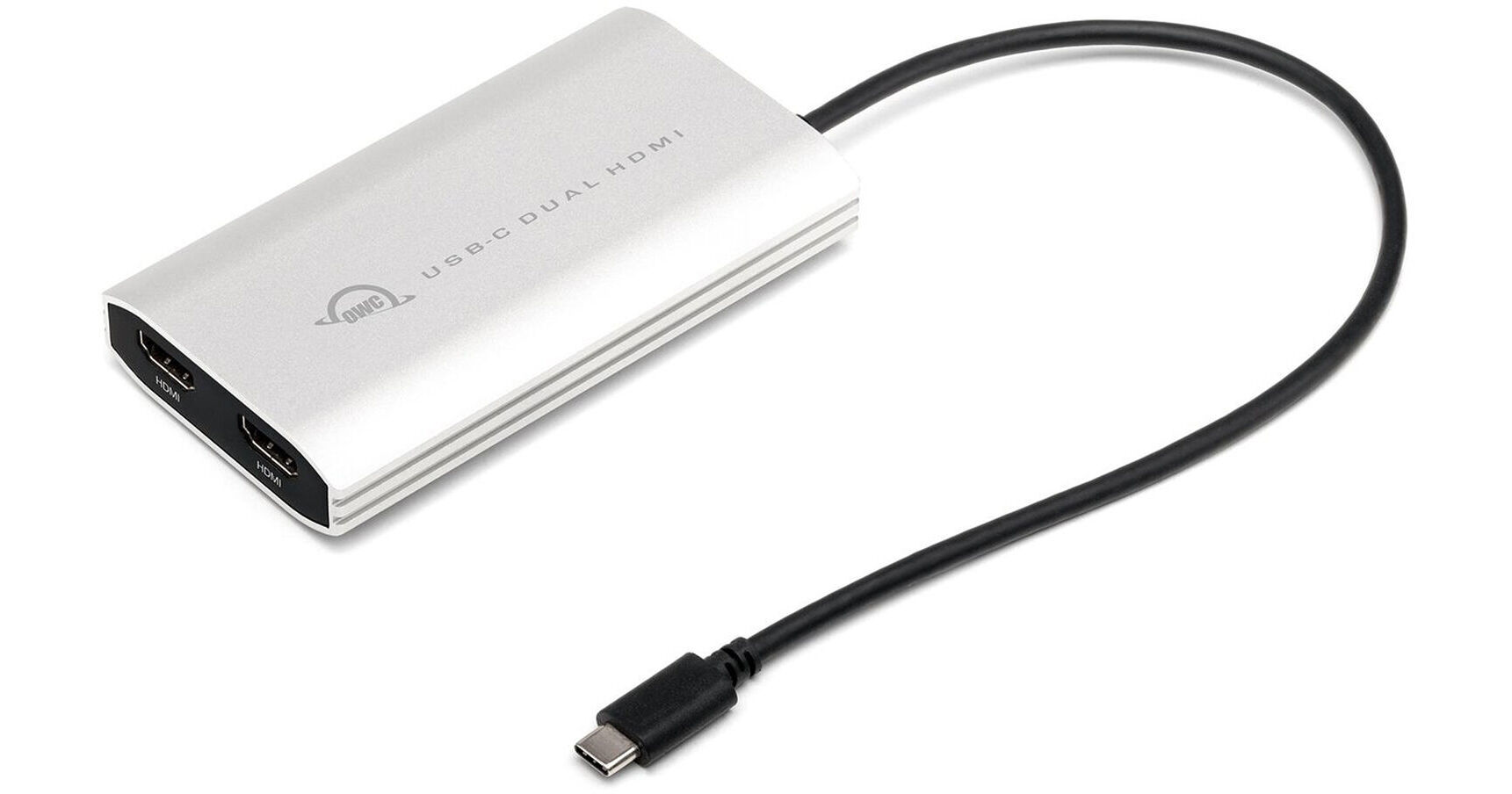
OWC USB-C to Dual HDMI 4K Display Adapter with DisplayLink

BH #OWCCADPDL2HD • MFR #OWCCADPDL2HDMI
Print
OWC USB-C to Dual HDMI 4K Display Adapter with DisplayLink
Key Features
  • USB-C Connection
  • 2 x HDMI 2.0 Ports
  • 4K UHD 3840 x 2160 at 60 Hz Resolution
  • Plug-and-Play Design
Streamline your workflow with the USB-C to Dual HDMI 4K Display Adapter with DisplayLink from OWC / Other World Computing. This adapter allows you to connect up to two 4K/60 Hz (3840 x 2160) HDMI displays to your Windows or Mac computer through a single USB-C cable. Multitask more efficiently by extending your primary display, or mirror your primary display for presentations.
More Details
In Stock
No Store Display
Free 2-Day Shipping
Ask an Expert
800-606-6969

OWC OWCCADPDL2HDMI Overview

Streamline your workflow with the USB-C to Dual HDMI 4K Display Adapter with DisplayLink from OWC / Other World Computing. This adapter allows you to connect up to two 4K/60 Hz (3840 x 2160) HDMI displays to your Windows or Mac computer through a single USB-C cable. Multitask more efficiently by extending your primary display, or mirror your primary display for presentations.

Dual Displays for All
Besides creating delightful dual-display nirvana with Apple M1, M2, and M3 Silicon Macs, you can easily use this nifty, pixel multiplying adapter with your USB-C or Thunderbolt equipped Mac or PC. Just connect the built-in USB-C cable to your machine, download the DisplayLink Manager application (Mac) or driver (Windows), and bam, dual 4K "Plug and Display" magnificence is yours to revel in.
Display-It-All + Power-It-Up
With its compact travel-friendly size and bus-powered convenience, you'll always be ready to wow an audience or a team with your newfound multi-display capability. No longer will you have to choose between power and dual displays, or take up a second USB-C port to charge your laptop - this handy little adapter features a power pass-thru port. Simply plug in your laptop's USB-C power adapter to keep the electrons flowing.
USB-C / Thunderbolt 3 / Thunderbolt 4 / USB4 Connectivity
Universal compatibility means one thing - if your port matches the plug, you're all set. You don't have to fiddle around to see if you have the right interface, the correct port, or the correct cable.
Planetary Exploration Encouraged
About the size and weight of a compact smartphone, the OWC USB Type-C Dual HDMI hides away in bags, pockets, and camera packs, and tucks neatly out-of-sight at your workstation. Wherever your adventures take you, plugging dual displays into your Mac or PC doesn't get any easier.
OS Compatibility
  • macOS 14.x Sonoma
  • macOS 13.x Ventura
  • macOS 12.x Monterey
  • macOS 11.x Big Sur
  • macOS 10.15 Catalina
  • Windows 11
  • Windows 10 (32-/64-bit)
  • Windows 8.1 (32-/64-bit)
  • Windows 7 (32-/64-bit)
  • Android 10.x to 13.x
  • Chrome OS
  • Ubunti 20.04 or later
Dual Display Support
Dual display support, including available resolution and refresh rates, is dependent on host hardware and drivers
  • Apple Silicon M1/M2/M3 Pro, M1/M2/M3 Max, and M1/M2 Ultra Mac models, Apple Intel-based Mac models, and Thunderbolt 4 PCs can support up to two displays at up to 4K/60 Hz via Thunderbolt
  • Apple Silicon M1/M2/M3 Mac models can support one external display up to 4K/60Hz via Thunderbolt
Single Display Support
The following Apple silicon M1/M2/M3 Mac models support a single display over a Thunderbolt port:
  • MacBook Pro (14", M3, 2023)
  • MacBook Pro (13", M1, 2020) - MacBookPro17,1
  • MacBook Pro (13", M2, 2022) - Mac14,7
  • MacBook Air (M1, 2020) - MacBookAir10,1
  • MacBook Air (M2, 2022) - Mac14,2
  • Mac mini (M1, 2020) - Macmini9,1
Macs with Partial Support for DisplayPort 1.4
The following Mac models provide only partial support for DisplayPort 1.4, including limiting resolution to 5K or 6K at 60 Hz. Please review Apple's display specifications for your specific Mac to determine the maximum supported resolution and color depth:
  • MacBook Pro (15", 2018) - MacBookPro15,1
  • MacBook Pro (13", 2018, Four Thunderbolt 3 ports) - MacBookPro15,2
  • MacBook Pro (13", 2019, Four Thunderbolt 3 ports) - MacBookPro15,2
  • MacBook Pro (15", 2019) - MacBookPro15,1 and MacBookPro15,3
  • MacBook Pro (13", 2019, Two Thunderbolt 3 ports) - MacBookPro15,4
  • MacBook Pro (16", 2019) - MacBookPro16,1 and MacBookPro16,4
  • MacBook Pro (13", 2020, Four Thunderbolt 3 ports) - MacBookPro16,2
  • MacBook Pro (13", 2020, Two Thunderbolt 3 ports) - MacBookPro16,3
  • MacBook Air (Retina, 13", 2018) - MacBookAir8,1
  • MacBook Air (Retina, 13", 2019) - MacBookAir8,2
  • MacBook Air (Retina, 13", 2020) - MacBookAir9,1
  • iMac (Retina 5K, 27", 2019) - iMac19,1
  • iMac (Retina 4K, 21.5", 2019) - iMac19,2
  • iMac (Retina 5K, 27", 2020) - iMac20,1 and iMac20,2
  • Mac mini (2018) - Macmini8,1
  • Mac Pro (2019) - MacPro7,1
  • Mac Pro (Rack, 2019) - MacPro7,1
UPC: 810586038423

OWC OWCCADPDL2HDMI Specs

Interface
DP Alt Mode (Video) Only
Connector 1
1x USB-C Male
Connector 2
2x HDMI Female
1x USB-C Female
Cable Length
10.2" / 26 cm
Maximum Resolution Support
3840 x 2160 at 60 Hz
Color
Silver
Certifications
CE, FCC, TAA
Dimensions
4.5 x 2.4 x 0.8" / 11.4 x 6.1 x 2 cm
Packaging Info
Package Weight
0.4 lb
Box Dimensions (LxWxH)
6.5 x 3.2 x 1"

OWC OWCCADPDL2HDMI Reviews

A great solution, but with a big caveat you need to know of

By Luke
Rated 4 out of 5
Date: 2023-02-17

The adapter is solidly built and with the DisplayLink software everything works great with my MBP. I got it at the same time as a new monitor for a dual monitor setup. However, it wasn't until I had everything set up and tried to calibrate the monitors that I realized there was an issue. I couldn't get the color calibration software to work. I went to the DisplayLink website and sure enough, the software does not support color calibration at this time, at least on MacOS. A brief web search showed the first posts about this issue were dated from 2020 so here we are in 2023 with no resolution yet... I really like the adapter and wish it would be to solution for my needs but as a photographer for whom accurate colors is essential, this is a no go for me. So I ended up putting in a return request with B&H, my first ever.

Works seamlessly with M2 MBP

By Ciara
Rated 5 out of 5
Date: 2022-08-09

I was very annoyed when I learned that my new M2 MacBook Pro only supported a single external display and started investigating solutions. My research indicated that DisplayLink was necessary and this product was the most inexpensive one I could find. I already had the DisplayLink software installed when I received it, so I plugged it into my laptop and monitors and it worked instantly. Been using it about a week now with no complaints.

See any errors on this page?

Can I use this to have a total of 4 4k outputs on ...

Can I use this to have a total of 4 4k outputs on a Mac Mini M2 Pro? 2 from this device and 2 directly from the mini?
Asked by: James
The Mac Mini M2 Pro can connect to a maximum of three external displays, regardless of external hubs or docks.
Answered by: Calvin M
Date published: 2023-05-08

What is the wattage of the PD on this device?

What is the wattage of the PD on this device?
Asked by: Ty
Total power delivery is dependent on capability of attached USB-C power adapter.
Answered by: OWC Andy
Date published: 2022-05-05

Does it support 2 4k HDR monitors? I only get 4k, ...

Does it support 2 4k HDR monitors? I only get 4k, but no HDR on my current setup.
Asked by: Mark
The OWC USB Type-C to Dual HDMI 4K Display Adapter with DisplayLink BH #OWCCADPDL2HD does not support HDR.
Answered by: Miguel M
Date published: 2022-05-03

will this allow me to have tow external monitors ...

will this allow me to have tow external monitors in extended view on my MacBook Pro M1 2020?
Asked by: Richard
Yes, the OWC USB Type-C to Dual HDMI 4K Display Adapter will allow you to connect 2 external monitors in extended view.
Answered by: Geoff
Date published: 2022-07-25
  • y_2026, m_7, d_16, h_8CST
  • bvseo_bulk, prod_bvqa, vn_bulk_3.0.48
  • cp_1, bvpage1
  • co_hasquestionsanswers, tq_4
  • loc_en_US, sid_1697444, prod, sort_[SortEntry(order=HAS_STAFF_ANSWERS, direction=DESCENDING)]
  • clientName_bhphotovideo
Whatever You Need, We've Got It