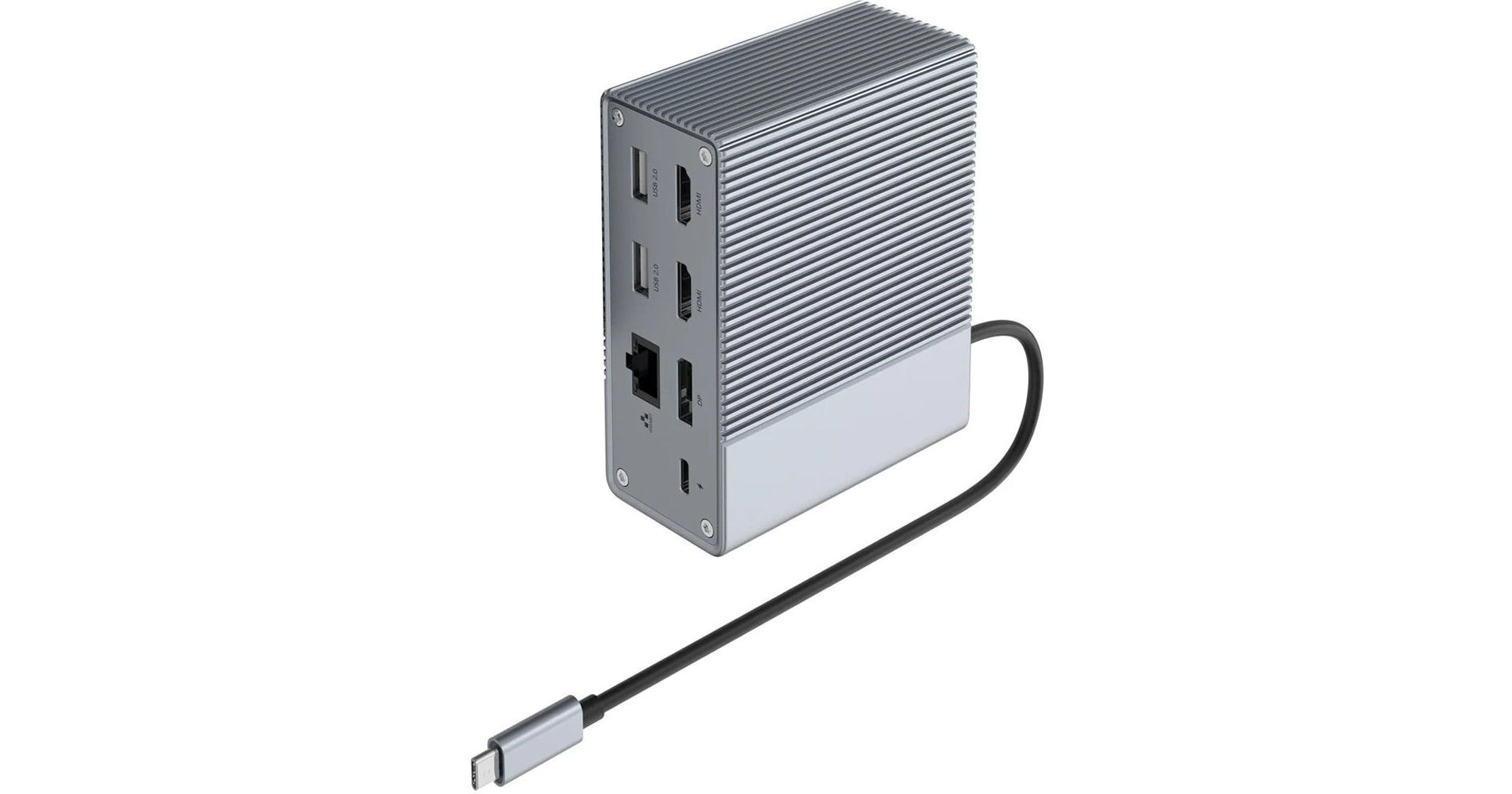
HYPER Hyperdrive GEN2 10-in-1 USB-C Docking Station

BH #HYHDG210 • MFR #HD-G210
Print
HYPER Hyperdrive GEN2 10-in-1 USB-C Docking Station
Key Features
  • 2 x USB-A 3.2 Gen 2 Ports
  • 2 x USB-A 2.0 Ports
  • 2 x HDMI | 1 x DisplayPort
  • 1 x RJ45 Port
Bring flexible connectivity and ample power to your laptop with the Hyperdrive GEN2 10-in-1 USB-C Docking Station from HYPER. Connect to wired accessories via two USB-A 3.2 Gen 2 and two USB-A 2.0 ports. Output video via a DisplayPort and two HDMI interfaces supporting one 4K display at 60 Hz or two 4K displays at 30 Hz. Interface with wired networks via an RJ45 port supporting Gigabit Ethernet; connect a headset using the 3.5mm combo audio port.
More Details
In Stock
No Store Display
Free 2-Day Shipping
Protect Your Gear
Add a protection plan from $24.99
Ask an Expert
800-606-6969

HYPER GEN2 10-In-1 Overview

Bring flexible connectivity and ample power to your laptop with the Hyperdrive GEN2 10-in-1 USB-C Docking Station from HYPER. Connect to wired accessories via two USB-A 3.2 Gen 2 and two USB-A 2.0 ports. Output video via a DisplayPort and two HDMI interfaces supporting one 4K display at 60 Hz or two 4K displays at 30 Hz. Interface with wired networks via an RJ45 port supporting Gigabit Ethernet; connect a headset using the 3.5mm combo audio port.

Use the USB-C power input port to provide up to 85W of pass-through power to a compatible laptop via the USB-C host connector. An aluminum construction and ridged design ensure ample passive cooling. The Hyperdrive GEN2 docking station is compatible with Windows 7 and later, as well as macOS and Chrome.

Triple Extended Display Support
Output video to one 4K display at 60 Hz or two 4K displays at 30 Hz. Use all three video outputs to connect one 3840 x 2160 display at 30 Hz as well as two 1920 x 1080 displays.
Driverless Plug and Play
Driverless plug and play capability allows for easy installation and deployment.
Pass-Through Charging
Use the USB-C power input port to deliver up to 85W of power to a connected host. Please note, the host port must support power delivery to benefit from pass-through charging. Compatible power adapters are available separately.
Fast and Reliable Gigabit Ethernet
Connect to wired networks to work, play, and video conference with ease, thanks to an RJ45 port supporting Gigabit Ethernet.
Audio Connectivity
A 3.5mm audio combo port allows you to connect a headset.
Cool to the Core
The metallic exterior and ridged design ensure ample cooling for optimal performance.
USB 3.2 Gen 2
Doubling the speed of its predecessor, USB 3.2 Gen 2 features a maximum throughput of 10 Gb/s when used with compatible devices and is synonymous with USB 3.1 Gen 2.
UPC: 817110016261

HYPER GEN2 10-In-1 Specs

Key Specs
USB I/O
2x USB-A 3.1/3.2 Gen 2
2x USB-A 2.0
1x USB-C (Charging Only) / Supports 100 W Power Delivery
Video I/O
2x HDMI
1x DisplayPort
Max Resolution
2 Displays Supported:
3840 x 2160 at 60 Hz (Single)
3840 x 2160 at 30 Hz (Dual)
Audio I/O
1x 1/8" / 3.5 mm Headphone/Microphone Combo Jack
Network I/O
1x RJ45 (10/100/1000 Mb/s)
Host Connection
USB-C 3.1/3.2 Gen 2 Supporting USB Power Delivery up to 85 W via Integrated Cable
USB I/O
2x USB-A 3.1/3.2 Gen 2
2x USB-A 2.0
1x USB-C (Charging Only) / Supports 100 W Power Delivery
Video I/O
2x HDMI
1x DisplayPort
Max Resolution
2 Displays Supported:
3840 x 2160 at 60 Hz (Single)
3840 x 2160 at 30 Hz (Dual)
Audio I/O
1x 1/8" / 3.5 mm Headphone/Microphone Combo Jack
Network I/O
1x RJ45 (10/100/1000 Mb/s)
Host Connection
USB-C 3.1/3.2 Gen 2 Supporting USB Power Delivery up to 85 W via Integrated Cable
Power Source
Included AC Adapter with USB-C Connector ( W)
OS Compatibility
Windows 7 or Later / macOS / Chrome OS
Enclosure Material
Aluminum
Lock Slot
No
Dimensions
4.2 x 3.5 x 1.7" / 106.7 x 88.9 x 42.9 mm
Weight
1.1 lb / 480.8 g
Packaging Info
Package Weight
1.265 lb
Box Dimensions (LxWxH)
6.5 x 6.4 x 2.3"

HYPER GEN2 10-In-1 Reviews

So-so results

By Paul
Rated 4 out of 5
Date: 2026-04-28

I have a Windows laptop and a Windows desktop, with a KVM switch so they can share dual-monitors, keyboard, mouse, etc. Whenever I wanted to connect my laptop to the KVM, I'd have to plug in at least 3 cables. I bought this docking station to fix that; everything from the KVM would plug into the Hyperdrive GEN2 and then it'd have a single cable into the laptop. On paper, that works as planned. In reality, using the KVM to switch to my desktop and back to the laptop causes it to lose connection to the monitors (although USB devices continue to work correctly). The laptop would see the existence of the monitors but would refuse to output an image. The only remedy for that seems to be a full power-down of the laptop; un-plugging and re-plugging cables did nothing. Unclear if this is a problem with the GEN2, a problem with the Dell laptop, or just a consequence of my odd use case, which is why I still give it 4 stars. If you're not using a KVM, it likely will work as desired for you.

Great little Hyper Drive

By Kim
Rated 5 out of 5
Date: 2023-12-13

Great drive work as described and very easy to bring along when traveling.

See any errors on this page?

Will this work with an Lenovo T14 laptop?

Will this work with an Lenovo T14 laptop?
Asked by: Lawrence
Yes, the HYPER Hyperdrive GEN2 10-in-1 USB-C Docking Station, (B&H #HYHDG210), is compatible with a Lenovo T14 Laptop.
Answered by: Miguel M
Date published: 2023-11-28

Will this work on an 2014 iMac and connect ...

Will this work on an 2014 iMac and connect external HDs?
Asked by: Brenda
The HYPER Hyperdrive GEN2 10-In-1 USB-C Docking Station is compatible with 2014 iMacs and would be capable of connecting to external HHDs.
Answered by: Paige K
Date published: 2022-05-04

With this accommodate two external displays for a ...

With this accommodate two external displays for a 2021 M1 16" MacBook Pro?
Asked by: Vincent
Yes, the HYPER Hyperdrive GEN2 10-In-1 USB-C Docking Station BH #HYHDG210 can accomodate 2 displays using the M1 Pro/Max Macbook Pro.
Answered by: Miguel M
Date published: 2023-05-22
  • y_2026, m_6, d_3, h_11CST
  • bvseo_bulk, prod_bvqa, vn_bulk_3.0.46
  • cp_1, bvpage1
  • co_hasquestionsanswers, tq_3
  • loc_en_US, sid_1698157, prod, sort_[SortEntry(order=HAS_STAFF_ANSWERS, direction=DESCENDING)]
  • clientName_bhphotovideo
Whatever You Need, We've Got It