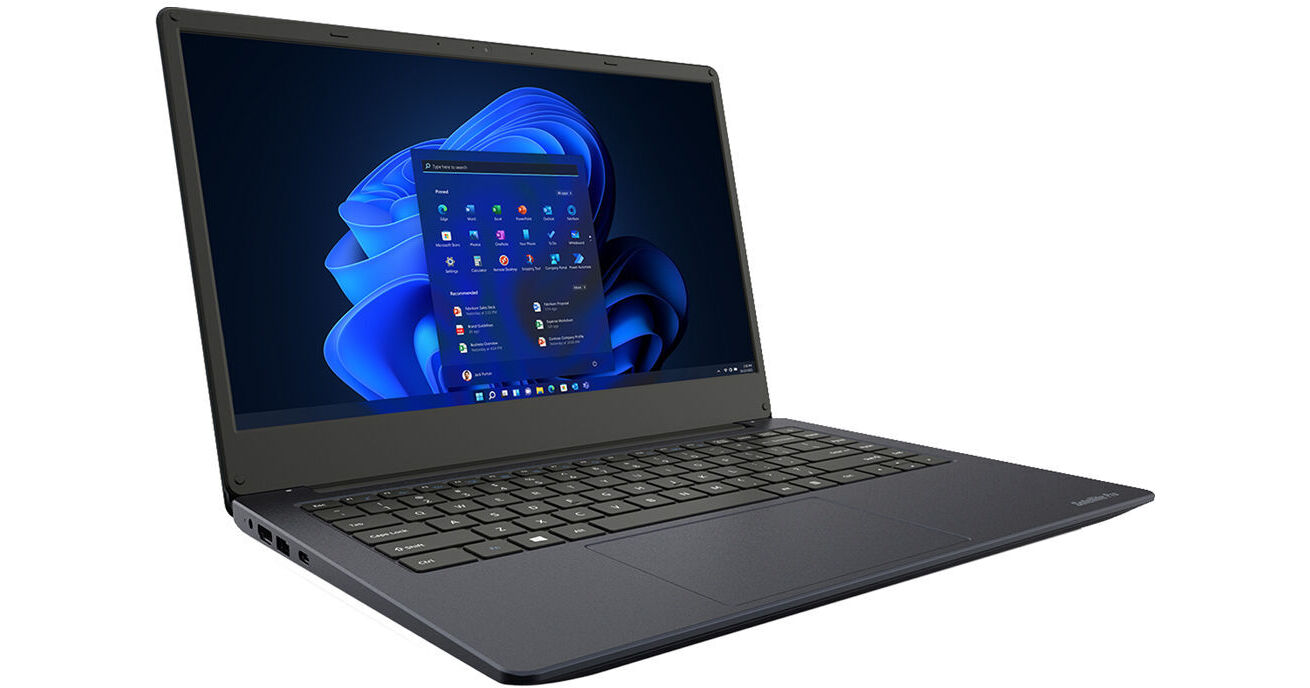
Dynabook 14" Satellite Pro C40-J14210 Laptop (Graphite Black)

BH #DYPYS46U00D0 • MFR #PYS46U-00D00E
Print
Dynabook 14" Satellite Pro C40-J14210 Laptop (Graphite Black)
Key Features
  • 2.4 GHz Intel Core i5 4-Core (11th Gen)
  • 8GB of DDR4 RAM | 256GB PCIe SSD
  • 14" 1920 x 1080 LCD Display
  • Integrated Intel Iris Xe Graphics
Stay productive and mobile with the 14" Satellite Pro C40-J14210 Laptop in graphite black from Dynabook. Featuring an 11th Gen 2.4 GHz Intel Core i5 4-core CPU and 8GB of DDR4 memory, this laptop is built for portable performance at home or on the road. Store important files locally and launch them in a flash with the 256GB PCIe SSD. Plus, a 14" Full HD LCD display and integrated Intel Iris Xe graphics provide engaging visuals. Videoconference with coworkers and friends using the HD webcam, dual-mic array, and stereo speakers. Stay safe wherever the job takes you thanks to a reinforced lock slot and TPM chip.
More Details
No Longer Available
No Store Display
Microsoft 365 Subscription not included: add to your purchase
Ask an Expert
212-444-6615

Dynabook C40-J 14" Overview

Stay productive and mobile with the 14" Satellite Pro C40-J14210 Laptop in graphite black from Dynabook. Featuring an 11th Gen 2.4 GHz Intel Core i5 4-core CPU and 8GB of DDR4 memory, this laptop is built for portable performance at home or on the road. Store important files locally and launch them in a flash with the 256GB PCIe SSD. Plus, a 14" Full HD LCD display and integrated Intel Iris Xe graphics provide engaging visuals. Videoconference with coworkers and friends using the HD webcam, dual-mic array, and stereo speakers. Stay safe wherever the job takes you thanks to a reinforced lock slot and TPM chip.

Connect to wired accessories with a USB 3.2 Gen 1 Type-C port supporting power, display, and data, or via two USB 3.2 Gen 1 Type-A ports including one supporting Sleep and Charge functionality. Or, interface with wireless peripherals using Bluetooth 5. Hop online with Wi-Fi 6 or connect to wired networks via an RJ45 Gigabit Ethernet port. Mirror or extend screen space to an additional display using the HDMI port. Furthermore, an antimicrobial paint coating ensures improved resilience in tough working conditions. The Dynabook C40-J14210 Laptop runs on the Windows 11 Pro operating system.

Powerful Performance
An 11th Gen 2.4 GHz Intel Core i5 4-core CPU and 8GB of DDR4 RAM make short work of everyday computing tasks, research, pet projects, and more. Plus, the 256GB PCIe SSD allows you to quickly access files while Wi-Fi 6 and USB 3.2 Gen 1 connectivity enable fast performance.
Ready to Connect
In addition to one Type-C port, this laptop sports USB Type-A, HDMI, and Gigabit Ethernet ports for easy connectivity. Plus, connect to multiple displays and other peripherals via a compatible Dynabook dock, available separately.
Durable Design
An antimicrobial paint coating defends against microorganisms found in tough working environments.
Collaborative to the Core
Team up with coworkers or consult with clients using the integrated 720p HD webcam. A dual-mic array and stereo speakers ensure clear videoconferencing.
Security-Minded
Stay secure at home, in the office, or on the go thanks to a dedicated TPM chip and reinforced lock slot.
Power through Your Workday
USB ports with Sleep and Charge technology allow you to charge your smartphone or other accessories, even when the laptop is not in use.
USB 3.2 Gen 1
USB 3.2 Gen 1 features a maximum throughput of 5 Gb/s and is synonymous with USB 3.1 Gen 1 and USB 3.0.
Windows 11 Pro
A New Start Position
Windows 11 has been completely redesigned from its predecessor to emphasize productivity, creativity, and ease of use. The customizable Start Menu is now at the center of the taskbar and utilizes the cloud, allowing you to quickly find and access recent files, regardless of what platform or device was previously used to view them. The streamlined Start Menu design also lets you pin apps and recent files in addition to powering down the system.
Making Productivity a Snap
Multitask quickly and efficiently with the ability to snap apps side-by-side. Snap Layouts and Snap Groups keep your windows organized using different layouts designed to fully optimize your screen space, no matter its size and resolution. Windows 11 also remembers their positions, so you can resume where you left off when selecting Snap Groups from the task bar, allowing you to switch between both individual applications and entire projects. Snap Layouts are also automatically restored when docking laptops with external monitors.
Microsoft Teams Integration
Stay connected with friends, family, co-workers, and clients with Microsoft Teams Chat integrated onto the Windows 11 taskbar. With a touch, you can connect to your contacts via text, voice, and video, regardless of whether they're using Windows, Android, or iOS devices. You can also communicate with those who don't have the Teams app installed using two-way SMS messaging.
Adapting to You
The Adaptive Input feature automatically optimizes the Windows 11 interface to however you prefer to interact with your device, whether it's using a mouse, keyboard, touch, voice, or handwriting.
Next Level Gaming
Enjoy smooth, immersive gaming experiences with DirectX 12 Ultimate providing realistic graphics at high frame rates while Auto HDR automatically adjusts in-game lighting and contrast for high-dynamic range. DirectStorage technology streamlines data access via high-speed devices such as NVMe SSDs and graphics cards without taxing the CPU, minimizing load times and reducing artifacts such as texture popping. Plus, Xbox Games Pass integration provides you with access to a massive library of games with a membership subscription.
Redesigned Microsoft Store
The redesigned Microsoft Store delivers a streamlined experience when looking for content such as apps, games, movies, and shows. Apps downloaded from the Store have been tested for security and family safety. Android apps are also available on the Microsoft Store through the Amazon Appstore and can be used directly on your PC from the taskbar or Start Menu.
Additional Windows 11 Pro Features
The Pro version of Windows 11 includes all the features that Windows 11 Home offers plus many designed specifically for business users, including Hyper-V virtualization, BitLocker disk encryption, and remote desktop access. Devices can also join domains and the Azure Active Directory and have access to Enterprise device management features. Windows 11 Pro does not require a Microsoft Account or an internet connection when setting up for the first time.

Dynabook C40-J 14" Specs

Key Specs
Operating System
Windows 11 Pro
Processor
Intel Core i5-1135G7 (11th Gen)
GPU
Intel Iris Xe
Installed RAM
8 GB
Display Size
14"
Native Resolution
1920 x 1080
Touchscreen
No
Total Installed Storage
256 GB
Ports
2 x USB-A 3.0 / 3.1/3.2 Gen 1
USB-C
1 x USB 3.0 / 3.1/3.2 Gen 1
Display I/O
1x HDMI
Wi-Fi
Wi-Fi 6 (802.11ax)
Weight
3.42 lb / 1.55 kg
Operating System
Windows 11 Pro
Performance
Processor
Intel Core i5-1135G7 (11th Gen)
CPU
2.4 to 4.2 GHz Quad-Core
L3 Cache
8 MB
Graphics Type
Integrated
GPU
Intel Iris Xe
Installed RAM
8 GB
Buffered Memory
No
Display
Panel Type
LCD
Size
14"
Aspect Ratio
16:9
Native Resolution
1920 x 1080
Touchscreen
No
Variable Refresh Technology
No
Storage and Expansion
Total Installed Storage
256 GB
Optical Drive
No
Inputs / Outputs
Ports
2 x USB-A 3.0 / 3.1/3.2 Gen 1
USB-C
1 x USB 3.0 / 3.1/3.2 Gen 1
Display I/O
1x HDMI
Audio I/O
1x 1/8" / 3.5 mm Headphone/Microphone Input/Output
Built-In Speakers
Yes
Built-In Microphones
:
Media/Memory Card Slot
Single Slot: microSD/microSDHC
Communications
Network I/O
1x RJ45 (Gigabit Ethernet)
Wi-Fi
Wi-Fi 6 (802.11ax)
MU-MIMO Support
Yes
Bluetooth
5.0
GPS
No
NFC
No
Webcam
User-Facing: 720p
Battery
Battery Chemistry
Lithium-Ion Polymer (LiPo)
Capacity
45.6 Wh
Keyboard & Mouse
Keyboard
Chiclet-Style Keyboard
Pointing Device
TouchPad
General
Security
Dedicated Hardware TPM Security Chip, Kensington Lock Slot
Power Supply
39 W with Barrel/Proprietary
AC Input Power
100 to 240 VAC, 50 / 60 Hz
Operating Temperature
37 to 67°F / 5 to 35°C
Operating Humidity
20 to 80% (Non-Condensing)
Certifications
ENERGY STAR, EPEAT, RoHS
*as per Manufacturer
Dimensions
12.9 x 8.9 x 0.7" / 328 x 225 x 18.9 mm
Weight
3.42 lb / 1.55 kg

Dynabook C40-J 14" Reviews

See any errors on this page?
Whatever You Need, We've Got It