Video Chat with a Pro Video Expert - Live

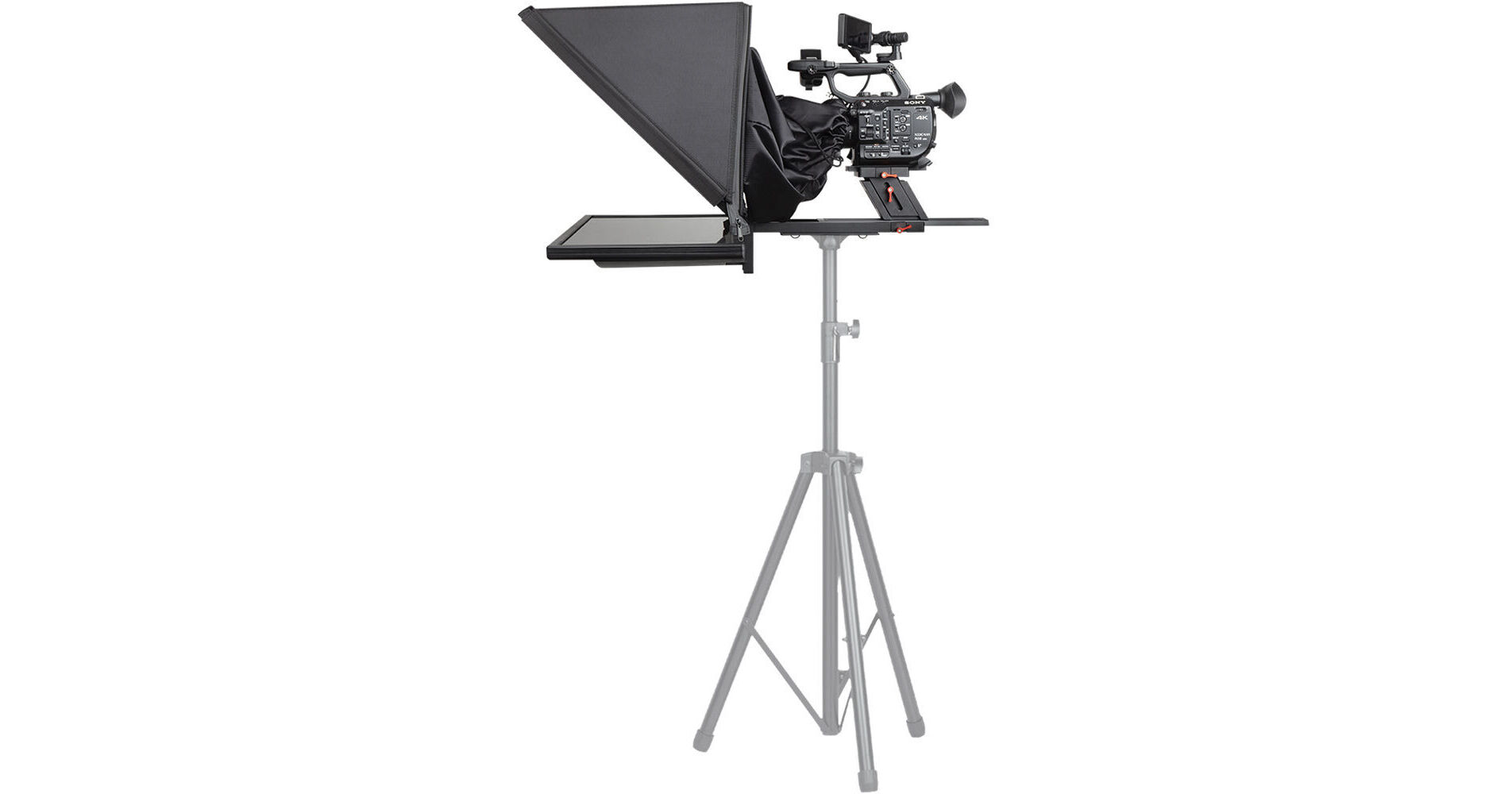
Desview T17 Teleprompter Set with 17" Self-Reversing Monitor

BH #DET17 • MFR #T17
Print
Desview T17 Teleprompter Set with 17" Self-Reversing Monitor
Key Features
  • 70/30 Beamsplitter Glass
  • 17" Self-Reversing Monitor
  • 1280 x 1024 Resolution
  • Height-Adjustable PTZ Mount
Record professional scripted presentations or broadcast video with this T17 Teleprompter Set from Desview thanks to its 17" monitor and 70/30 beamsplitter glass. The 1280 x 1024 monitor is self-reversing and reflects onto ultra-clear optical glass, ensuring legibility of your transcript. An included PTZ mount allows you adjust the height of the teleprompter to suit DSLR cameras, camcorders, and cinema cameras. Composite AV, VGA, USB Type-A, BNC, and HDMI inputs provide a wide range of connectivity.

Legibility is further improved by the teleprompter app, which allows you to adjust the font size, color, and background to best suit your talent. A Bluetooth remote control and foot pedal offer different forms of control of your text speed from up to 32.8' away. The monitor and app support Windows operating systems up to Windows 11. Included with the set are all the mounting tools you need to assemble your teleprompter as well as additional accessories like a teleprompter hood and carrying case.

More Details
In Stock
No Store Display
Free Expedited Shipping
Protect Your Gear
Add a protection plan from $69.99
Ask an Expert
800-606-6969

Desview T17 Overview

Record professional scripted presentations or broadcast video with this T17 Teleprompter Set from Desview thanks to its 17" monitor and 70/30 beamsplitter glass. The 1280 x 1024 monitor is self-reversing and reflects onto ultra-clear optical glass, ensuring legibility of your transcript. An included PTZ mount allows you adjust the height of the teleprompter to suit DSLR cameras, camcorders, and cinema cameras. Composite AV, VGA, USB Type-A, BNC, and HDMI inputs provide a wide range of connectivity.

Legibility is further improved by the teleprompter app, which allows you to adjust the font size, color, and background to best suit your talent. A Bluetooth remote control and foot pedal offer different forms of control of your text speed from up to 32.8' away. The monitor and app support Windows operating systems up to Windows 11. Included with the set are all the mounting tools you need to assemble your teleprompter as well as additional accessories like a teleprompter hood and carrying case.

Included Accessories
  • Teleprompter hood prevents light from hitting the monitor and glass for a clearer image
  • Patented PTZ mount has a tilt angle of 60° and can be adjusted up to 1.6" tall to improve the viewing angle
  • Wireless remote control with Bluetooth connection can pause, play, accelerate speed from up to 32.8' away
  • Foot pedal with USB Type-A connection to pause and play script
Teleprompter App
  • Compatible with Word, TXT, and PDF file formats
  • Supports English, Spanish, and Chinese
  • Adjust font size, color, and background to optimize reading experience

Desview T17 Specs

Key Specs
Size (Diagonal)
17" / 43.2 cm
Inputs/Outputs
1x RCA (Composite) Input
1x VGA Input
1x HDMI (HDMI Unspecified Version) Input
System Connection
1x USB-A
Self Reversing
Yes
General
Beamsplitter Ratio
70/30
Beamsplitter Shape
Rectangular
Beamsplitter Material
Glass
Monitor
Size (Diagonal)
17" / 43.2 cm
Maximum Brightness
300 nits / cd/m2
Native Resolution
1280 x 1024
Aspect Ratio
4:3
Panel Type
LCD
Viewing Angle (H x V)
160 x 170°
Inputs/Outputs
1x RCA (Composite) Input
1x VGA Input
1x HDMI (HDMI Unspecified Version) Input
System Connection
1x USB-A
Self Reversing
Yes
Power Consumption
10 W
Remote
Wireless Range
32.8' / 10 m
Software
OS Compatibility
Windows
Physical
Material of Construction
Aluminum
Height Adjustment
Yes: 1.6" / 40 mm
Packaging Info
Package Weight
31 lb
Box Dimensions (LxWxH)
5.9 x 4.7 x 2.1"

Desview T17 Reviews

Prompters are built well and function, the Software is outdated and clunky. Foot pedal control is awful.

By Cody
Rated 3 out of 5
Date: 2025-12-24

The teleprompters themselves are built well and solid and all function great. They're a bit heavy. Make sure you have a good and sturdy stand or a bulky tripod for mounting. The included foot pedal is laughable. It's so terribly loud when you step on it and makes a very loud clicking sound. For being an item used to make videos, no one would ever use this as it's so loud and there's no way the clicking noise it makes wouldn't be heard in a video. The wireless remote is fine. Like the software (explained below), it's a little clunky and not as simply designed for button controls as one might think it should be, but it works when you get the hang of it. I found the actual teleprompter software to be clunky and outdated. Working with our IT department on setup, because I was running into multiple issues, we found you couldn't drag or move the teleprompter software window, making it hard to move to the teleprompter screens themselves for displaying on the right screens. We had to create a shortcut that we have to drag onto the teleprompter screen to display the teleprompter text and software because you can't just simply drag the software window from one screen to another. And the software windows are all in Japanese or something when you first open. Once we figured it all out and trouble shot everything, they work and function fine. I was just hoping for a simpler and easy setup and use of the software. For now I'm using the included teleprompter software because it works with the included wireless remote, but I'll definitely go back to using our old free software and finding a different wireless remote option that will work to avoid using this included software.

See any errors on this page?

How is this teleprompter compatible with PTZs?

How is this teleprompter compatible with PTZs?
Asked by: Kennedy
Following unit has a bracket that accommodates PTZ cameras to sit on bracket while allowing lens to go through to record video. Please also review what other units we have to offer as well https://bhpho.to/3E8q0E2
Answered by: hectorm
Date published: 2022-09-29

How exactly is this compatible with PTZs?

How exactly is this compatible with PTZs?
Asked by: Kennedy
The Desview T17 Teleprompter Set with 17" Monitor is compatible with PTZ cameras through the use of the included mounting plate and hood, simply mount the PTZ camera to the appropriate camera plate and then cover the camera with the hood to ensure no light leaks in.
Answered by: Paige K
Date published: 2022-09-29

Will the HDMI feed work if plugged into a Mac ...

Will the HDMI feed work if plugged into a Mac computer? Or not at all?
Asked by: Maurice
The Desview T17 Teleprompter Set with 17" Self-Reversing Monitor is compatible with the HDMI ouput of a Mac computer.
Answered by: John W
Date published: 2025-11-22

Do you have to use Desview's software or can you ...

Do you have to use Desview's software or can you use any software of your choosing?
Asked by: Sean
No, the Teleprompter App on the Desview T17 Teleprompter Set with 17" Self-Reversing Monitor is optional and you can connect your computer with whatever software you desire using the video inputs on the screen.
Answered by: Jonathan S
Date published: 2024-12-22

Hello, its possible to attach a video head ...

Hello, its possible to attach a video head instead the tripod in the photo?
Asked by: Claudio
Yes, The Desview T15/T17/T22 prompters are equipped with 1/4 and 3/8 mounting holes that would allow you to work with tripod heads.
Answered by: Chris H
Date published: 2022-08-02
  • y_2026, m_6, d_4, h_10CST
  • bvseo_bulk, prod_bvqa, vn_bulk_3.0.46
  • cp_1, bvpage1
  • co_hasquestionsanswers, tq_5
  • loc_en_US, sid_1709127, prod, sort_[SortEntry(order=HAS_STAFF_ANSWERS, direction=DESCENDING)]
  • clientName_bhphotovideo
Whatever You Need, We've Got It