Video Chat with a Pro Video Expert - Live

Kiloview N60 UHD 4K HDMI/USB to NDI Bidirectional Converter

BH #KI4KHUNBDC • MFR #N60
Print
Kiloview N60 UHD 4K HDMI/USB to NDI Bidirectional Converter
Key Features
  • 1 x HDMI Input, 1 x HDMI Output
  • 1 x USB Type-A & 1 x USB Type-C Port
  • Supports NDI and NDI|HX Conversion
  • Up to UHD 4K Video at 60 fps
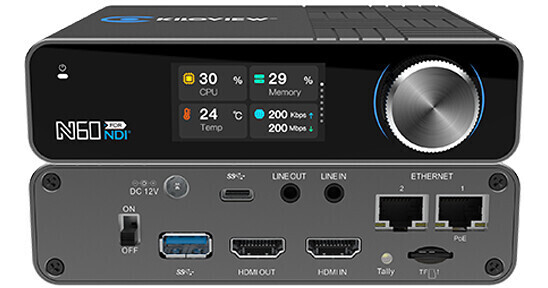
Take up to UHD 4K HDMI video sources and encode or decode your video for IP video transmission using this N60 UHD 4K HDMI/USB to NDI Bidirectional Converter from Kiloview. One HDMI input and one HDMI output can encode or decode video into NDI or NDI|HX video streams up to UHD 4K at 60 fps. A USB Type-A input and a USB Type-C port can accept web camera and PC computers as video sources to expand connectivity and allow for PTZ control.

The HDMI loop output can be used with a monitor or projector for viewing. An audio line input and output adds audio to your encoding and decoding capabilities. The front of the unit has a large 1.96" LCD screen and a scroll wheel to control your ports as well as adjust settings. Integrated in the converter's design is a TF card slot to record encoded NDI video directly to a storage card. Power for the device can be achieved via PoE or DC connection.

More Details
In Stock
No Store Display
Free Expedited Shipping
Protect Your Gear
Add a protection plan from $54.99
Ask an Expert
800-606-6969

Kiloview N60 Overview

Take up to UHD 4K HDMI video sources and encode or decode your video for IP video transmission using this N60 UHD 4K HDMI/USB to NDI Bidirectional Converter from Kiloview. One HDMI input and one HDMI output can encode or decode video into NDI or NDI|HX video streams up to UHD 4K at 60 fps. A USB Type-A input and a USB Type-C port can accept web camera and PC computers as video sources to expand connectivity and allow for PTZ control.

The HDMI loop output can be used with a monitor or projector for viewing. An audio line input and output adds audio to your encoding and decoding capabilities. The front of the unit has a large 1.96" LCD screen and a scroll wheel to control your ports as well as adjust settings. Integrated in the converter's design is a TF card slot to record encoded NDI video directly to a storage card. Power for the device can be achieved via PoE or DC connection.

Features at a Glance
  • Up to YCC 4:2:2 and 10-bit color depth
  • USB 3.0 Type-C connects to your PC as a video input
  • USB 3.0 Type-A connects to a web camera as a video input for encoding
  • Control PTZ camera via USB expansion and serial RS-232/485/422
  • Adopts network control protocols such as Sony VISCA, PELCO-D, and PELCO-P
  • 1.96" LCD screen and scroll wheel
  • Two Ethernet interfaces, one supports PoE
  • Supports NDI and NDI|HX 2.0
  • TF storage expansion to record encoded NDI video into a TF card
  • Mount via cold shoe or V-mount accessory
EAN: 6970631322267

Kiloview N60 Specs

Key Specs
Video I/O
Input
1x HDMI 2.0 Female
Output
1x HDMI 2.0 Female
Audio I/O
Input
1x 1/8" / 3.5 mm TRS Female
Output
1x 1/8" / 3.5 mm TRS Female
Video Resolution
HDMI Input (8/10-Bit 4:2:2 YCC)
3840 x 2160 at 23.98/24/25/29.97/30/50/59.94/60 fps
1920 x 1080p at 23.98/24/25/29.97/30/50/59.94/60 fps
1920 x 1080i at 50/59.94/60 fps
1280 x 720 at 23.98/24/25/29.97/30/50/59.94/60 fps
HDMI Output
3840 x 2160 at 23.98/24/25/29.97/30/50/59.94/60 fps
1920 x 1080p at 23.98/24/25/29.97/30/50/59.94/60 fps
1920 x 1080i at 50/59.94/60 fps
1280 x 720 at 23.98/24/25/29.97/30/50/59.94/60 fps
Broadcast System Compatibility
NTSC
IP Video
Encoding/Decoding via H.264/H.265/NDI
3840 x 2160
IP Audio
Encoding
AAC-LC/G.711
Decoding
AAC-LC
Inputs/Outputs
Video I/O
Input
1x HDMI 2.0 Female

Output
1x HDMI 2.0 Female
Audio I/O
Input
1x 1/8" / 3.5 mm TRS Female

Output
1x 1/8" / 3.5 mm TRS Female
Other I/O
Input
2x RJ45
1x USB-C
1x USB-A
Expansion Slots
No
Format Support
Video Resolution
HDMI Input (8/10-Bit 4:2:2 YCC)
3840 x 2160 at 23.98/24/25/29.97/30/50/59.94/60 fps
1920 x 1080p at 23.98/24/25/29.97/30/50/59.94/60 fps
1920 x 1080i at 50/59.94/60 fps
1280 x 720 at 23.98/24/25/29.97/30/50/59.94/60 fps

HDMI Output
3840 x 2160 at 23.98/24/25/29.97/30/50/59.94/60 fps
1920 x 1080p at 23.98/24/25/29.97/30/50/59.94/60 fps
1920 x 1080i at 50/59.94/60 fps
1280 x 720 at 23.98/24/25/29.97/30/50/59.94/60 fps
Embedded Audio
HDMI
Reclocking
No
Standards
Broadcast System Compatibility
NTSC
IP Streaming
IP Video
Encoding/Decoding via H.264/H.265/NDI
3840 x 2160
IP Audio
Encoding
AAC-LC/G.711

Decoding
AAC-LC
Hardware
Media/Memory Card Slot
Single Slot: SD/SDHC/SDXC [2 TB Maximum]
Display
Display
1.91" LCD
Power
Power I/O
1x Barrel (12 VDC ) Input
PoE Support
Yes: PoE+ 802.3at
Power Consumption
Device: 16 W
General
Operating Conditions
-4 to 113°F / -20 to 45°C
Storage Conditions
-4 to 158°F / -20 to 70°C
Certifications
CE, FCC, RoHS
Dimensions
5.3 x 4.2 x 1.4" / 135 x 105.5 x 35 mm
Weight
1.2 lb / 545 g
Packaging Info
Package Weight
2.03 lb
Box Dimensions (LxWxH)
7.7 x 6.4 x 3.3"

Kiloview N60 Reviews

Lightyears Ahead of BirdDog

By Daniel S.
Rated 4 out of 5
Date: 2026-03-08

For the longest time, I used BirdDog products because it seemed like a good idea at the time. A company where their entire product line dives deep into NDI? Pfft well I think networked video is the future so I said: "Take my money". Soon, I started to see through their deceptive marketing strategies and began to finally realize that the performance of their converters were not as great as they advertised. I had to look into other brands. So I went on the NDI website and realized that there was an NDI-Certified Product Finder there the whole time. Enter: The Kiloview N60. I haven't used it for a very long time (yet) but this thing just WORKS. In Decode mode, a common issue with the BirdDog converters, is that I would constantly have to hit reset and refresh the NDI source list and even then when I choose the source to Decode, nothing happens, almost 80% of the time. It was infuriating. That's not the case here. I don't even have to press refresh. The sources just populate in the list automatically! And even cooler, is that I can create source presets, up to 9 of them, where I can just switch between them seamlessly with one button press. Encode mode is also pretty cool with the main feature that I enjoy is being able to see a live preview of the input THROUGH THE WEB GUI. An added plus is that the HDMI Output can be used as a loop out but honestly I don't see myself using that a whole lot because of the UI preview but it's nice to know that it's there. All in all, it does what I expect an NDI converter to do with a ton of other fun functionality. Full list below! Pros: - Two network ports allow you to bridge NDI streams between two networks or combine them to create a LAG for redundancy and increased throughput. - When in Encoder mode, you can preview the source within the web GUI. - When in Decoder mode, you can save up to 9 presets making it easier to switch between sources quickly and efficiently. - When in Decoder mode, you can choose an output resolution separate from the input resolution (i.e. the input signal is 3840x2160 at 60 fps while the output signal can be 1920x1080 at 60 fps) - You can record your NDI stream directly onto a TF card. - If the converter is on for long periods of time, you can schedule hardware reboots in Settings (something I wish was included more on other devices!) - Power over Ethernet! Always a plus! - So far, the user interface experience is *chef’s kiss*. - When in Encoder mode, the HDMI Output port can be used as a loop out. - Multiple connection preferences are available to suit the network infrastructure such as Single-TCP, Multipath-TCP, Reliable UDP, Unicast UDP, and Multicast. This is standard with most NDI products, but it is always nice to know they exist. You can also subscribe to a Discovery Server if one is available on the network. - You can upload a custom image to show when no input is detected in Encoding mode or what to show when the device is set to Decoding mode (which will show as an NDI stream). Cons: - You cannot preview the chosen input source in Decoder mode. - The knob control for the front display has noticeable latency when controlling elements on screen, but I can look past that since all I’d really use it for is setting the IP address. - You cannot monitor resources such as CPU and memory usage or the current temperature from the web GUI. This can only be seen on the physical display of the device, currently. You can get around this by using Kiloview’s KiloLink Server Pro, but this requires additional configuration. Not a full 5 stars because no product is but if I could I would really give it a 4.5.

Cream of the crop

By Michael
Rated 5 out of 5
Date: 2025-11-10

I've been through a plethora of NDI encoders and decoders. The N60 is by far the most comprehensive and reliable solution to put a high quality 4K60 stream on a network for broadcast use. Numerous firmware improvements has been posted by KiloView over the years and they stand by their product.

See any errors on this page?

Is the recording to the card done in the format ...

Is the recording to the card done in the format that comes in via NDI?, or in the format that comes out via HDMI (if I have set
Asked by: DAVID
The Kiloview N60 UHD 4K HDMI/USB to NDI Bidirectional Converter records the encoded NDI feed.
Answered by: Paige K
Date published: 2025-01-13

Does this have a fan inside it ?

Does this have a fan inside it ?
Asked by: Paul
Yes, the Kiloview N60 UHD 4K HDMI/USB to NDI Bidirectional Converter does have two built-in cooling fans to keep it cool.
Answered by: Chris H
Date published: 2025-08-20

Can this encode and decode at the same time?

Can this encode and decode at the same time?
Asked by: William
No, the Kiloview N60 UHD 4K HDMI/USB to NDI Bidirectional Converter can not encode and decode at the same time.
Answered by: Paige K
Date published: 2024-10-30

what does this "USB 3.0 Type-C connects to your ...

what does this "USB 3.0 Type-C connects to your PC as a video input" mean specifically?
Asked by: Christian
The USB-C acts as an encoder to a computer would, offering the ability to bring your video signals into software like zoom or teams.
Answered by: Jonathan S
Date published: 2023-11-02

Is it possible to input a signal in NDI at 4K ...

Is it possible to input a signal in NDI at 4K resolution, and output it in HDMI at 1080P resolution?
Asked by: DAVID
Yes, the Kiloview N60 UHD 4K HDMI/USB to NDI Bidirectional Converter supports downscaling a 4K NDI feed to output at 1080p via the HDMI port.
Answered by: Tim Z
Date published: 2025-01-09

Does this support Windowing from two NDI sources?

Does this support Windowing from two NDI sources?
Asked by: Ryan
No, the Kiloview N60 UHD 4K HDMI/USB to NDI Bidirectional Converter does not have any "windowing."
Answered by: Jonathan S
Date published: 2024-11-17

When acting as a Decoder, does the USB C port act ...

When acting as a Decoder, does the USB C port act as a USB Video Class (UVC) device?
Asked by: Christian
UVC is not available on the Kiloview N60. The USB-C allows for talkback and audio interface expansion.
Answered by: Jonathan S
Date published: 2023-10-19

Can the USB be used for keyboard and mouse ...

Can the USB be used for keyboard and mouse control in decoding mode via the KVM protocol built into NDI?
Asked by: Joseph
Kiloview does not state keyboard and mouse control compatibility on the Kiloview N60 UHD 4K HDMI/USB to NDI Bidirectional Converter.
Answered by: Tim Z
Date published: 2024-11-07
  • y_2026, m_8, d_19, h_4CST
  • bvseo_bulk, prod_bvqa, vn_bulk_3.0.48
  • cp_1, bvpage1
  • co_hasquestionsanswers, tq_9
  • loc_en_US, sid_1713319, prod, sort_[SortEntry(order=HAS_STAFF_ANSWERS, direction=DESCENDING)]
  • clientName_bhphotovideo
Whatever You Need, We've Got It