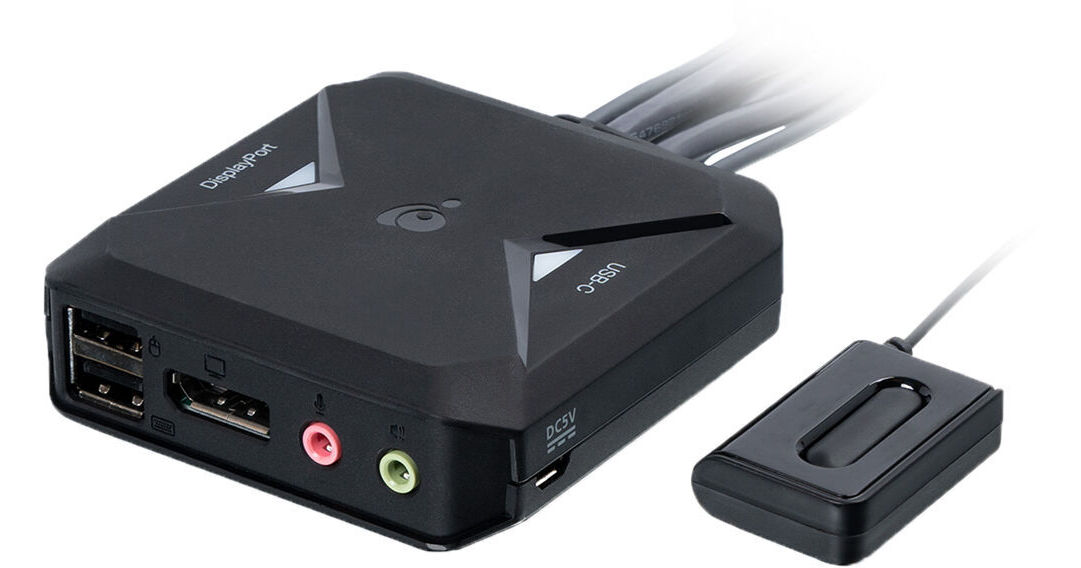
IOGEAR 2-Port 4K KVM Switch

BH #IOGCS82DPC • MFR #GCS82DPC
Print
IOGEAR 2-Port 4K KVM Switch
Key Features
  • Supports up to Two Systems
  • USB Type-A & DisplayPort Host Connection
  • USB Type-C System Connection
  • 3.5mm Audio Jacks & Connectors
Designed for those who need to quickly swap between multiple systems, the IOGEAR 2-Port 4K KVM Switch streamlines your desktop system, allowing you to conveniently control up to two computers from a single keyboard and mouse setup.
More Details
In Stock
No Store Display
$69.99
Free 2-Day Shipping
Protect Your Gear
Add a protection plan from $6.99
Ask an Expert
800-606-6969

IOGEAR GCS82 Overview

Designed for those who need to quickly swap between multiple systems, the IOGEAR 2-Port 4K KVM Switch streamlines your desktop system, allowing you to conveniently control up to two computers from a single keyboard and mouse setup.

Sporting a small footprint and integrated cable design, this KVM can easily rest on your desktop and provides you with an integrated remote so you can switch systems quickly. Two USB Type-A ports, DisplayPort video output, and dual 3.5mm audio jacks support your mouse, keyboard, display, and audio devices respectively. The KVM features two sets of cables. One set offers a DisplayPort, USB Type-A, and two 3.5mm audio connectors while the secondary set gives you a USB Type-C and two 3.5mm audio connectors, ideal for desktop and notebook setups. This KVM can support display resolutions up to 4096 x 2160 with a refresh rate up to 60 Hz, giving you a clear and smooth picture suitable for work and enjoying your favorite media.

USB Hub Support
You can easily expand the utility of the KVM by attaching a USB Type-A hub to one of the ports, allowing you to support devices like storage drives without connecting them directly to your systems. Hot-Swap design enables you to also remove and add peripherals without shutting down your connected devices.
Keyboard & Mouse Emulation
With keyboard and mouse emulation, you maintain a reliable connection when switching between your systems. This eliminates having to disconnect and reconnect all your peripherals every single time.
Plug & Play Design
You can use this KVM right out of the box without downloading an additional drivers or software thanks to its plug-and-play design. The bus-powered design enables you to set this device up quickly without taking up a power outlet.
Multi-Platform Support
You can use this KVM on a variety of devices using Windows, Mac, and Linux operating systems for optimal compatibility.
UPC: 881317520739

IOGEAR GCS82 Specs

Key Specs
# of Systems Supported
2
Console I/O
1x DisplayPort
1x USB-A
4x 1/8" / 3.5 mm
1x USB-C
KVM I/O
1x DisplayPort
2x USB-A
2x 1/8" / 3.5 mm
Supported Resolutions
4069 x 2160 @ 60 Hz
# of Systems Supported
2
Console I/O
1x DisplayPort
1x USB-A
4x 1/8" / 3.5 mm
1x USB-C
KVM I/O
1x DisplayPort
2x USB-A
2x 1/8" / 3.5 mm
Supported Resolutions
4069 x 2160 @ 60 Hz
USB Keyboard/Mouse Emulation
Yes
Operating Conditions
32 to 122°F / 0 to 50°C up to 80% Humidity
Storage Conditions
-4 to 140°F / -20 to 60°C
Rack Mountable
No
Material of Construction
Plastic
Cable Length
4' / 1.2 m (KVM)
6' / 1.8 m (Remote)
Packaging Info
Package Weight
0.95 lb
Box Dimensions (LxWxH)
7.8 x 6.6 x 2.3"

IOGEAR GCS82 Reviews

Pretty good mixed-use KVM

By David
Rated 5 out of 5
Date: 2025-04-22

This connects to my laptop with USB C, to my desktop with 3.5mm audio and HDMI, and out to my monitor with DisplayPort and my speakers. I can't run my desktop at 3840x2160 @60Hz, but it works at 30Hz. My desktop does detect the 60Hz mode, but the screen never comes off of black. My laptop does that resolution at 60Hz no problem. The problem with my desktop might be because I have to use an adapter from its mDP to the HDMI on this KVM. I like the ability to easily switch my keyboard, mouse, video, and audio with a single button.

Still trying to make it work

By Harlan
Rated 1 out of 5
Date: 2022-10-19

The usb C side works fine and sends video to the monitor properly- The Full-size Display Port cable input side fails to pass any kind of signal to the monitor- All output settings are within specifications - I'm looking for a firmware update before I give up

See any errors on this page?
Whatever You Need, We've Got It