Video Chat with a Pro Video Expert - Live

SmallHD Camera Control Kit for ARRI

BH #SM182001 • MFR #18-2001
Print
SmallHD Camera Control Kit for ARRI
Key Features
  • Control Select ARRI Cameras from Monitor
  • ARRI Camera Control Software License
  • For ALEXA 35, ALEXA Mini/LF, AMIRA
  • For Ultra 5/7 and Cine 7 Monitors
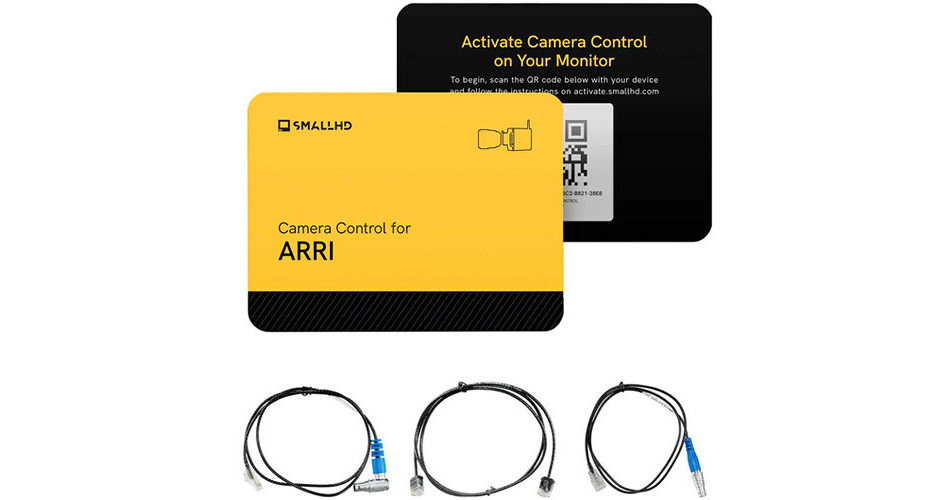
Control your ARRI ALEXA 35, ALEXA Mini, ALEXA Mini LF, or AMIRA cinema camera functions using your Ultra 5 or Cine 7 monitor with this Camera Control Kit from SmallHD. The kit includes a software license that provides full control via ARRI control protocol over your camera functions and settings, as well as two 10-pin LEMO-type to Ethernet camera control cables and an Ethernet patch cable. This software allows you to access and control all camera functions available, such as run/stop, playback, menu control, and more, via the SmallHD monitor touchscreen.
More Details
Special Order
Expected availability: 7-14 Business Days
No Store Display
This item cannot be canceled or returned.
Free Standard Shipping
Ask an Expert
866-839-7214

SmallHD Camera Control Kit Overview

Control your ARRI ALEXA 35, ALEXA Mini, ALEXA Mini LF, or AMIRA cinema camera functions using your Ultra 5 or Cine 7 monitor with this Camera Control Kit from SmallHD. The kit includes a software license that provides full control via ARRI control protocol over your camera functions and settings, as well as two 10-pin LEMO-type to Ethernet camera control cables and an Ethernet patch cable. This software allows you to access and control all camera functions available, such as run/stop, playback, menu control, and more, via the SmallHD monitor touchscreen.

Camera Control Access
  • Record/Start, Record/Stop, Playback Control
  • Set and Read TC; Set and Read Project Rate
  • Read and Set System Date/Time, Read Clip List from Medium
  • Camera Type, Camera Serial, Camera State
  • Look Filename, Color Temperature, Tint Variable
  • Exposure Index, Sensor FPS List, Sensor FPS
  • Shutter Angle List, Shutter Angle
  • Exposure Time List, Exposure Time, Exposure Index List
  • ND Filter List, ND Filter, White, Balance List
  • Media Status, Recording Mode, Clip Scene, Clip Take
  • Medium Type, Model, Name, Serial Number, Clip Count
  • Current Reel, Medium Size, Medium Status
  • Write Protection, Clip, Count, Current Reel
  • Free Capacity, Clip Filename, Clip UUID
  • Clip Project Rate, Clip Start TC, Clip Duration TC
UPC: 811786033607

SmallHD Camera Control Kit Specs

General
Compatibility
ARRI ALEXA 35 / ALEXA Mini / ALEXA Mini LF / AMIRA
SmallHD Cine 7 / Ultra 5 / Ultra 7
Inputs/Outputs
Connector 1
1x 10-Pin Male
1x RJ45 Ethernet Male
Connector 2
1x RJ45 Ethernet Male
Physical
Cable Length
36" / 91.4 cm (10-Pin to Ethernet Cable)
Packaging Info
Package Weight
0.275 lb
Box Dimensions (LxWxH)
5.7 x 4.05 x 3.05"

SmallHD Camera Control Kit Reviews

Doesn't work with the BIG 6 Firmware Update

By Brandon
Rated 1 out of 5
Date: 2026-07-08

Don't buy this for the FX6. It doesn't work. SmallHD has admitted as much (google it). I'm sure it's Sony's fault, but your dreams of touch focus will be dashed. Save yourself an afternoon of trying EVERYTHING to make it work.

Works great but one glitch

By Steve
Rated 4 out of 5
Date: 2025-01-30

Works great, like having a dedicated RED monitor. Only glitch is that through the USB/serial port there is a few second delay for the record indication to light up. Small HD told me its due to REDs older usb connection. The work around is to add a SDI overlay and you can add a record indicator which shows up immediately.

See any errors on this page?

The description and compatibility says that the ...

The description and compatibility says that the indie 7 is compatible but it doesn't have an ethernet port. Will it work?
Asked by: Kaleb
The SmallHD Camera Control Kit for ARRI is only compatible with the Ultra 5, Ultra 7, Ultra 10, and Cine 7 SmallHD displays and not the Indie 7.
Answered by: Chris H
Date published: 2025-07-24

Does the camera control feature work only if Cine ...

Does the camera control feature work only if Cine 7 is hard-lined to the camera itself, or can it be controlled wirelessly?
Asked by: Shun
Wireless controls with the SmallHD Camera Control Kit for ARRI require a hardwired connection.
Answered by: Elliot
Date published: 2024-08-29

Does this allow for users to format cards?

Does this allow for users to format cards?
Asked by: Mitchel
Media formatting is not supported by the SmallHD Camera Control Kit for ARRI.
Answered by: Elliot A
Date published: 2025-03-04

Will this work with the 702 touch? Will it allow ...

Will this work with the 702 touch? Will it allow control of the Alexa 35?
Asked by: Theodore
This cable also won't fit into the ARRI Alexa 35 because of the right angle direction.
Answered by: Eric
Date published: 2023-06-10

Can this work with the SmallHD 702 Touch?

Can this work with the SmallHD 702 Touch?
Asked by: Andrew
Yes it will.
Answered by: Nick Y
Date published: 2022-05-25

Will this work with the FX3 and/or FX2?

Will this work with the FX3 and/or FX2?
Asked by: Jon C
The SmallHD Camera Control Kit for Sony BURANO, FX6, VENICE 1 & 2 (Ultra 5, 7, 10, Cine 7) (B&H# SM182012) is only for the Sony BURANO, FX6, VENICE 1 & 2. Unfortunately, there is currently no option for the Sony FX3, FX3A, or FX2.
Answered by: Yoni S
Date published: 2026-05-27

will this work with sony burano?

will this work with sony burano?
Asked by: Alex
Yes, the SmallHD Camera Control Kit for Sony BURANO, FX6, VENICE 1 & 2 (Ultra 5, 7, 10, Cine 7) can be used with the Sony BURANO.
Answered by: Kenneth C
Date published: 2025-12-21

Cable length?

Cable length?
Asked by: Manuel
The SmallHD EXT 9-Pin to 5-Pin USB Camera Control Cable for RED KOMODO (18") included with the SmallHD Camera Control Kit for RED RCP2 KOMODO/DSMC3 Cameras is 18 inches.
Answered by: Richard
Date published: 2022-08-18
  • y_2026, m_7, d_20, h_7CST
  • bvseo_bulk, prod_bvqa, vn_bulk_3.0.48
  • cp_1, bvpage1
  • co_hasquestionsanswers, tq_20
  • loc_en_US, sid_1742778, prod, sort_[SortEntry(order=HAS_STAFF_ANSWERS, direction=DESCENDING)]
  • clientName_bhphotovideo
Whatever You Need, We've Got It