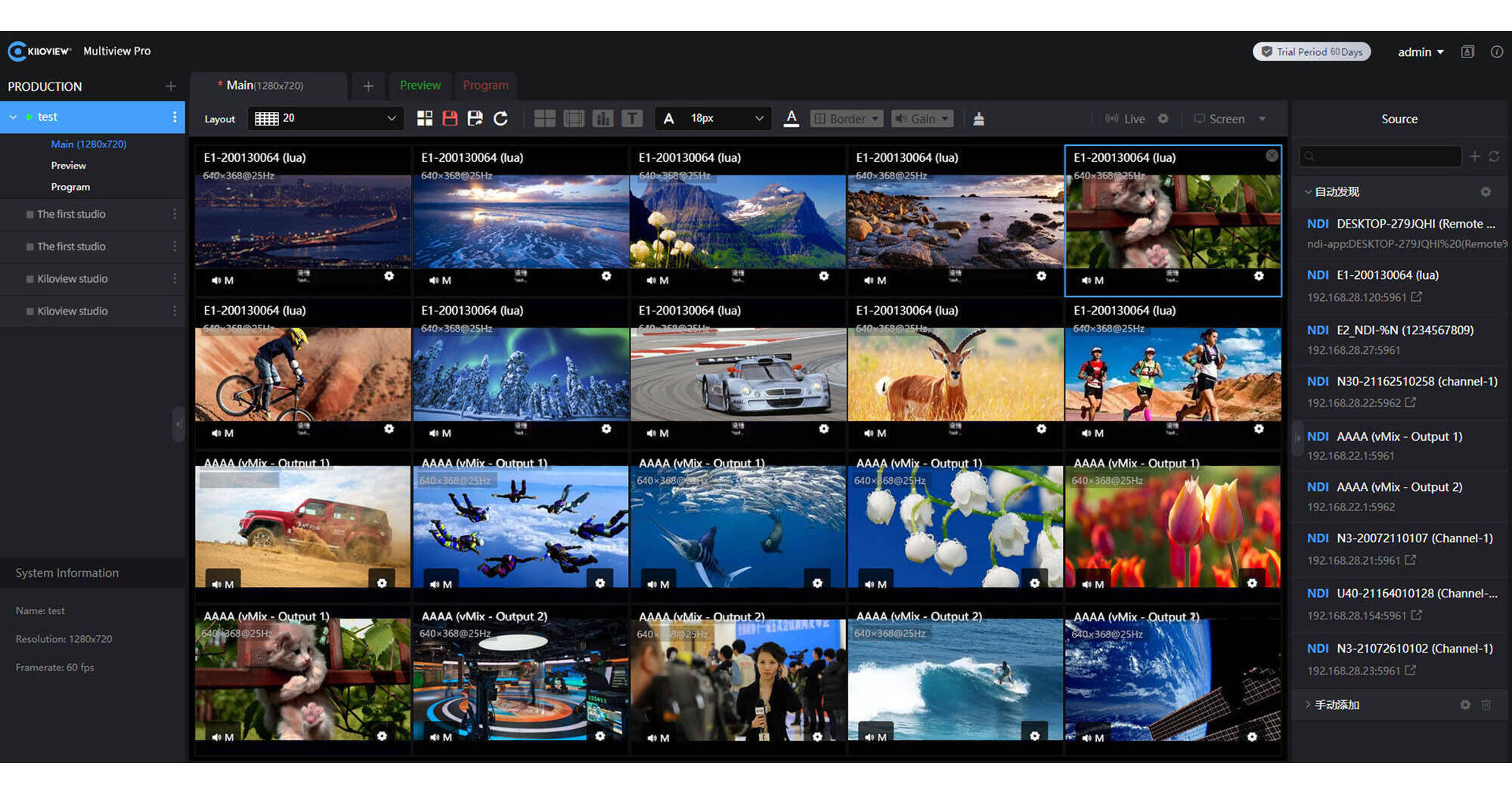
Centralize the management of multiple NDI streams with real-time monitoring and switching using the Multiview Pro for macOS from Kiloview. Unlimited NDI sources are supported with the capability of decoding multiple channels of Full NDI, NDI|HX2, and NDI|HX3 video streams in resolutions up to 4K60. Boasting professional video tools, such as VU metering, safe areas, center cross, and custom names with control of name visibility and screen border, the software is ideal for use in a TV studio, reality TV programming, and multicamera PTZ conferences.
System Requirements
- Storage: 1TB SSD (recommended)
- CPU: i7-11700 or 8-core, 16-thread CPU
- Memory: 32GB DDR4 RAM
- Network adapter: Intel X520-DA2 or 10G dual SFP+ NIC
Intuitive UI Design with Fully Managed Permissions
Perform flexible switching and control your production with fully customizable projects, programs, cameras, layouts, and more. You're in control with advanced permission control by user, group, or project.
Tally Control with Enhanced Flexibility
Easily set each screen in Preview (PVW) mode or Program (PGM) mode to control the tally status of your NDI streams. Real-time switching between Preview and Program mode with tally signal helps maximize the flexibility of the video production.
No Limit for Added NDI Sources
Add up to 20 NDI streams per screen, and unlimited screens per Multiview Pro player in NDI, NDI|HX2, and NDI|HX3, limited only by server performance. The system automatically adjusts the NDI input to either the main or sub stream.
Custom Layouts with Drag and Drop
Monitor multiple Full NDI, NDI|HX2, and NDI|HX3 sources using Multiview Pro as a multi-window screen, with PiP (Picture in Picture), PBP (Picture by Picture) or 1/2/3/4/5/6/7/8/9/16/20 grids. Fully customizable layout with simple drag and drop with video thumbnail, name and resolution, width, height, and horizontal and vertical alignment.
Remotely Switch Displays
Multiview Pro allows you to switch videos among multiple screens remotely. You can send different videos from the main screen or display them on another screen with one click, manually or automatically. Plus, every video can be output by NDI for transmission.
Customizable Resolution and Frame Rates
Multiview Pro can mix the multi-window video flows into NDI streams as NDI sources to your local network with custom resolutions and frame rates.