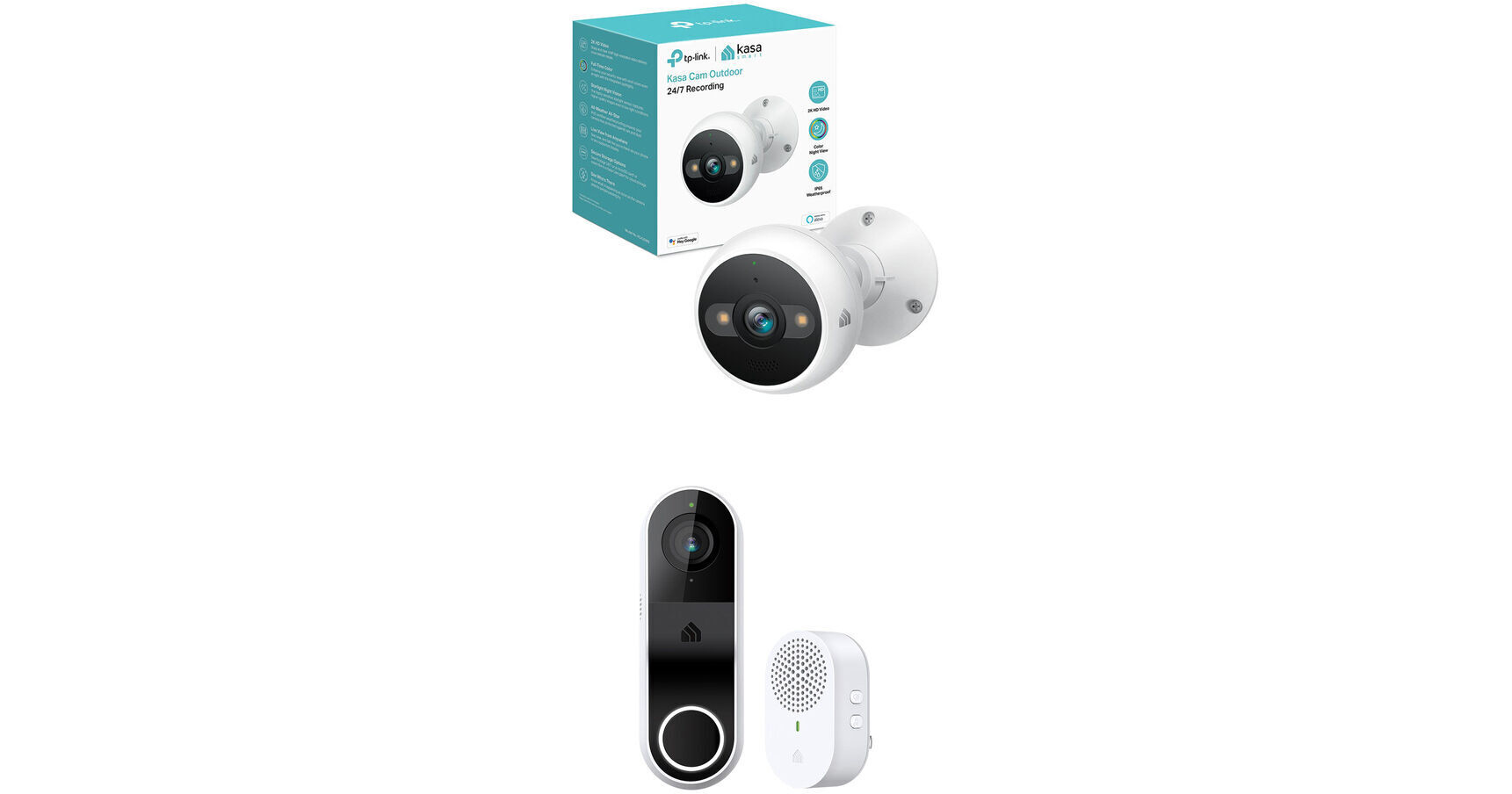
TP-Link KC420WS Kasa Cam Outdoor 4MP Wi-Fi Security Camera with KD110 Kasa Smart Doorbell

BH #TPKC420WSDBK (B&H Kit)
Print
TP-Link KC420WS Kasa Cam Outdoor 4MP Wi-Fi Security Camera with KD110 Kasa Smart Doorbell
Key Features
  • 2560 x 1440 Camera Resolution
  • 2304 x 1296 Doorbell Resolution
  • Camera Night Vision up to 98'
  • 110° Field of View for Camera
This B&H Kit includes a TP-Link KC420WS Kasa Cam Outdoor 4MP Wi-Fi Security Camera bundled with a KD110 Kasa Smart Doorbell to monitor an outdoor area and your front door.
More Details
In Stock
Free 2-Day Shipping
Protect Your Gear
Add a protection plan from $16.00
Ask an Expert
800-606-6969
Kit Contains:

From Manufacturer

This B&H Kit includes a TP-Link KC420WS Kasa Cam Outdoor 4MP Wi-Fi Security Camera bundled with a KD110 Kasa Smart Doorbell to monitor an outdoor area and your front door.

TP-Link KC420WS Kasa Cam Outdoor 4MP Wi-Fi Security Camera with Night Vision & Spotlights

Monitor an indoor or outdoor area with the KC420WS Kasa Cam Outdoor 4MP Wi-Fi Security Camera from TP-Link. This unit uses a 1/3" starlight sensor to capture 2560 x 1440 resolution video. An IR LED provides up to 98' of night vision, while two spotlights provide illumination for recording full color video as well as deterrence of unwanted activity. Additionally, a siren keeps intruders and unwanted guests at bay. The camera's 3.18mm fixed lens delivers a 110° field of view. Two-way audio is possible thanks to a built-in microphone and speakers. A memory card slot accepts microSD cards up to 256GB (available separately).

The Kasa Smart app for iOS and Android enables remote viewing and management. Users will be able to stream live video to displays that support Amazon Alexa or Google Assistant. The camera is housed in an IP65-rated enclosure that is suitable for outdoor use.

Features
Motion, person, and sound detection
Receive instant notifications via Kasa Smart app for iOS and Android
Create customizable trigger zones for alerts from pertinent areas
Dual spotlights and siren to deter intruders
Voice commands via Amazon Alexa and Google Assistant
Live video can be streamed to any Amazon Alexa or Google Assistant supported display
Compatible with IFTTT and Samsung SmartThings
802.11b/g/n Wi-Fi standards
128-bit AES encryption with SSL/TLS
WEP and WPA/WPA2-PSK wireless security
Reset button
LED indicators for status
Cloud storage available via optional Kasa Care Plan subscription
UPC: 840030702433
TP-Link KD110 Kasa Smart Doorbell

Monitor your front door with the KD110 Kasa Smart Doorbell from TP-Link. This Wi-Fi doorbell can be powered by existing doorbell wiring to capture 2304 x 1296 resolution video at 15 fps. It features up to 15' of night vision, a 160° diagonal field of view, and two-way audio thanks to a built-in microphone and speaker.

The Kasa Smart app for iOS and Android enables remote viewing and management. Users will be able to stream live video to displays that support Amazon Alexa or Google Assistant. The doorbell is housed in an IP64-rated enclosure for protection from water and dust.

Features
Hardwired installation uses existing doorbell wiring for power
Quick and easy DIY installation
Indoor chime included
Chime equipped with built-in speaker and features eight ringtones
Voice commands via Amazon Alexa and Google Assistant
Live video can be streamed to any Amazon Alexa or Google Assistant supported display
Compatible with IFTTT and Samsung SmartThings
Motion and person detection
802.11b/g/n Wi-Fi standards
128-bit AES encryption with SSL/TLS
Reset button
LED indicators for status
Cloud storage via optional Kasa Care Plan subscription
UPC: 840030707339
Kit Contains:

TP-Link KC420WS Kasa Cam Outdoor 4MP Wi-Fi Security Camera with Night Vision & Spotlights

Key Specs
Image Sensor
1/3"-Type
Field of View
Horizontal: 110°
Wireless
Wi-Fi 4 (802.11n)
Built-In Microphone
Yes
Smart Home Ecosystems
Amazon Alexa, Google Assistant, Samsung SmartThings
Power I/O
1x Barrel Input
Imaging
Image Sensor
1/3"-Type CMOS
Effective Sensor Resolution
4 Megapixel
Exposure Control
Minimum Illumination
0 Lux (Black and White)
Lens
Focal Length
3.2mm
Max Digital Zoom
8x
Field of View
Horizontal: 110°
Maximum Aperture
f/1.6
Video
Max IP Streaming
via RJ45
2560 x 1440 up to 15 fps
Networking
Frequency Range
2.4 GHz
Cellular Support
No
Wireless
Wi-Fi 4 (802.11n)
Interface
Media/Memory Card Slot
Single Slot: microSD/microSDHC/microSDXC [256 GB Maximum]
1- or 2-Way Audio
Two-Way
Built-In Microphone
Yes
Built-In Speaker
Yes
System Integration
Smart Home Ecosystems
Amazon Alexa, Google Assistant, Samsung SmartThings
Analytics
Audio Detection, Motion Detection, People Detection
Sensors & Alarms
Sensors
Motion Detection
Night Vision
Sound
Sensor Range
IR: 98' / 29.9 m
Event Trigger
Yes
Event Action
Recording, Notification, Alarm
Power
PoE Support
Yes
Power I/O
1x Barrel Input
Power Consumption
Power Supply:
Environmental
Operating Conditions
-4 to 109°F / -20 to 42°C at 10 to 95% Humidity
Environmental Resistance
Dust/Water-Resistant (IP65)
General
Certifications
FCC (Part 15 Class B)
Illumination
IR LEDs up to 98' / 29.9 m
2x 3000K LED Spotlights
OS Compatibility
Android/iOS
Dimensions (W x H x D)
4.97 x 2.77 x 2.77" / 126.24 x 70.36 x 70.36 mm
Packaging Info
Package Weight
0.895 lb
Box Dimensions (LxWxH)
7 x 6.7 x 4.3"

TP-Link KC420WS Reviews

Second Camera Of This Specific Model

By Louis
Rated 5 out of 5
Date: 2025-11-05

I Have Several Kasa Cams And Very Pleased. This Is The 2nd KC420 That I Bought And It Works Great! Definitely Recommend

SW can be improved, but great

By Eric
Rated 4 out of 5
Date: 2022-06-10

KASA software could be improved. Activity zones are useless as activity outside the zones still generates alarms. Other few glitches, but overall great product. Cheap, easy to install and fast delivery as always from B&H.

See any errors on this page?

power adapter voltage 110-220?

power adapter voltage 110-220?
Asked by: Edward
Hi! Yes, the included power adapter for the KC420WS Kasa Cam supports 100 - 240V, 50/60Hz.
Answered by: TPLinkSupport
Date published: 2023-05-09

How can I access videos stored on the sd card?

How can I access videos stored on the sd card?
Asked by: Glenn
Hi! You can use the Kasa app to access the video stored on the Micro SD card.
Answered by: TPLinkSupport
Date published: 2023-10-25

Does the camera require fixed IP to be accessed ...

Does the camera require fixed IP to be accessed remotely?
Asked by: Mihail
Hi! To access the camera remotely, it will need to be set up on an Internet-enabled, encrypted, 2.4GHz Wi-Fi network, and associated with a Kasa account that you create during the setup process. Once the camera is set up and connected to the Internet, you can manage/view it via the Kasa app on your smartphone, wherever your smartphone has Internet connectivity.
Answered by: TPLinkSupport
Date published: 2022-06-21

Does this device provide a way to view the live ...

Does this device provide a way to view the live camera images from a PC? In a web browser maybe?
Asked by: Bill
compatible with Amazon google nest security cam?
Answered by: June
Date published: 2023-11-22

Is there 2-days of cloud storage of motion ...

Is there 2-days of cloud storage of motion detected events without subscription like with the KC200?
Asked by: Yuri
Hi! For activity-based recording and cloud storage, a Kasa Care subscription plan is required. Alternatively, you can install a micro SD card (not included) to store video locally on the camera.
Answered by: TPLinkSupport
Date published: 2022-05-10

Is it battery powered?

Is it battery powered?
Asked by: Andrew
No, the KC420WS is powered via the included power adapter and power cord, which must be plugged into a power outlet.
Answered by: TPLinkSupport
Date published: 2022-11-10

Can spotlights and siren be turned off?

Can spotlights and siren be turned off?
Asked by: Donna
Yes.
Answered by: TPLinkSupport
Date published: 2024-08-12
  • y_2026, m_6, d_10, h_10CST
  • bvseo_bulk, prod_bvqa, vn_bulk_3.0.46
  • cp_1, bvpage1
  • co_hasquestionsanswers, tq_7
  • loc_en_US, sid_1804728, prod, sort_[SortEntry(order=HAS_STAFF_ANSWERS, direction=DESCENDING)]
  • clientName_bhphotovideo
Whatever You Need, We've Got It