Video Chat with a Pro Video Expert - Live

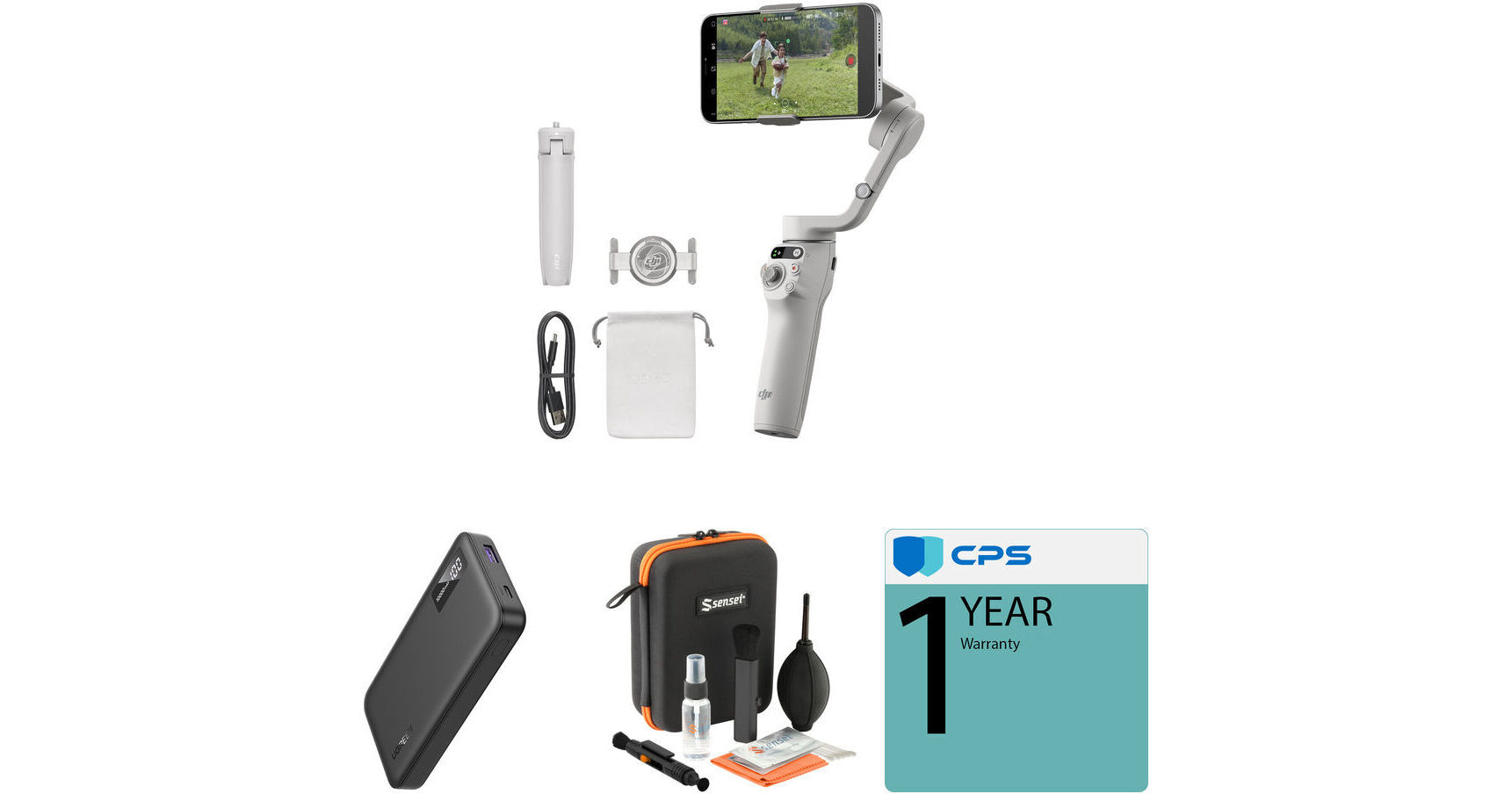
DJI Osmo Mobile 6 Smartphone Gimbal with Power Bank & Optics Cleaning Kit (Platinum Gray)

BH #DJOM6PGACK (B&H Kit)
Print
DJI Osmo Mobile 6 Smartphone Gimbal with Power Bank & Optics Cleaning Kit (Platinum Gray)
Key Features
  • Osmo Mobile 6 Smartphone Gimbal
  • Quick-Charging Power Bank
  • Jupio CableBuddy 6-in-1 Keyring Cable
  • Optics Care and Cleaning Kit
The DJI Osmo Mobile 6 Smartphone Gimbal with Power Bank & Optics Cleaning Kit from B&H equips you with a gray smartphone gimbal, a high-capacity power bank, a 6-in-1 cable adapter, and an optics cleaning kit to keep your footage free of debris. Capture smooth video footage for social media on long shooting days with ease.
More Details
In Stock
No Store Display
$149.94
Free Standard Shipping
Ask an Expert
866-264-7509
Kit Contains:
DJI Osmo Mobile 6 Smartphone Gimbal (Platinum Gray)
Improving on the previous OM 5 gimbal stabilizer, the DJI Osmo Mobile 6 Smartphone Gimbal stabilizer comes in an even more compact frame that's easier to balance and fold down, and it now features an extension rod that provides an additional 8.5" length to help design more creative shots. It also comes with an improved magnetic phone clamp that allows the gimbal to automatically detect your phone and aligns the clamp. You can mount any smartphone up to 3.3" wide in its phone cradle, and its magnetic phone holder allows for simple and fast mounting and unmounting. The integrated intelligent sensor even tells you when your smartphone is mounted. The built-in battery runtime is approximately 6.4 hours, and it takes approximately 1.4 hours to charge using the included USB-C cable. The bottom of the gimbal handle features a mounting thread to mount the gimbal on the included grip tripod or other accessories. A storage pouch is also included to store and transport the gimbal.
Firmware Update
A new firmware update adds support for remote control using your Apple Watch. Users can view the camera feed, control gimbal direction, adjust composition, switch between portrait and landscape modes, and enable ActiveTrack remotely, all from their watch. ActiveTrack has been optimized for better detection in crowded spaces or at higher speeds. Pet tracking for both cats and dogs is also improved. The DJI Mimo app has been expanded to include an AI Editor with Parent-Child Mode to capture two subjects simultaneously. The video is then automatically edited and generated in the app once completed.
Quick Launching Device
Start up the Osmo Mobile 6 by unfolding it and attaching your smartphone via a magnetic clamp to begin shooting. No need to remove your phone from its case, the upgraded clamp supports phones measuring up to 3.3" wide. A built-in intelligent sensor and automatic alignment detect your phone and adjust the gimbal accordingly for optimal balance.
3-Axis Stabilization and ActiveTrack 6.0
The Osmo Mobile 6 features improved stability for longer distances using the updated ActiveTrack 6.0, which can automatically track body shapes to track human subjects without needing to make a manual selection. Track subjects even after they leave the frame using automatic zooming and gimbal movements for continuous filming. Embedded stabilization technology creates shots free of shaking or distortion due to your terrain.
Compact, Extendable Form Factor
  • Film with low-angle or high-angle perspectives
  • Extension rod for additional 8.5" length
  • Ultracompact, foldable design with redesigned comfort handgrip
  • 1/4"-20 tripod mounting thread, grip tripod included
Quick Switch to Portait Orientations
Native switching from portrait to landscape orientations is supported by the gimbal. Simply double-click on the switch button to toggle and easily transition from vlogging to selfies or TikTok videos.
Intuitive Onboard and Gesture Controls
  • Onboard controls include an integrated joystick and other buttons on the handle grip. A system status indicator displays the battery level and gimbal mode.
  • A side wheel allows you to adjust the focal length and zoom in/out on your smartphone via Bluetooth 5.1 connectivity.
  • Controllable range: -161.64 to 173.79° pan / -120.30 to 211.97° roll / -101.64 to 78.55° tilt
  • Controllable speed: 120°/s max
  • You can also use hand gestures to control the gimbal to track your movement, take a selfie, or start/stop your smartphone camera, so you don't have to press the record button or touch any controls.
Creative Gimbal Shooting Modes
  • Time-lapse, motion-lapse, and hyper-lapse modes manipulate time and space in your footage.
  • DynamicZoom moves inward or outward to get stretching and compressing effects and create dynamic shots.
  • Three panoramic modes—3x3, 240°, and CloneMe—capture vast expanses.
DJI Mimo App
  • ActiveTrack 6.0 technology built into the app allows the Osmo Mobile 6 to automatically keep your phone facing you as you move
  • Body shape recognition for more accurate tracking of a person
  • New Sport mode for faster movements
  • Modes/Functions: Standard, Portrait, Underslung, Flashlight, Time-Lapse, Hyperlapse, and Panorama
  • Live stream moments using YouTube Live
  • Take one-second-long exposures to produce light trails, star trails, and dramatically blurred cars without a tripod
Compatibility
For a full list of compatible cameras, please see the most current compatibility information on the DJI website.
UPC: 190021090484
UGREEN PB311 USB-C Power Bank (10,000 mAh)

Keep your portable gear charged while you're out and about with the PB311 USB-C Power Bank from UGREEN. Equipped with a 10,000mAh lithium-ion battery, the PB311 comes with one 20W USB-C input/output that both charges your devices and recharges the power bank in up to 3 hours using a 20W AC adapter. There is also a 22.5W USB-A output that may be used for charging your mobile devices. Also supported are USB Power Delivery 3.0 and Quick Charge 3.0, while an integrated LED power indicator lets you keep an eye on the charger's status.

LED Indicator
An integrated LED indicator lets displays the power bank's charging status.
USB-A Output
The USB-A port provides a power output of up to 22.5W (5V/3A, 9V/2A, 12V/1.5A, 4.5V/5A, and 5V/4.5A).
USB-C Input/Output
The USB port provides a power outputs and inputs of up to 20W (5V/3A, 9V/2.22A, and 12V/1.67A).
Fast Recharging
This power bank may be recharged in up to 3 hours using a 20W charger.
Device Protections
  • Over-voltage protection
  • Short-circuit protection
  • Over-current protection
  • Over-charge protection
  • High temperature protection
  • Over-temperature protection
Compatible with Small Current Devices
200mA of charging power works well with small-current devices.
Compatibility
  • Apple iPhone 8 to 15
  • Samsung Galaxy 8 to 23, Note 20 Ultra, Z Fold 4
  • Google Pixel 3 to 7 and Sense 7
  • Xiaomi 13-10 and Redmi K40
  • iPad Pro, iPad Air, iPad mini, and iPad
  • Apple AirPods and AirPods Pro
  • Apple Watch
UPC: 850062221024
Sensei Deluxe Optics Care and Cleaning Kit

Keep your optical surfaces clean with the Sensei Deluxe Optics Care and Cleaning Kit. This kit includes a lens cleaning pen, a bulb air blower, a lipstick brush, cleaning fluid, premoistened lens cleaning wipes, a microfiber cloth, cotton swabs, and a durable case with precut foam to hold everything in place. The kit can be used to clean a variety of different optics and glass. Use the air bulb blower, either brush, or the microfiber cloth to initially remove dust from optics surfaces. For more stubborn blemishes and smudges, use the lens pen, premoistened lens cleaning wipes, cotton swabs, or large microfiber cloth.

UPC: 847628008410
Kit Contains:

DJI Osmo Mobile 6 Smartphone Gimbal (Platinum Gray)

Key Specs
Gimbal Design
Single Handgrip
Load Capacity
6 to 10.2 oz / 170 to 290 g
Number of Axes
Three: Pitch (Tilt) / Roll / Yaw (Pan)
Smartphone Dimensions
Width: 2.64 to 3.31" / 67 to 84 mm
Thickness: 0.3 to 0.4" / 6.9 to 10 mm
Smartphone Mounting Method
Magnetic Clamp
Display Type
No
Dimensions
7.4 x 3.9 x 3.3" / 189 x 99 x 84.5 mm (Folded)
10.9 x 4.4 x 3.9" / 276 x 111.5 x 99 mm
Weight
10.8 oz / 305 g
Gimbal Design
Single Handgrip
Gimbal
Load Capacity
6 to 10.2 oz / 170 to 290 g
Number of Axes
Three: Pitch (Tilt) / Roll / Yaw (Pan)
Rotation Range
Controllable Range
Yaw (Pan): -161.6 to 173.8° 
Roll: -120.3 to 211.9° 
Pitch (Tilt): -101.6 to 78.6° 

Mechanical Range
Yaw (Pan): 335.4° (-161.6 to 173.8°) 
Roll: 332.3° (-120.3 to 212°) 
Pitch (Tilt): 180.2° (-101.6 to 78.6°) 
Follow Speed
Pan: 120°/s
Tilt: 120°/s
Roll: 120°/s
Counterweight
No
Joystick Controller
No
Compatibility
Smartphone Dimensions
Width: 2.64 to 3.31" / 67 to 84 mm
Thickness: 0.3 to 0.4" / 6.9 to 10 mm
Smartphone Mounting Method
Magnetic Clamp
Connectivity
Inputs/Outputs
1x USB-C (5 VDC Power) Input
Wireless
Bluetooth 5.1
Mobile App Compatible
Yes: Android & iOS
Battery
Battery Type
Built-In (1000 mAh)
Battery Runtime
6.4 Hours
Battery Charging Time
1.5 Hours
Power
Operating Voltage
6.0 to 8.8 VDC
General
Display Type
No
Operating Conditions
32 to 104°F / 0 to 40°C
Accessory Mounting
1 x 1/4"-20 Female
Built-In Selfie Stick
No
Built-In Tripod
Yes
Dimensions
7.4 x 3.9 x 3.3" / 189 x 99 x 84.5 mm (Folded)
10.9 x 4.4 x 3.9" / 276 x 111.5 x 99 mm
Weight
10.8 oz / 305 g
Packaging Info
Package Weight
1.225 lb
Box Dimensions (LxWxH)
7.7 x 5.4 x 2.1"

DJI Mobile 6 Reviews

Great gimble, easy to use

By Molly
Rated 5 out of 5
Date: 2026-04-28

I used the DJI Osmo Mobile 6 for several video projects. It was easy to set up and use. This was my first time using a gimble so it took a little getting used to, but was pretty intuitive. The tripod is short but the handle connector is compatible with other tripod bases, which I did use to ad height. I never worried about battery life as it is very long lasting as I used it for several hours multiple days in a row. The one thing was that the gimble stopped working because I needed to update the DJI app which was hard to determine that as the issue, but once I updated the app it worked perfectly again. It also works great with your regular phone camera, although using the app allows you to use a few of the extra knobs on the handle, for zooming in and things.

Easy to use right away

By Alexandra
Rated 5 out of 5
Date: 2025-02-27

I was looking for something quick and portable instead of carrying around a phone tripod, and this is it. Everything is super easy to use and connects seamlessly to my phone. I was on the go trying to learn how to use it and everything is pretty intuitive. Excited to continue using it!

See any errors on this page?

Does the DJI Mobile 6 work with a Galaxy S24 ...

Does the DJI Mobile 6 work with a Galaxy S24 Ultra?
Asked by: Bob
Yes, the DJI Osmo Mobile 6 Smartphone Gimbal is compatible with the Samsung Galaxy S24 Ultra.
Answered by: Jonathan S
Date published: 2024-08-28

Is it compatible with Filmic Pro?

Is it compatible with Filmic Pro?
Asked by: Phil
It is not currently supported by Filmic Legacy (AKA Filmic Pro). I recently purchased this gimbal and was disappointed to find this. My old Osmo Mobile 3 is fully supported by Filmic Legacy.
Answered by: Shabbir
Date published: 2023-12-05

Does its clamps fit the Galaxy S23 Ultra with UAG ...

Does its clamps fit the Galaxy S23 Ultra with UAG Civilian case?
Asked by: Tam
I would expect the answer is No. The specs here list a gimbal width limit of 3.31 inches. The UAG website lists the width of the UAG Civilian Case for the Galaxy S23 Ultra as 3.34 inches.
Answered by: William
Date published: 2024-11-20

Can I share the video captured to my computer?

Can I share the video captured to my computer?
Asked by: Shawna
No, the DJI Osmo Mobile 6 Smartphone Gimbal itself cannot share video to the computer.
Answered by: Jonathan S
Date published: 2024-10-27

Is the Zoom-wheel function only available in the ...

Is the Zoom-wheel function only available in the DJI App? I want to use it in the Blackmagic Design App for Iphone 15 Pro.
Asked by: Paul
The DJI Osmo Mobile 6 Smartphone Gimbal (Black) has a zoom/focus wheel on the side of the gimbal, which can be used to control your phone's camera's zoom, but you will need to install the DJI Mimo App so that the gimbal can communicate with your phone, so you will not be able to use the Blackmagic app at the same time.
Answered by: Paige K
Date published: 2023-10-30

Does this gimbal have the ability to be used as a ...

Does this gimbal have the ability to be used as a tripod?
Asked by: Ana
Yes, The following gimbal system offers a 1/4 tripod socket.
Answered by: hectorm
Date published: 2023-12-25

Will it work with a iPhone 16 Pro max?

Will it work with a iPhone 16 Pro max?
Asked by: Bob
Yes, the DJI Osmo Mobile 6 Smartphone Gimbal (Slate Gray) is compatible with the iPhone 16 Pro Max.
Answered by: Jonathan S
Date published: 2025-06-05

Curious to know if anyone has used this with DJI ...

Curious to know if anyone has used this with DJI Mimo AND Blackmagic Cam installed on the phone? My guess is it would work.
Asked by: Ronald
Yes the MIMI app does support the Black magic camera application via Bluetooth when using the DJI Osmo Mobile 6 Smartphone Gimbal. The OSMO 6 supports stop/start recording - everything but zoom/focus from the side button.
Answered by: Chris H
Date published: 2024-03-28
  • y_2026, m_5, d_31, h_13CST
  • bvseo_bulk, prod_bvqa, vn_bulk_3.0.46
  • cp_1, bvpage1
  • co_hasquestionsanswers, tq_45
  • loc_en_US, sid_1818279, prod, sort_[SortEntry(order=HAS_STAFF_ANSWERS, direction=DESCENDING)]
  • clientName_bhphotovideo
Whatever You Need, We've Got It