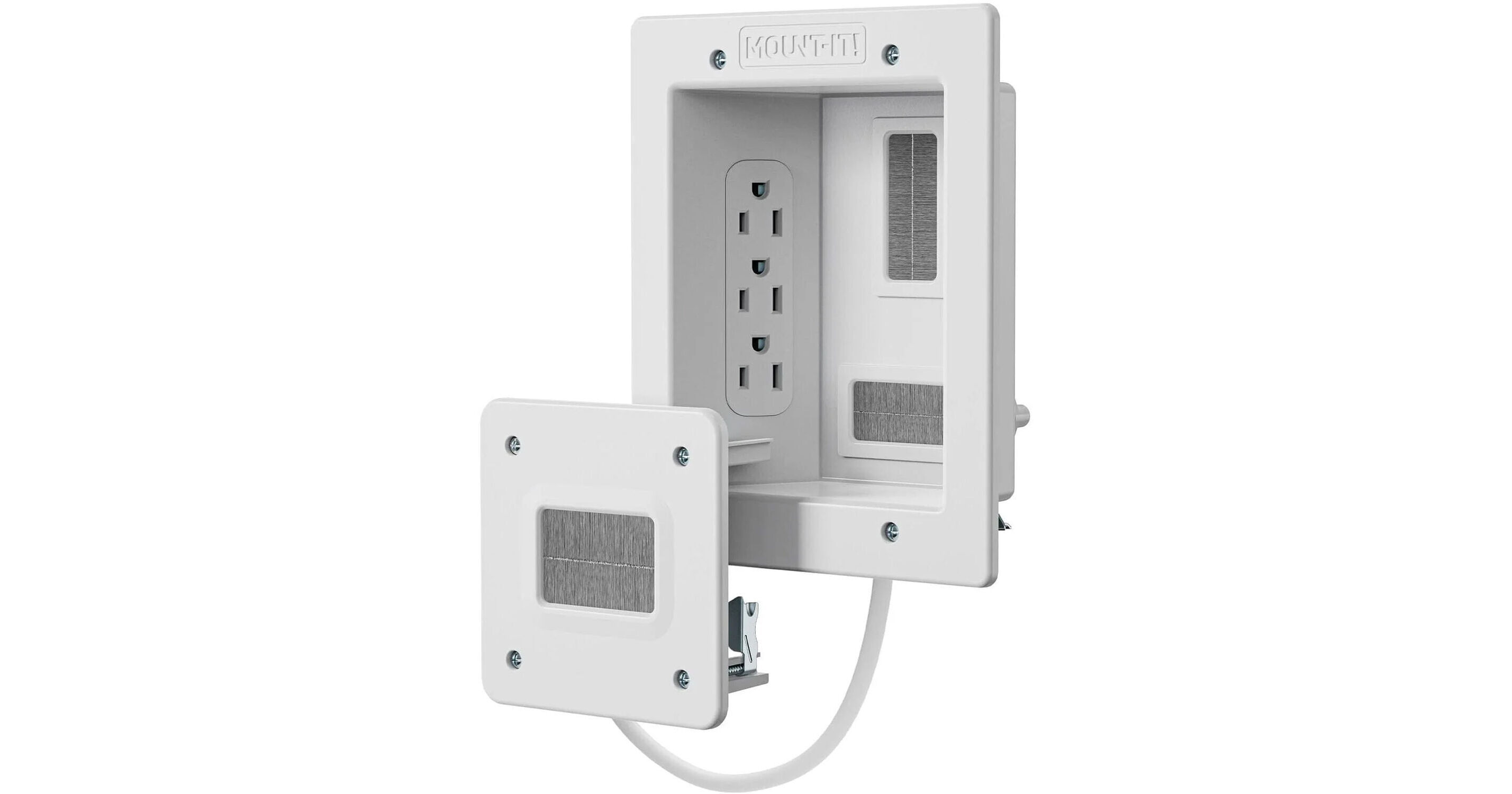
Mount-It! MI-7284 In-Wall TV Cable Concealer with Recessed Power

BH #MOMI7284 • MFR #MI-7284
Print
Mount-It! MI-7284 In-Wall TV Cable Concealer with Recessed Power
Key Features
  • 2-Piece In-Wall Kit for Hiding Cables
  • Onboard Triple-Outlet AC Power
  • Includes 9' Pre-Wired Power Cord
  • Brush Passthrough for Low Voltage Cables
The Mount-It! MI-7284 In-Wall TV Cable Concealer with Recessed Power is designed to help you create a clean and sleek entertainment space by hiding unsightly cables behind the wall. It provides recessed power for up to three devices and a long 9' pre-wired power cord, along with brush passthroughs to help conceal AV and other low voltage cables for a clutter-free setup.
More Details
In Stock
No Store Display
$66.99
Free 2-Day Shipping
Ask an Expert
800-952-1815

Mount-It! MI-7284 Overview

The Mount-It! MI-7284 In-Wall TV Cable Concealer with Recessed Power is designed to help you create a clean and sleek entertainment space by hiding unsightly cables behind the wall. It provides recessed power for up to three devices and a long 9' pre-wired power cord, along with brush passthroughs to help conceal AV and other low voltage cables for a clutter-free setup.

Additional Details
  • Quick and easy installation with all required tools included
  • ETL certified to meet industry safety and quality standards
UPC: 810041738561

Mount-It! MI-7284 Specs

Inputs/Outputs
Power I/O
3 x NEMA 5-15R 120V AC Outputs
Power
Power Source
AC Input (Built-In)
AC Input Power
120 VAC, 60 Hz
Physical
Color
White
Certifications
ETL
Cable Length
9' / 2.7 m (Pre-Wired Power Cord)
Dimensions
7.9 x 6.3 x 2.4" / 200.7 x 160 x 61 mm (Upper In-Wall Box with Outlets)
4.5 x 4.5 x 1.9" / 114.3 x 114.3 x 48.3 mm (Lower In-Wall Cable Passthrough)
Packaging Info
Package Weight
2.51 lb
Box Dimensions (LxWxH)
13.5 x 9.6 x 2.8"

Mount-It! MI-7284 Reviews

Super easy and very happy

By CordlessJoe
Rated 5 out of 5
Date: 2025-12-04

Super easy to install, no more cords! I used a multitool/oscillating saw instead of the handsaw they provided but I’m sure that would have worked just fine as well. Had everything done in 10-15 minutes. Most of the time was just deciding the location then trace the template, cut the holes, and the the screws work like drywall anchors and don’t actually screw into anything. Super happy with it.

The perfect system to "float" your TV

By David in 12529
Rated 5 out of 5
Date: 2024-11-20

We had a brand new 55" TV that I wanted to mount on the LR wall, but NOT have all the cables hanging below. I actually put the main plate in the LR and the secondary plate in the adjacent room, so the receiver and DVD player are out of sight. This option was possible because my remotes are radio frequency (so can transmit through walls) not InfraRed (which would need a repeater.) Installation requires above average DIY skills. I actually cut out a 18"X36" section of sheetrock so that I could get sufficient access for running cables (old house with non standard stud alignment.) After I made enough room, I cut a templated hole into a new piece of sheetrock for the main plate, passed the power supply through, cut off the plug and wired directly to the house service. I also ran 2 HDMI cables (one for receiver, one for DVD player) through both plates. The sheet rock was then screwed in place, joints taped, joint compound applied, smoothed, primed and painted. The TV was attached with a swing arm, just floats off the wall. The final job looks amazing!

See any errors on this page?

Do I need to run a conduit or something for the ...

Do I need to run a conduit or something for the cords to go in, or does it just open to the void in the wall?
Asked by: Andrew
You do not need to run a conduit for the Mount-It! In-Wall TV Cable Concealer with Recessed Power, as the system relies on the void inside your wall.
Answered by: JP A
Date published: 2025-08-31
  • y_2026, m_6, d_7, h_12CST
  • bvseo_bulk, prod_bvqa, vn_bulk_3.0.46
  • cp_1, bvpage1
  • co_hasquestionsanswers, tq_1
  • loc_en_US, sid_1820378, prod, sort_[SortEntry(order=HAS_STAFF_ANSWERS, direction=DESCENDING)]
  • clientName_bhphotovideo
Whatever You Need, We've Got It