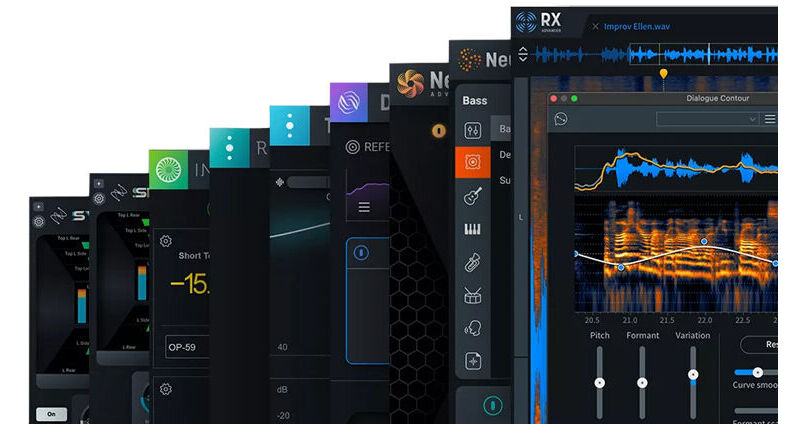


Designed for audio engineers and video editors, the iZotope RX Post Production Suite 7.5 is a complete set of audio postproduction tools that will take your production to the next level. The suite includes RX 11 Advanced, Neutron 4, Dialogue Match, Nectar 4 Advanced, Insight 2, Relay, Melodyne 5 Essential, Stratus 3D, Symphony 3D, and Tonal Balance Control 2.
This license upgrade is for registered owners of RX Post Production Suite 7.5.
Audio engineers and video editors in need of a complete audio restoration tool set will be impressed with iZotope RX 11 Advanced, the latest update to their audio repair software, which is considered a staple within the recording, mastering, audio-for-video, and postproduction communities. The software can operate either as a standalone application or a plug-in for both Mac- and Windows-based DAWs and NLEs. From fixing common audio problems like noises, distortions, and inconsistent recordings, to repairing severely damaged audio using Spectral Repair, the software can transform previously unusable audio into something usable.
The advanced edition of RX 11 features new state-of-the-art neural networks that supercharge the machine-learning algorithms, enabling real-time, low-latency processing for Dialogue Isolate, the highest quality stem separation for Music Rebalance, and improved intelligence and speed for Repair Assistant. iZotope also added an industry-first Loudness Optimize tool alongside the new Streaming Preview, so you can release tracks in confidence—major upgrades to their Audio Random Access (ARA) processing for a seamless workflow. All previous modules are in place for RX 11 including multichannel support, high-quality resampling, dithering, and the rest of RX's classic features. As always, RX 11 can be used as a standalone audio editor (including standalone but connected to your host via RX Connect, or as your DAW's audio editor in the case of Logic Pro), although much of it can be used as a suite of plug-ins in any DAW.
- New and Improved Dialogue Isolate: iZotope overhauled Dialogue Isolate, adding in Dialogue De-reverb and state-of-the art machine learning that enables lightning-fast (real time) processing. Now you can de-noise dialog or vocals and control reverb in one easy-to-use module (also available as part of RX 11 Standard for the first time). The Advanced version includes a brand-new high-quality offline processing mode with multiband processing.
- New Streaming Preview: There’s no worse feeling than putting heaps of time into a track only to be disappointed with how it sounds on streaming services—so here comes Streaming Preview. Now you can hear your tracks the way the rest of the world hear them and release with confidence.
- New Loudness Optimize—Tracks still sounding quiet at maximum loudness? Analyze any opportunity for improvement with the smart Learn function, and automatically adjust your tracks with Loudness Optimize. Just export your new master, and you’re ready for release.
- Improved Music Rebalance: Easily reanimate an existing mix, prep for a remix, or create instrumentals and vocal stems with Music Rebalance. Shape your sound with laser focus thanks to Music Rebalance’s improved stem separation, featuring upgraded machine-learning based on the most modern neural network available. (Included in Standard and Advanced.)
- Improved Repair Assistant: Clean up tracks faster than ever with enhanced precision. Polish dialog and vocals with ease thanks to new machine-learning tech, and make final tweaks with deeper controls. The next-generation Repair Assistant goes from trusty helper to lifesaver.
- Improved Dialogue Contour: Adjust the character and expressivity of a voice with new levels of control in Dialogue Contour, ensuring that dialog edits flow seamlessly. Take care of frankenbites with ease, no matter how many takes you need to stitch together for a perfect delivery.
- New Mid/Side Mode: Visualize and process your stereo image with new Mid/Side mode in RX’s main window.
- New Audio Devices Refresh: Refresh audio devices in preferences without having to quit and restart RX.
It is designed to separate spoken dialog from nonstationary background noise such as crowds, traffic, footsteps, weather, or other noise with highly variable characteristics. It can be particularly effective at increasing the level of dialog in challenging low-signal-to-noise-ratio conditions.
There are two Quality settings:
- Good: for faster high-quality processing that is optimized for speed over separation
- Best: for higher quality processing with fewer artifacts and better isolation at the cost of a longer processing time
You can also use the legacy Dialogue Isolate algorithm from before version 9. Choose this in the settings.
In Static mode, you can target hum with a fundamental tone and the 16 harmonic bands above it. In Dynamic mode, RX can learn and remove any amount of hum with up to 1024 dynamically variable notch filters.
Seamlessly connect dialog and ADR cuts with real background movement and textures with Complex mode, allowing you to quickly match ambiences never before possible: ocean, wind, traffic, crowds, and more. Or, use Static mode to match stationary ambiences like a quiet room with a soft hum.
When hovering your cursor over an item in the History list with a selection made in the spectrogram, an icon appears in line with the text. Clicking this icon will restore your selection to that point in its history. This is the same as going back to that point in undo history, except for your current selection.
- De-plosive eliminates every plosive from any dialogue track with transparency
- Leveler smooths any volume inconsistencies with an automatic clip-gain envelope; leveler is optimized for dialogue using intelligent De-breath and De-ess algorithms
- Instant Process tool is a one-click eraser for removing unwanted coughs, scene-interrupting sirens, and more
- Module Chain can process multiple modules at once, save your customized chains as presets, and execute them all with a single click, enhancing workflow and reducing mouse clicks
- Sync and integrate the RX Audio Editor with any DAW or NLE timeline using RX Connect
- Corrective EQ for removing harsh high frequencies, whines, rumbles, resonances, and distortion artifacts, and for accurately homing in on any problem-frequency areas
- Problem-oriented presets across several modules
- Signal Generator creates accurate test tones, calibration tones for postproduction delivery specs, and bleep tones for eliminating obscenities in dialogue
- Markers and regions (search) provide greater flexibility for those longer edits, with the ability to perform text-based searches of any markers, regions, and comments in the metadata of the audio
- Turn flawed audio into usable material by removing noises, distortions, and more
- Edit audio with visual editing techniques using precision drawing tools, such as a brush and magic wand
- Salvage unusable material by filling in audio gaps instantly with Spectral Repair
- Seamlessly integrates with audio- or video-editing software, both as a standalone application or plug-in
- EQ Match allows for quickly learning the EQ of a source audio clip and applying that EQ curve to a target audio clip, enabling sonic balance and smooth transitions between multiple audio sources with different EQ qualities
- Ambience Match for matching the environment noise of two different audio recordings
- Learn the ambient noise from a source audio clip, apply it to another audio clip, and create long sections of constant ambient noise to insert under inconsistent dialogue recordings
- High-quality resampling using the SRC sample-rate conversion algorithm
- Reduce bit resolution for final delivery of a project without sacrificing quality with the MBIT+ Dither algorithm
- Rebuild distorted audio caused by analog and digital overload, and get through projects faster with the automatic Suggest feature
- Spectrum Analyzer delivers a detailed spectral display that detects peaks automatically
- Adaptive Hum Removal notches out fundamental hum frequencies that may change over time, like when recording a shot in multiple locations
- Nondestructive Clip Gain allows you to easily adjust and balance the volume of vocals and instrumentals
- Export marker regions as files
- Metadata display ID3 tags and broadcast WAV metadata like source timecode, etc.
- Time-reverse audio
- Updated timeline ruler that displays original recorded source timecode
- Movable tabs
- Full-screen support for Mac
Available for download, iZotope Dialogue Match is a tool designed to make the lives of post-production engineers easier, specifically by matching the timbre and ambience of ADR dialogue with material recorded in production. Using iZotope's machine learning, the company's forensic technologies, and Exponential Audio's reverb algorithms, Dialogue Match expertly massages looped dialogue so that it naturally matches the tone of the original scene.
Operating has been made streamlined and simple: first, you capture a reference profile from a desired track such as a character's dialogue as recorded within the scene itself from a boom or lapel microphone. Then in Pro Tools, you highlight the audio you're intending to affect, such as the ADR. Hit the Capture button in the GUI, and the software will automatically calibrate an EQ curve and an ambience and reverb profile, creating the perfect match.
From here, you can tweak the EQ curve, the reverb, and the ambience by ear if need be. Hit render, and the processing is completed.
Dialogue Match allows you to save snapshots as presets, so you don't have to keep tweaking the chain every time you're working with similar audio. You can also save captured references for storage. This speeds up your workflow, because you won't have to keep recapturing the same audio for targeting.
This software is only available as an AudioSuite process in Pro Tools 11 or later. It is compatible with Mac and Windows operating systems.
- Amount: Controls the dry/wet ratio for your processed audio file
- Up to 8 frequency band nodes for sonic flexibility and versatility
- 5 shapes for each band node: Bell, High Pass, High Shelf, Low Pass, and Low Shelf
- Individual Enable/Bypass controls on each band node for easy A-to-B comparisons
- Wet and Dry controls: Presented as individual parameters to better balance your desired reverb tone
- Bypass: Enables and disables the Reverb module
- Early Reflections: Controls the Level (gain) and Time (length) of the first reverb reflections
- Tail: Controls the Predelay, Level, Attack, and Time (length) of the reverb tail
- Reverb types: Choose from Chamber, Hall, or Plate reflections to tailor the right reverb for your project
- Output Filter: Offers high and low pass filtering for your reverb signal
- Density: Colors your reverb for even more precise fine-tuning
Audio professionals wishing harness the power of artificial intelligence to help craft professional mixes will be inspired by iZotope Neutron 4, a complete suite of plug-ins that will help you mix smarter and faster, while keeping you in the flow.
Updates to version 4 include the new Assistant View, Target Library, and Unmask module, plus an updated Trash mode in the Exciter module, and a Punch mode in the Compressor module. The Assistant View feature's Neutron's AI powered mix assistant with modernized, intelligent control that produces fast, personalized results. As with previous iterations, you get an equalizer, a transient shaper, and sculptor.
- Assistant View: Neutron's beloved AI powered mix assistant is now modernized into the new Assistant View, your intelligent control center.
- Target Library: Dynamically match the tone of your track to a sample or stem using tone matching technology.
- Unmask Module: Makes space between two competing tracks, balancing your bass and kick or allowing vocals to shine over your mix.
- Trash Mode: Added to the Exciter module, you can distort and destroy sounds, allowing you to discover new extremes by blending between different textures
- Punch Mode: Added to the compressor module, you can control and visualize how hard your sound hits
- Make broad, sweeping sonic improvements to the Assistant's suggestion, using the Intent Controls for punch, adjusting punch, distortion and width. Toggle Neutron between the Assistant View and to the Detail View to customize your workflow.
- Tone and tame character changes in Neutron's Exciter with the new adjusting low or high frequency content and the new Tame button to preserve dynamic expression.
- Sidechain metering in the Compressor Module: See your sound, scope your sidechain. Visualize your dynamics with the new Oscilloscope View in Neutron's Compressor.
- Improved performance: Neutron is now compatible with Apple silicon native (M1, M1 Pro, M1 Max) chips for faster processing.
- Includes Visual Mixer and Relay to help your plug-ins talk to each other and Tonal Balance Control 2 to view your levels as you mix.
- Neutron’s AI-powered Mix Assistant is now modernized into the new Assistant View, your intelligent control center that produces fast, personalized results. Powered by machine learning, the Assistant View starts listening as soon as you play audio, producing a reference starting point and taking you to an intelligent control center where you can perfect your sound.
- Use the Intent Controls to make big sonic improvements by dialing in punch and distortion to taste before jumping into the Detail View to fine tune. This is your Mix Assistant, but even faster and more flexible.
- Neutron 4 discovers and fixes masking issues for you, enabling you to reach new levels of clarity. The new Unmask Module makes space between two competing tracks, balancing your bass and kick or allowing vocals to shine over your mix.
- Unmask from a track or bus in your DAW, then adjust levels to reach your optimal balance. It’s simple to set up and fixes muddy mixes in seconds.
- The Exciter Module in Neutron 4 now has a slice of fan favorite, Trash 2.
- Distort and destroy sound with Trash Mode, allowing you to discover new extremes by blending between different textures.
- Curate character changes with the new Tone Slider to explore the boundaries of weird and wild.
- Distort responsibly with the Tame button to preserve dynamic expression as you destroy.
- Make an impact using the new Punch Mode in the Compressor Module to control and visualize how hard your sounds hit.
- Add more thump, punch or snap to breathe life into vocals, percussion, bass, and more.
- Choose from Punch Mode, Modern Mode or Vintage Mode to easily manipulate microdynamics.
Polish your vocals to a professional sheen with iZotope Nectar 4 Advanced, complete vocal production software that's designed for vocal mixing and production. Everything you need to process the human voice is here, from high-quality equalizers and compressors to modulation and time-based effects. No longer will you need to break out a vocal into parallel tracks or aux returns—now you can do it all in one intuitive yet powerful interface.
Nectar 4 Advanced builds upon its predecessor but still retains the same ease of use and studio-quality sound. Explore new modules like Auto-Level for consistency, Voices for vocal layering, Backer for background singers, and Vocal Assistant for easy and powerful processing. Unleash a suite of powerful plug-ins for complete control over your vocal sound.
- Two 24-band EQs come equipped with Dynamic and Follow modes for adaptive tone crafting.
Pitch
- Get transparent or extreme pitch correction and color to taste with an array of creative parameters.
Dimension
- Dimension includes chorus, flanger, and phaser effects to add movement and depth to your vocal.
Compressor
- Two compression modules ensure dynamic balance and add unique character to your vocals.
Reverb
- Add natural space for a subtle halo effect, or dial in a wash of reverb with intuitive controls.
De-esser
- Tame sibilant vocal sounds in seconds with Nectar’s new De-esser module.
Available for download, iZotope Insight 2 is an update to their renowned metering software and comprises a set of tools designed for post-production and broadcast applications. Insight 2 provides an extensive set of audio analysis and metering tools that can help you visualize the changes made during mixing and mastering. These meters can be essential for troubleshooting problematic mixes, as well as ensuring compliance with broadcast loudness standards.
Fully customizable and scalable, Insight 2 allows you to visually monitor all the relevant information from your mono, stereo, or multichannel mix in a convenient floating window. This window has been redesigned and updated to provide a sleek look more in concert with iZotope's current design scheme. Also, the GUI is now resizable: it can encompass a full screen or just one tiny meter floating in the corner of your DAW. Thus, the metering can be adapted to suit your workflow as it changes.
Insight 2 visually guides you throughout the mixing process, empowering you to look deeper into your audio with intelligent analysis tools and real-time monitoring capabilities. Loudness meters are clearly visible with color-coded readouts for short-term, momentary, and integrated values. Multichannel RMS metering is on hand, as is sound-field monitoring, a loudness history graph, a spectrum analyzer (for frequency content), a customizable spectrogram, and a new addition to the family: the Intelligibility Meter.
This tool works in conjunction with iZotope's new Relay module to help you see, at a glance, whether or not dialogue is intelligible over the rest of the mix. Simply put Relay on your mix, and track the results in the meter. With an easy-to-read scale, you will discover if your dialogue's intelligibility will translate to other listening environments. You can even choose listening environments to check if the dialogue will read well over moderately noisy or severely noisy confines.
The included Relay module facilitates intercommunication with compatible iZotope products as well as the ability to monitor the output of audio affected by third-party plug-ins; the latter function is accomplished by instantiating Relay as the last plug-in in your chain. The module itself has multiple useful features, including delay offset, phase invert, sum-to-mono, L/R swap, and high-pass filtering.
Fully compliant with EBU R128, ITU-R BS.1770-1/2/3/4, ATSC A/85, OP-59, and other current standards, Insight 2 provides the tools you need to be confident that your audio meets regulations. It is compatible with Mac and Windows platforms, and operates in AU, AAX, AAX-AS, RTAS, DPM-AS, VST2, and VST3.
Audio professionals looking for advanced reverb for stereo, surround, and immersive audio applications will be thrilled with iZotope Exponential Audio Stratus 3D, an algorithmic reverb that can add depth, dimension, and even complexity to sound sources. The plug-in offers 24-channel support equally useful in music and postproduction contexts. Whether you're preparing audio for surround formats up to 7.1, Atmos, or Auro-3D, this reverb can provide an intuitive yet tweakable interface, as well as a pleasurable sound.
Stratus 3D provides comprehensive controls separated into tabs. Click into the Early Reflections tab, and you can tailor the sound to your needs in highly specific ways. Click into the Tails tab and you'll find a whole new set of controls over the late reflections. You'll also see three sets of input filtering, providing high-, low-, and band-pass tweaking on global inputs, early reflection inputs, and tail inputs.
There are two Balance tabs, Top Balance and Main Balance, to control the height dimension. Flip between the two to manipulate parameters for sound emanating above and below you.
Both of these sections offer control over levels and delays on a per-channel basis. Go into this tab when you want to create compelling soundscapes for surround-sound formats.
The Warp tab lets you add compression and overdrive. This tab also facilitates other effects, such as bit-reduction for a vintage digital sound.
Whether you're looking for halls, chambers, rooms, plates, or exterior landscapes, Stratus 3D has a reverb for you. Browse through them all by keyword, or use the search field. Over 1700 presets are provided for music, postproduction, and other contexts.
This product is compatible with Mac and Windows platforms. It operates in AU, VST, and AAX formats. iLok License Manager is required for authorizing the plug-in.
- Natural reverb support up to 24 channels, including Atmos, Auro 3D, NHK, and more
- Channel-specific balance controls for top and main signals in Atmos and other immersive formats
- Advanced control of reverb tail and early reflections
- Predelay and reverb delay adjustable by tempo
- Warp controls with compression and overdrive
- 3D controls link multiple plug-in instances
- Over 1700 presets for rooms, plates, halls, chambers, and more
- EuControl support
Audio professionals in search of a top-quality reverb for stereo, surround, or immersive audio applications will be impressed with the iZotope Exponential Audio Symphony 3D, an algorithmic reverb that can add character and color to sound sources. The plug-in offers 24-channel support, useful in music and postproduction contexts. Whether you're preparing audio for surround sound formats (up to 7.1), Atmos, or Auro 3D, this reverb can provide an intuitive yet tweakable interface as well as a pleasurable sound.
Exponential Audio plug-ins trace their origin to the classic Lexicon units of yesteryear. Symphony 3D certainly expands upon that sound, adding color as well as dimension to your signals. This product is compatible with Mac and Windows platforms. It operates in AU, VST, and AAX formats. An iLok account is required for authorizing the plug-in, though an iLok key is not strictly necessary.
- Lush surround reverb algorithm
- Up to 24 channels including Atmos, Auro 3D, NHK, and more
- Channel-specific balance controls for top and main signals
- Advanced control of reverb tail and early reflections
- Channel-specific control over reverb delay and gain
- Freeze, chorus, and gate for musical effects
- Over 1700 presets for rooms, plates, halls, chambers, and more
- EuControl support
Both of these sections offer control over levels and delays on a per-channel basis. Go into this tab when you want to create compelling soundscapes for surround-sound formats.
- Early Reflections: Tailor the sound to your needs in highly specific ways.
- Tails: Discover a whole new set of controls over the late reflections.
- Input Filtering: Provides high-, low-, and band-pass tweaking on global inputs, early reflection inputs, and tail inputs respectively.
- Warp: Add compression and overdrive while facilitating other effects such as bit-reduction, for a more vintage, digital sound.
- Chorus: Adds modulation and can dictate how modulation effects the tails or early reflections on an individual basis.
- Gate: Create classic, gated-reverb sounds, or automate the Freeze button to achieve weird, momentary effects.
Available for download, iZotope Tonal Balance Control 2 is metering software designed for mixing and mastering music. It is designed to show you vital information about your mix's frequency profile, and to help guide you to a frequency target that best matches your genre.
Load up a genre or style from the Preset menu and see how your program material compares. If you want, you can also load individual songs or entire albums from your collection into the plug-in to be analyzed for comparison. Two viewing options are on hand: a finer view, and a more detailed view, for helping you see how you compare to your references. You can solo bass, middle, and treble ranges to hear them independently. A crest-factor meter tied to the low end shows how compressed your bass information is by measuring and displaying the peak-to-average ratio of low-end elements.
New to Tonal Balance Control 2 is inter-plug-in communication with other iZotope products. You can now tweak instances of Neutron, Ozone, and Relay within Tonal Balance Control 2, so you that you can correct issues within your mix from the same GUI you're using to meter. Tonal Balance Control 2 is compatible with Mac and Windows platforms. It will operate within AU, VST2, VST3, and AAX plug-in formats.
Available for download, Celemony Melodyne 5 Essentials is pitch-and-time-shifting software that is well-regarded for its ability to tune and rhythmically realign notes. Professional mixing engineers often use Melodyne to heighten the performance of parts that don't quite make the cut, either in monophonic or polyphonic situations.
Version 5 boasts many new features and various improvements over version 4. A Level Macro can execute dynamics control in a more broadstroke manner, without sacrificing musical results. The new Melodic algorithm tunes material in such a way as to preserve its fundamental humanity and natural sound. For tuned instruments such as tablas or 808 kick drums, Melodyne 5 Essentials offers a new Percussive Pitch algorithm. Editing chords is also much easier thanks to the new Chord Track.
Overhauls have been made in integrating shortcuts and saving presets. Also, the file-saving system has been revamped: no more separate .mdd files; all detection data is now saved to the audio file itself, simplifying your file directory in the process.
Melodyne 5 Essentials is a standalone piece of production software, but it can communicate with supported DAWs via ARA integration, or you can use the sotware as a VST, AU, or AAX plug-in. It is compatible with Mac and Windows operating systems.
- New Melodic algorithm with sibilant detection for natural-sounding results
- New Leveling macro to reduce or eliminate excessive volume disparities between notes
- New Percussive Pitched algorithm for instruments such as tabla, berimbau, or 808 kick drums
- search functions for keyboard shortcuts, saving of shortcut sets
- Psychoacoustically Accurate Pitch Correction: Sometimes an out-of-tune note needs to stay untweaked to preserve the humanity of a performance. Sometimes a note needs to be tuned to sound correct. Melodyne can now better identify and pin down the all important human element while tuning vocal. The software can identify problem areas precisely, and the offset shown in the Note Inspector will be calculated from the pitch of each note at the crucial moment only, rather than its duration. As a result, double-clicking a note value can now yield a musical and correct result. Each individual note is pitched to perfection. Yet everything still sounds natural and alive
- Chord Track and Chord Grid: Melodyne 5 Editor offers a chord track that is linked to the Pitch Grid in the Note Editor. This makes working with chords far more enjoyable and working with harmonies much more transparent. Because you can see which pitches are compatible with the current chord at any time, you can adapt the notes accordingly with lightning speed. This is helpful when you're altering chords, and if you want to match any sample harmonically to your music
- Robust Pitch Curve: With this new option, you can obtain better sound quality when editing certain signals, such as those with a great deal of reverberation. When it is activated, the monophonic algorithms employ a pitch curve that has been slightly smoothed out
- Improved Complex Algorithm: This algorithm has been improved, and can now be used just as flexibly as the Tonal algorithm when it comes to formant preservation and manipulation
- Better Keyboard Shortcut: A new search function for keyboard shortcuts has been added, and the saving of personalized shortcut sets has been improved
- No More .mdd Files: Melodyne's detection data, which was previously saved to separate .mdd files, is now stored in the audio files themselves, making file directories clearer, and the sharing of projects easier
- Works as a plug-in or in standalone mode
- Connect via ReWire to compatible DAWs
- Supports ARA Audio Random Access in compatible DAWs
- Dynamic just intonation for transparent chord tuning
- Universal time-stretching algorithm
- Streamlined user-interface
- Enhanced key commands
- Tempo Intelligence: map and edit tempo fluctuations within a recording
- Manual or automatic correction of intonation and timing errors
- Refashioning of melodies, harmonies, timing, and rhythm
- Modifying various note parameters such as volume, vibrato, and formant spectrum
- In-depth editing of the timing of notes
- Pitch shifting and time stretching
- Requantization
- Modifying the pitch
- Modifying the pitch drift
- Modifying the pitch modulation
- Modifying the position
- Modifying the length
- Modifying the attack speed
- Modifying the time course within notes
- Modifying the volume
- Shifting the formant spectrum
- Modifying the pitch of any transition between notes
- Modifying the volume of any transition between notes
- Shifting the formant spectrum of any transition between notes
- Timing requantization
- Pitch quantization
- Cut, copy, and paste
- Modifying the pitch (relative)
- Modifying the position
- Modifying the length
- Modifying the volume
- Modifying the attack speed
- Modifying the time course within notes
- Shifting the formant spectrum
- Modifying the volume transition between blobs
- Shifting the formant spectrum of transitions between blobs
- Timing quantization
- Cut, copy, and paste