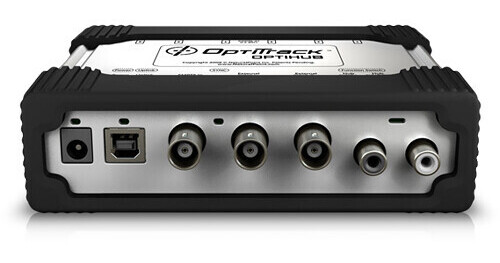
The OptiHub 2 from OptiTrack provides essential power regulation, camera syncing using OptiSync, tracking distance extension, hub chaining, and general interoperability between motion capture tracking gear. It is compatible with a variety of motion capture gear, including Flex 13 and Flex 3 cameras, and shutter glasses from NuVision and RealID, as well as Motive, ARENA, Expression, and other motion capture software and camera SDKs.
Onboard Voltage Regulation
The OptiHub 2 provides stable, onboard voltage regulation and consistent power distribution to Flex 13 and Flex 3 cameras. This method is unlike COTS hubs, which vary the voltage based on the power load to the hub. Reliable power to all cameras maximizes IR strobe brightness, resulting in more consistent tracking and fewer dropped markers.
Shutter Glasses Support
Both NuVision and RealD shutter glasses are supported for integration into OptiTrack environments. External syncing using the OptiHub 2 allows the camera strobe and shutter glasses sequencing to be staggered, reducing interference.
External Sync In/Out
Integrate OptiTrack into large-scale tracking and analytical ecosystems using the OptiHub 2 external in and out sync ports. You can utilize frame triggers or free-run triggering to synchronize frame cycling with external software controls and hardware components like force plates and shutter glasses.
Hub-to-Hub Sync
OptiHubs in the same chain will automatically propagate sync data to all connected cameras. OptiSync provides connection topology data for cameras and hubs in relation to each other, enabling automatic camera numbering based on port location.
Sync Signal over USB
With NaturalPoint's OptiSync system, sync signals are sent and received over a USB cable. This reduces cabling by 50%, enabling a simpler, cleaner setup.
High Power Mode
High Power mode is available for the Flex 13 and the Flex 3, which are specifically designed for use with the OptiHub 2. The hub allows cameras to draw additional power for the strobe, which increases effective capture range, allowing wider FOV lenses and smaller markers to be used.
USB Uplink with Status LEDs
Status LEDs enable monitoring of each port's activity, indicating whether the port is operating in high-speed or full-speed mode.